A Private Documentation Assistant on VCF 9.1
The whole build: from VCF 9.1 with NSX to a local AI service that reads thousands of pages of product documentation and answers with document, version and page — on one consumer GPU passed through to a VKS worker.
A large language model cannot look anything up. Ask one about a VCF 9.1 default and you get an answer assembled from every version that was ever on the public internet, delivered with total confidence and no page reference to check it against — which is exactly the wrong shape for the only question I ever actually have, which is what does the design guide say I should do about this.
The fix is retrieval, and it fits on a graphics card that cost A$1,000. This post is the build: from “VCF 9.1 with NSX” to a service on my own cluster that reads the product documentation and answers with the document, the version and the page number. Two VMs, one GPU, about three hours, most of it waiting.
Every throughput, latency and corpus figure on this page came off this build on real hardware. The failures are the ones that actually happened, in the order they happened. What was tested, and what wasn't.
kubectl, for a handful of users who know it exists. What an enterprise needs is a self-service catalogue, tenancy and quotas, model governance, GPU sharing across teams, and a supported lifecycle — which is precisely the gap those two products fill. Build this to learn the mechanics and to prove the platform. Recommend the product path for anything a business depends on.At a glance
Builds like this usually circulate as recipes — a list of commands that worked for somebody. This one is written to be followed that way, and it keeps the parts a recipe drops: why each choice was made, and what the measurements were.
| Ingredients | VCF 9.1 with NSX · a Supervisor and one vSphere Namespace · an ESXi host with a free PCIe x16 slot and an NVIDIA GPU · a subscribed VKr content library · a storage policy · an internal CA and two DNS records · a jump host with kubectl, helm, python3 · the documentation PDFs you want to search |
| Serves | One team. A single GPU worker, one large model resident at a time, plus a permanently resident embedding model |
| Total time | 2–3 hours, most of it waiting — Part A ~60 min · Part B ~40 min · Part C ~40 min plus a 15 min first index build |
| Difficulty | Comfortable with vSphere and basic kubectl. No AI or machine-learning background needed |
| Cost | A consumer GPU and existing VCF capacity. No additional GPU software licensing for the passthrough model used here (VCF 9.1, pp. 2227–2231) |
| Measured | 15,770 passages indexed across 2,677 source pages · 33 ms query · 24.5 tok/s generation · 2 VMs |
Five choices in this build are yours, not the architecture’s. Each is argued where it is made.
| Ingredient | Used here | Swap for |
|---|---|---|
| GPU | GeForce RTX 5060 Ti 16 GB | Any NVIDIA card from RTX 20-series up. More VRAM removes most of the tuning; a datacentre or RTX Pro card adds vGPU and MIG |
| Load balancer | NSX ALB (Avi), as the lab had it | NSX native LB — supported and included with VCF; nothing in the build depends on the choice |
| Certificate issuer | OpenBao/Vault PKI via cert-manager | Any cert-manager issuer — a corporate CA, or the self-signed issuer if you have neither |
| Models | devstral:24b + nomic-embed-text | Any Ollama chat model that fits your card, plus any embedding model — but rebuild the index if you change the embedder |
| Chat interface | Open WebUI | LibreChat, AnythingLLM or Jan if you need an OSI-approved licence — Open WebUI is source-available, with a branding restriction above 50 users |
What you end up with
A service on your own VCF cluster that you can ask, in plain English:
$ rag_query.py "what does a stretched cluster need for witness bandwidth?"

 1. [decision] VSAN-STRETCH-CFG-004 (Design Decision)
    VCF 9.1 Architectural Guide · p. 812 · vSAN Stretched Cluster
    "Provision a minimum of 2 Mbps of bandwidth per 1,000 components..."

 2. [prose]    Bandwidth requirements between the witness and data sites
    VCF 9.1 Planning and Preparation · p. 344
It answers from documents you chose and ingested, it names the document and page each answer came from, and it runs on hardware you control. The same endpoint also serves a chat interface in the browser and an OpenAI-compatible API that coding tools can point at.
Why retrieval rather than a bigger model
A model is trained once, on a snapshot of text, and it cannot look anything up afterwards. Three specific problems follow the moment you ask it about VMware Cloud Foundation.
- It doesn’t know your version. Training data is a mixture of every version that was ever on the public internet. Ask about a 9.1 default and you may get a 4.2 answer, stated with total confidence.
- It cannot cite. A number you cannot trace to a page is a number you cannot put in a design document or repeat to a customer.
- It invents plausible detail. Design-decision IDs, port numbers and maximums are exactly the kind of specific-looking text a model will fabricate when it has no source in front of it.
Pasting the documentation into the chat window does not fix this either. The VCF 9.1 set alone is thousands of pages, far past any practical context window, and it would need re-pasting every session.
What RAG actually does
Retrieval-Augmented Generation splits the job in two. Retrieval finds the handful of passages in your documents that are relevant to the question. Generation then asks the model to answer using only those passages, which are supplied in the prompt.
View source
graph TD
  subgraph BUILD["Build once — and again on each new document"]
    PDF["PDF"] --> CH["text chunks"] --> EM["embedding model"] --> IX[("vectors + index")]
  end
  Q["<b>question</b>"] --> E2["embed"] --> VS["vector search"]
  Q --> BM["keyword search · BM25"]
  IX -. searched .-> VS
  IX -. searched .-> BM
  VS --> TOP["top passages"]
  BM --> TOP
  TOP --> LLM["chat model"] --> A["<b>answer + citation</b>"]
The consequence is the important part: the model never has to know anything about VCF. It is handed the relevant paragraphs at question time and asked to summarise them. Change the documents and the answers change, with no retraining, no fine-tuning and no GPU-months.
Embeddings, in one paragraph
An embedding model converts a piece of text into a list of numbers — here, 768 of them — positioned so that passages about similar things land near each other. “How much bandwidth does the witness need” ends up close to a paragraph about witness traffic even though they share few words. That is what lets the search find relevant text the reader didn’t quote verbatim, and it is a different, much smaller model than the one that writes the answer.
Keyword search still matters — more than you’d expect. On this corpus, plain BM25 keyword search beat vector search outright, and combining them beat either alone. Product documentation uses precise vocabulary that the person asking tends to reuse, so exact matching is the stronger signal and embeddings are the paraphrase backstop. The measured comparison is in step 11.
What the model is for, and what it isn’t
Two different models do two different jobs here, and conflating them is the most common source of confusion.
| Model | Job | Size | Runs on |
|---|---|---|---|
nomic-embed-text | Understanding similarity. Turns passages and questions into vectors. Never writes prose | 274 MB | CPU, permanently resident |
devstral:24b | Writing the answer. Reads the retrieved passages and summarises them. Also drives coding tools | 14 GB | GPU, loaded on demand |
The chat model is a language engine, not a knowledge base. Its value in this system is that it can read six retrieved paragraphs and produce one coherent answer that quotes them. That is a genuinely useful capability and a modest one — and it is why a 24-billion-parameter model on a consumer card costing A$1,000 is sufficient. You are not asking it to have memorised VMware’s documentation. You are asking it to read.
Treat generated answers as a reading aid, not a source. Retrieval is the trustworthy part: it returns real passages with real page numbers. The synthesis step can still garble a summary. For anything going into a design document or a customer conversation, read the cited passage — which is why the query tool prints the evidence underneath every generated answer, and why it is worth keeping that behaviour.
Why run it locally at all
The documents may not be yours to upload. Pre-release documentation, customer design documents and internal architecture notes are exactly what you want to search and exactly what should not be pasted into a hosted service.
It also demonstrates the platform, which is the point of having a VCF lab at all. This is a GPU workload, a Kubernetes workload and a storage workload in one, built from supported components. And there is no per-token cost and no dependency on an external service being reachable, which matters for a demo in a customer’s building.
Architecture
Three layers, and the boundary between the first two is the one that catches people out.
View source
graph TB
  subgraph ESX["ESXi host"]
    GPU["<b>RTX 5060 Ti</b><br/>+ HD-audio function<br/>same IOMMU group, both passed"]
    subgraph VM["VKS worker VM · Ubuntu 24.04"]
      DRV["NVIDIA driver 580-open<br/>container toolkit · device plugin"]
      OL["<b>pod: ollama</b><br/>devstral:24b (GPU)<br/>nomic-embed-text (CPU)"]
      UI["<b>pod: open-webui</b><br/>chat UI · model admin · users"]
    end
  end
  GPU -->|Dynamic DirectPath I/O| VM
  VM --> SVC["Service type=LoadBalancer"]
  SVC --> VIP["Supervisor realises a VIP<br/>on the platform load balancer"]
  VIP --> ING["Contour ingress"]
  ING --> UI2["ai.DOMAIN → chat UI"]
  ING --> API["llm.ai.DOMAIN → /v1 API"]
  API -.-> CON["RAG tools · coding agents"]
A pod cannot own the GPU — a VM must. The PCI device is passed through to the worker VM via its VM class; the NVIDIA device plugin running inside the cluster then advertises
nvidia.com/gpu: 1so an ordinary pod can request it. If you have wondered why this needs a special VM class rather than just a pod spec, that is why. It also means the card is only ever available to one worker node.
Components
Versions are from a working build. Substitute freely, but these combinations are known to work together.
| Component | Version | What it is, and why it’s here |
|---|---|---|
| Platform | ||
| vSphere Supervisor | VCF 9.1 | Turns a vSphere cluster into a Kubernetes control plane. Provides namespaces, VM classes and the load-balancer integration |
| VKS guest cluster | k8s v1.35.5+vmware.1 | A conformant Kubernetes cluster whose nodes are VMs. Where the workload actually runs |
| ClusterClass | builtin-generic-v3.6.0 | The template the cluster is stamped from — node counts, VM classes, OS image and extra disks |
| VM class | custom, 8 vCPU / 32 GiB | Defines the worker’s hardware including the passed-through GPU. The critical object in this build |
| Antrea CNI · containerd | 2.5.1 · 2.2.3-fips | Supplied by the ClusterClass; nothing to configure |
| GPU enablement | ||
| NVIDIA GPU Operator | v26.7.0 | Installs and manages everything GPU-side inside Kubernetes so you never build drivers by hand |
| NVIDIA driver | 580.105.08 (open modules) | Compiled against the node kernel by the operator. RTX 50-series requires the open kernel modules |
| Container toolkit | v1.20.0 | Lets containers see the GPU |
| Device plugin | v0.20.0 | Advertises nvidia.com/gpu so the scheduler can place pods on it |
| DCGM exporter | 4.6.0 | GPU metrics — utilisation, VRAM, temperature — into Prometheus |
| Serving | ||
| Ollama | 0.32.15 | The model server. Pulls models, loads them onto the GPU, exposes a native API and an OpenAI-compatible /v1 |
| Open WebUI | v0.11.0 | Browser chat interface plus model administration and user accounts |
| Contour + Envoy | v1.33.0 · v1.35.2 | Ingress controller. Its Envoy service is type=LoadBalancer, which is what asks the platform for a VIP |
| cert-manager | v1.19.4 | Issues and renews the TLS certificate from your internal PKI |
| Knowledge pipeline | ||
ingest_pdf.py | needs pymupdf | Converts a product PDF into markdown chunks that follow the document’s own table of contents, carrying page numbers and version metadata |
extract_decisions.py | needs pymupdf | Pulls design-decision tables out into a TSV, so each decision becomes its own searchable record |
rag_index.py | stdlib only | Chunks, embeds and indexes the corpus. Incremental — re-embeds only what changed |
rag_query.py | needs numpy | Hybrid search (vector + keyword), optional answer synthesis, always prints citations |
Before you start
- VCF 9.1 with NSX, and a vSphere Supervisor you can enable (or one already enabled) with a vSphere Namespace you can create VM classes and clusters in.
- An ESXi host with a spare PCIe x16 slot and a GPU. This build used a GeForce RTX 5060 Ti 16 GB; any NVIDIA card from the RTX 20-series onward works, with more VRAM being strictly better.
- A subscribed content library providing Kubernetes releases (VKr), and a storage policy for the namespace.
- An internal CA for the TLS certificate, and internal DNS you can add two records to. A self-signed issuer works if you have neither.
- A jump host that can reach the Supervisor, with
kubectl,helmandpython3. - The product PDFs you want to search.
Sizing the GPU, and what a bigger card buys you
This build uses a 16 GB consumer card because it was the cheapest way to prove the pattern, and because it is the hardest case: everything has to fit. Nothing here is specific to that card. A larger or faster GPU is a drop-in change — a different device ID in the VM class and a larger MMIO window — and it removes most of the tuning this post spends its time on.
| VRAM | What it comfortably runs | What changes in this build | vGPU / MIG |
|---|---|---|---|
| 16 GB (this build) | One 24B model at Q4 with 12k context, plus the embedder on CPU | Baseline. Context and residency are tightly constrained — that is what the tuning tables are about | No |
| 24–32 GB | A 32B model at Q4, or the same 24B at 32k+ context; two chat models resident at once | Raise OLLAMA_CONTEXT_LENGTH; raise MAX_LOADED_MODELS. The spill problem largely disappears | No, on GeForce parts |
| 48 GB | 70B-class models at Q4, or several mid-size models resident for different jobs | Model choice stops being a constraint; you pick on quality rather than fit | Yes, on datacentre and RTX Pro parts |
| 80 GB+ | Production-grade serving, longer contexts, higher concurrency, tensor parallelism across cards | Consider vLLM instead of Ollama for throughput and batching | Yes, including MIG partitioning |
Two of those changes are mechanical. The VM class needs the new card’s PCI device ID (and its audio function, if it has one), and pciPassthru.64bitMMIOSizeGB follows the same rule as before — VRAM rounded up to a power of two, then the next power of two, so 24 GB and 32 GB both give 64, 48 GB gives 128, and 80 GB gives 256. Full memory reservation still applies. The driver, GPU Operator, Ollama and everything above them are unchanged.
The step that actually changes the architecture is moving to a datacentre or RTX Pro card, because those support vGPU and MIG — one physical GPU carved into several logical ones. That is what lets multiple teams share a card instead of one workload owning it, and it is the point at which the single-worker, no-live-migration constraints below stop applying. It is also where NVIDIA AI Enterprise licensing enters the picture, since the vGPU compute model “requires NVAIE for C-series licensing” (VCF 9.1, pp. 2219–2226) whereas the passthrough model used here needs no additional GPU software licensing (pp. 2227–2231).
A second card in a second host buys something different again: a place for HA to restart the workload. With one card there is no compatible failover host, so host maintenance is a declared outage.
You do not need VCF Automation for this
Worth stating plainly, because it is a common assumption. Supervisor, namespaces, VM classes and VKS clusters are all vSphere-native. The documentation is explicit: a Supervisor “can be activated as an optional configuration during workload domain creation… If you do not activate the Supervisor during the workload domain creation, you can deploy the Supervisor later with VPC from vCenter” (VCF 9.1, pp. 6599–6602), and the VKS adoption blueprint places Kubernetes enablement at stage 3 with VCF Automation only at stage 4, noting that “organizations do not need to adopt the full private cloud stack immediately in order to begin consuming Kubernetes services” (pp. 1425–1437).
That is a statement about sequencing, not about value. The reference design’s own decisions deploy Private AI Services, the vector database and VKS clusters through VCF Automation by default — see the enterprise path below for what each adds and where hand-building stops being the right answer.
Load balancer: NSX is fine, and it’s included
Every Kubernetes Service type=LoadBalancer — including the ingress in this build — needs the Supervisor to realise a VIP. VCF 9.1 supports several providers (Table 1783, “Supervisor Networking Options”, pp. 6574–6585):
| Networking stack | Load balancers supported |
|---|---|
| vSphere networking (VDS) | Foundation LB, Avi LB |
| NSX segment networking | NSX LB, Avi LB |
| NSX VPC | NSX LB, Avi LB |
The NSX-provided option — presented as the VCF Native Load Balancer when you activate the Supervisor — is “Included with VCF”, whereas Avi Load Balancer carries “Additional entitlement required” (Table 24, “Load Balancer Models in VCF”, pp. 665–672). For this workload, which needs a single L4 VIP in front of an ingress controller, the NSX Edge Tier-1 or VPC load balancer is entirely sufficient. The L7 features that justify Avi are not in play.
Three constraints worth knowing before you choose. You can only use one load balancer per Supervisor — “if the Supervisor is configured with the VCF Native Load Balancer, a VPC using the Avi Load Balancer cannot be used” (pp. 6603–6610). The NSX Edge VPC load balancer is API-only, with no UI for instance and configuration creation. And as of VCF 9.1 “the vSphere Client UI no longer supports deploying a Supervisor with classic NSX Segment Networking — you can deploy Supervisor through the API” (pp. 6574–6585), so VPC is the UI path.
The lab this was measured on happens to front its Supervisor with Avi. Nothing in the build depends on that — the cluster asks for a LoadBalancer service and the platform answers.
On licensing
This build does not use VMware Private AI Foundation and installs no NVIDIA AI Enterprise software. The documentation is clear that the DirectPath compute model carries “No additional GPU software licensing required” and uses “standard workload GPU drivers only, no hypervisor GPU manager layer” (VCF 9.1, pp. 2227–2231), in contrast to the vGPU model which “requires NVAIE for C-series licensing” (pp. 2219–2226).
Both of those statements are about NVIDIA software licensing. The documentation set does not state whether GPU or PCI-passthrough VM classes are gated by a VCF Private AI Foundation entitlement, so I am not going to claim they are or aren’t — confirm your entitlement position with a licensing specialist before repeating it to a customer.
vGPU is not an option on a GeForce card regardless of licensing: NVIDIA’s vGPU-supported GPU list contains only datacentre and RTX Pro parts. Whole-device passthrough is the only mechanism available, which conveniently is also the one with no additional GPU software licensing.
Part A — Platform
About sixty minutes to a Kubernetes cluster whose worker owns the GPU. Most of it is waiting for the cluster to build.
1 · Host passthrough
vSphere Client · one-off · requires a host reboot
Host BIOS first: VT-d/IOMMU on, “Above 4G decoding” on, Resizable BAR off — resizable BAR is unsupported for passthrough.
Then vSphere Client → host → Configure → Hardware → PCI Devices, and toggle passthrough for both the GPU function and its HD Audio function. They share an IOMMU group; the VM must claim both or the card will not power on. Reboot the host and confirm both devices show “Passthru active”.
Leave the host’s own console GPU — an iGPU, typically — out of passthrough. There is no host-side VIB to install: with DirectPath the guest talks to the card directly.
2 · Supervisor login
jump host · repeat each session
#!/usr/bin/env bash
# scripts/sup-login.sh
# Log in to the Supervisor (and optionally a guest cluster). Source it:
#   . sup-login.sh            # Supervisor context = $NS
#   . sup-login.sh $CLUSTER   # guest-cluster context
# kubectl + kubectl-vsphere are fetched from the Supervisor itself, so no
# internet is needed. The password must be in KUBECTL_VSPHERE_PASSWORD
# (export it from your secret store; never put it on the command line).
SUP_IP="${SUP_IP:?}"; NS="${NS:?}"; VC_USER="${VC_USER:-administrator@vsphere.local}"
CLUSTER="${1:-}"
WORK=/tmp/vks-deploy; BIN="$WORK/bin"; mkdir -p "$BIN"
if [ ! -x "$BIN/kubectl-vsphere" ]; then
  curl -sk "https://${SUP_IP}/wcp/plugin/linux-amd64/vsphere-plugin.zip" -o "$WORK/vsphere-plugin.zip"
  (cd "$WORK" && unzip -oq vsphere-plugin.zip)
  cp "$WORK"/bin/kubectl-vsphere "$WORK"/bin/kubectl "$BIN/" 2>/dev/null || cp "$WORK"/vsphere-plugin/bin/* "$BIN/"
  chmod +x "$BIN"/kubectl*
fi
export PATH="$BIN:$PATH"
: "${KUBECTL_VSPHERE_PASSWORD:?export KUBECTL_VSPHERE_PASSWORD first}"
if [ -n "$CLUSTER" ]; then
  kubectl vsphere login --server="$SUP_IP" -u "$VC_USER" --insecure-skip-tls-verify \
    --tanzu-kubernetes-cluster-namespace="$NS" --tanzu-kubernetes-cluster-name="$CLUSTER" >/dev/null
  kubectl config use-context "$CLUSTER"
else
  kubectl vsphere login --server="$SUP_IP" -u "$VC_USER" --insecure-skip-tls-verify >/dev/null
  kubectl config use-context "$NS"
fi
echo "logged in: $(kubectl config current-context)"
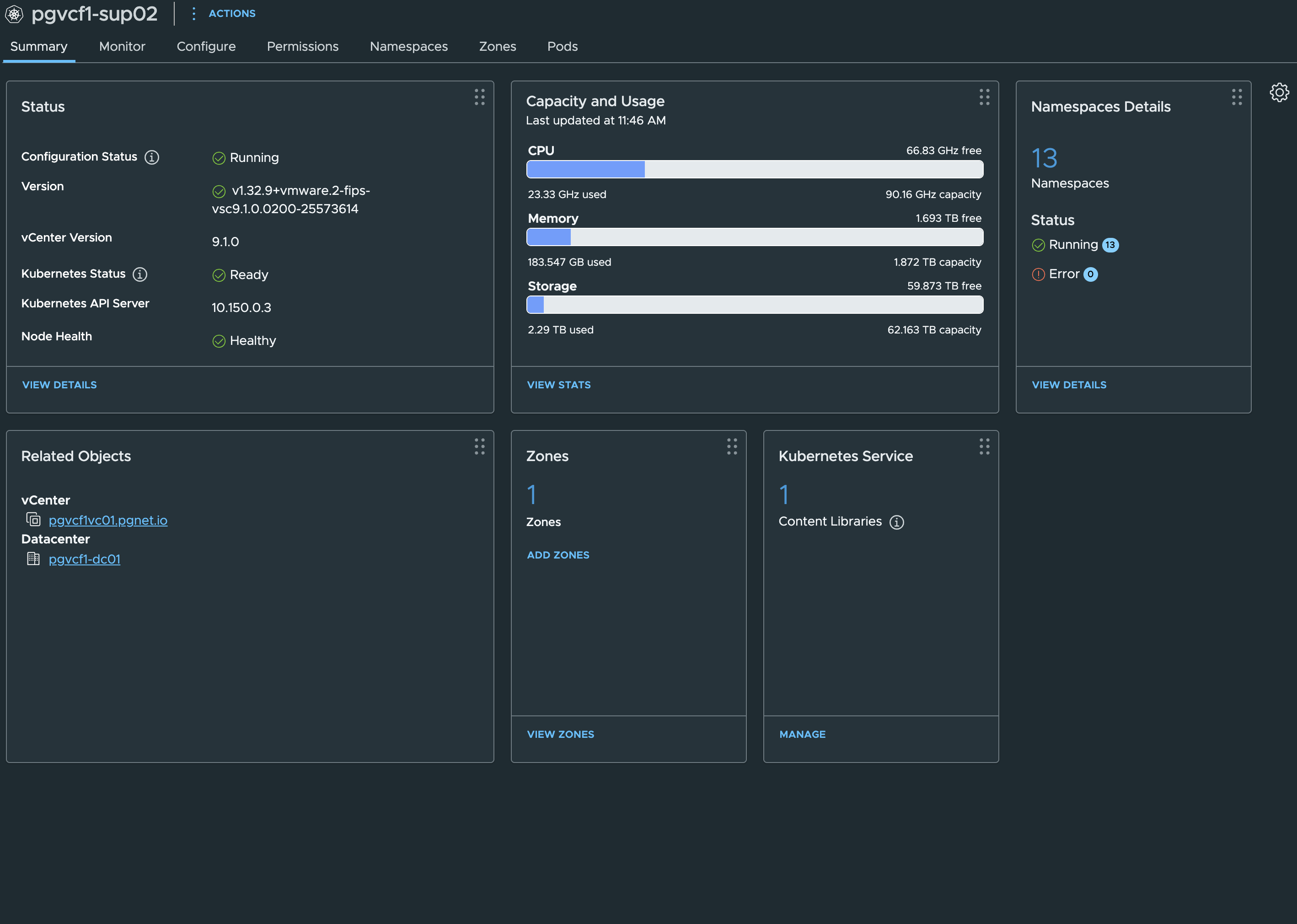
If the VIP is unreachable — “network is unreachable”, not a timeout — look at the fabric before the load balancer. On the upstream router, run the BGP summary and confirm the Tier-0 sessions are Established. In this lab a router re-provision silently restored stale BGP neighbours and every VIP vanished at once. The Supervisor’s management IP is not an API substitute: it serves the login page but rejects the token for API calls.
3 · The GPU VM class
jump host · vSphere REST API · one-off, survives Supervisor rebuilds
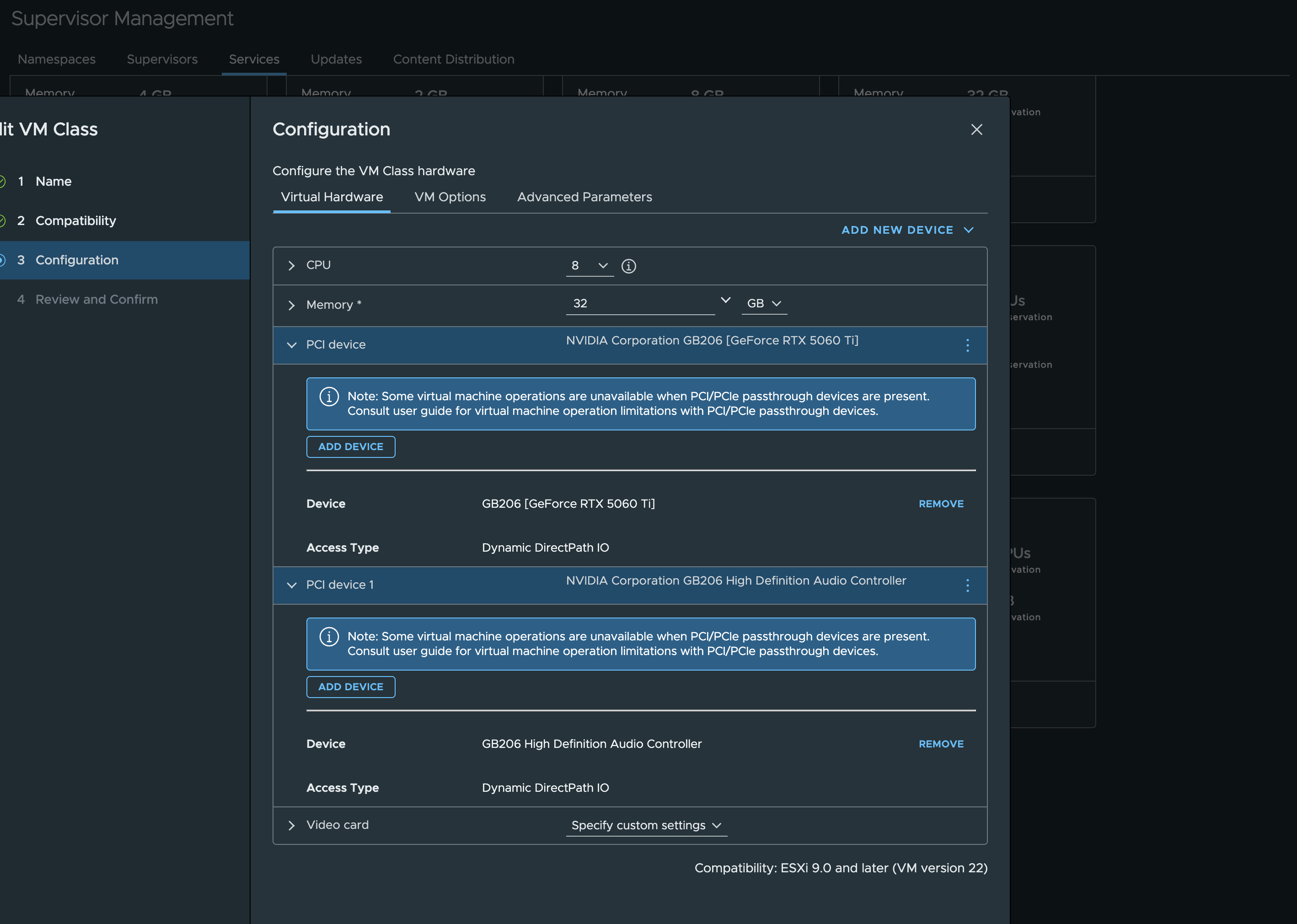
VM classes are vCenter objects. On VKS 3.x even the SSO administrator is Forbidden from creating a VirtualMachineClass with kubectl, so use the namespace-management REST API.
Two things the API is picky about. The PCI devices must be expressed as a config_spec.deviceChange — the devices shortcut key is dynamic_direct_path_IO_devices, capital IO, and the lowercase form is silently dropped. And memory must be 100 % reserved, which passthrough requires anyway.
{
  "id": "pgnv5060ti",
  "description": "8 vCPU / 32 GiB, RTX 5060 Ti + HD audio fn via Dynamic DirectPath I/O. Worker pool only.",
  "cpu_count": 8,
  "memory_MB": 32768,
  "cpu_reservation": 0,
  "memory_reservation": 100,
  "devices": {
    "dynamic_direct_path_IO_devices": [
      { "vendor_id": 4318, "device_id": 11524 },
      { "vendor_id": 4318, "device_id": 8939 }
    ]
  },
  "config_spec": {
    "_typeName": "VirtualMachineConfigSpec",
    "extraConfig": [
      { "_typeName": "OptionValue", "key": "pciPassthru.use64bitMMIO",   "value": { "_typeName": "string", "_value": "TRUE" } },
      { "_typeName": "OptionValue", "key": "pciPassthru.64bitMMIOSizeGB", "value": { "_typeName": "string", "_value": "64" } }
    ],
    "deviceChange": [
      { "_typeName": "VirtualDeviceConfigSpec", "operation": "add",
        "device": { "_typeName": "VirtualPCIPassthrough", "key": -100,
          "backing": { "_typeName": "VirtualPCIPassthroughDynamicBackingInfo",
            "allowedDevice": [ { "_typeName": "VirtualPCIPassthroughAllowedDevice", "vendorId": 4318, "deviceId": 11524 } ],
            "customLabel": "", "assignedId": "" } } },
      { "_typeName": "VirtualDeviceConfigSpec", "operation": "add",
        "device": { "_typeName": "VirtualPCIPassthrough", "key": -101,
          "backing": { "_typeName": "VirtualPCIPassthroughDynamicBackingInfo",
            "allowedDevice": [ { "_typeName": "VirtualPCIPassthroughAllowedDevice", "vendorId": 4318, "deviceId": 8939 } ],
            "customLabel": "", "assignedId": "" } } }
    ]
  }
}
MMIO sizing follows the VCF 9.1 rule (COM-007): VRAM rounded up to a power of two, then the next power of two — 16 GB → 32 → 64. A 24 GB card is 32 → 64 as well; a 32 GB card is 64 → 128.
#!/usr/bin/env python3
"""scripts/vmclass.py — create a VM class in vCenter and bind it to a namespace.
   VC_FQDN=... VC_USER=... VC_PASSWORD=... python3 vmclass.py vcf/vmclass.json $NS
"""
import json, os, ssl, sys, urllib.request, urllib.error, base64
spec = json.load(open(sys.argv[1])); ns = sys.argv[2]; name = spec["id"]
base = f"https://{os.environ['VC_FQDN']}"
ctx = ssl.create_default_context(); ctx.check_hostname = False; ctx.verify_mode = ssl.CERT_NONE
def call(method, path, body=None, token=None):
    hdr = {"Content-Type": "application/json"}
    if token: hdr["vmware-api-session-id"] = token
    else: hdr["Authorization"] = "Basic " + base64.b64encode(f"{os.environ['VC_USER']}:{os.environ['VC_PASSWORD']}".encode()).decode()
    req = urllib.request.Request(base + path, data=json.dumps(body).encode() if body is not None else None, headers=hdr, method=method)
    try:
        with urllib.request.urlopen(req, context=ctx) as r:
            raw = r.read(); return json.loads(raw) if raw else None
    except urllib.error.HTTPError as e:
        print(f"{method} {path} -> {e.code}: {e.read().decode()[:600]}"); raise
tok = call("POST", "/api/session")
VMC = "/api/vcenter/namespace-management/virtual-machine-classes"
if name in {c["id"] for c in call("GET", VMC, token=tok)}:
    call("PATCH", f"{VMC}/{name}", {k: v for k, v in spec.items() if k != "id"}, token=tok); print("updated", name)
else:
    call("POST", VMC, spec, token=tok); print("created", name)
got = call("GET", f"{VMC}/{name}", token=tok)
print("devices:", json.dumps(got.get("devices")), "status:", got.get("config_status"))
cur = call("GET", f"/api/vcenter/namespaces/instances/{ns}", token=tok)
have = (cur.get("vm_service_spec") or {}).get("vm_classes", [])
if name not in have:
    call("PATCH", f"/api/vcenter/namespaces/instances/{ns}", {"vm_service_spec": {"vm_classes": have + [name]}}, token=tok)
print("namespace", ns, "vm_classes:", call("GET", f"/api/vcenter/namespaces/instances/{ns}", token=tok)["vm_service_spec"]["vm_classes"])
Verify from the Supervisor context. kubectl get virtualmachineclass $VMCLASS -n $NS -o jsonpath='{.spec.hardware.devices}' must list both dynamicDirectPathIODevices. If it shows {}, the devices were dropped — re-check the JSON keys.
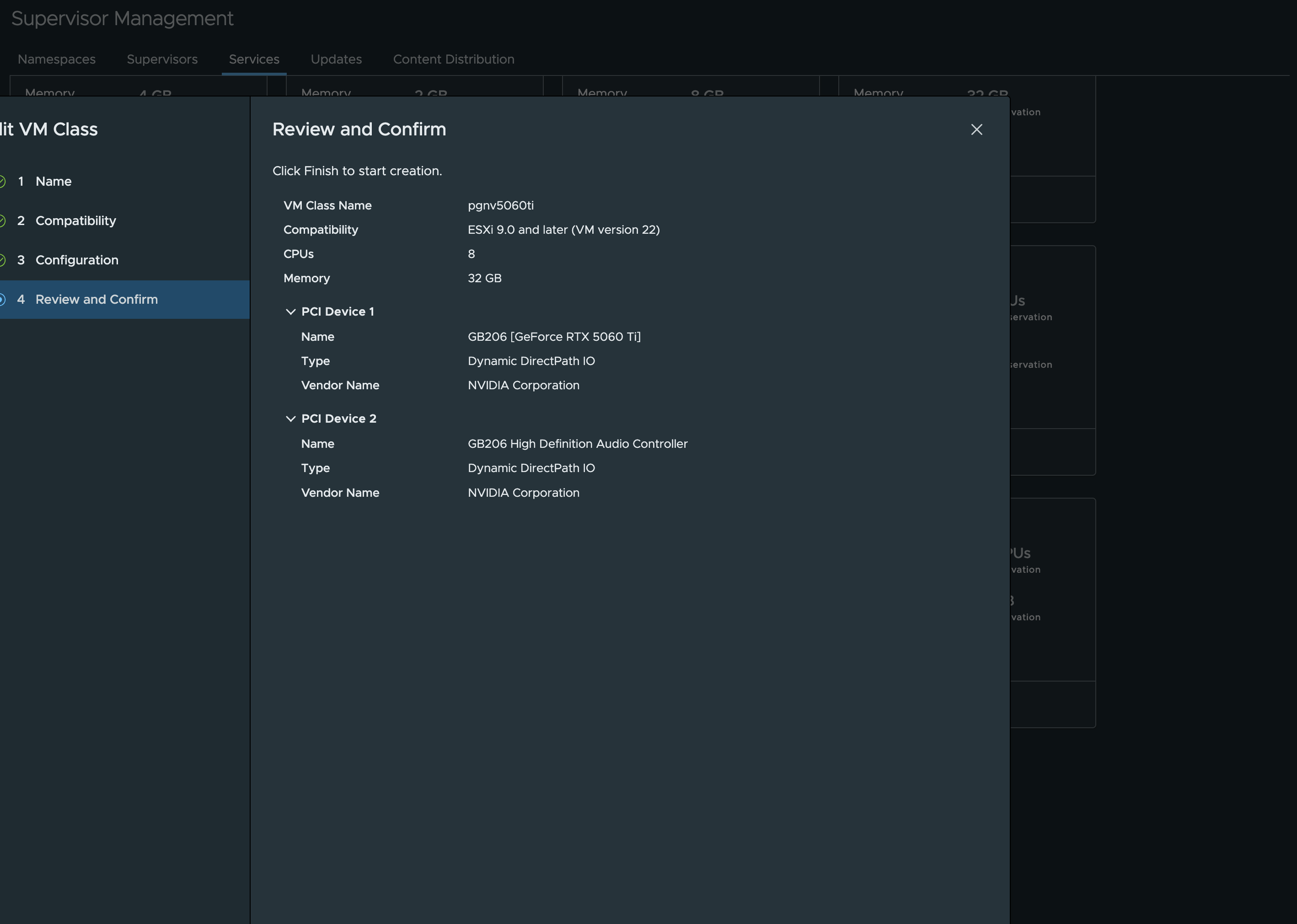
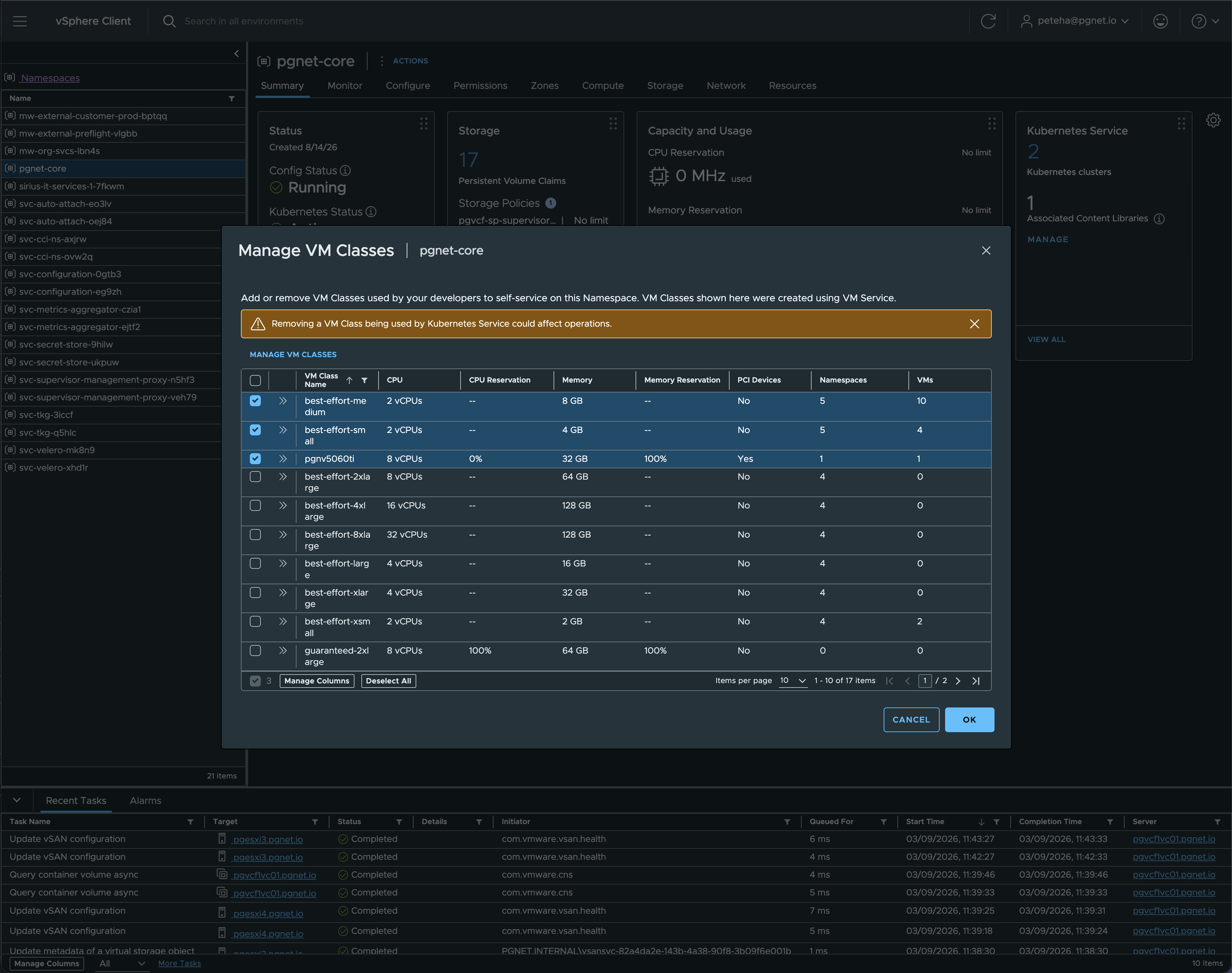
The class only becomes usable once the namespace binds it — existing in vCenter is not enough:
4 · The cluster
Supervisor context · ~15 minutes
One control plane, one GPU worker. Three choices in this file are the difference between a cluster that works and one that fights you for an afternoon, and each is commented where it lives.
apiVersion: cluster.x-k8s.io/v1beta1
kind: Cluster
metadata:
  name: pgnet-ai-cl1
  namespace: pgnet-core
spec:
  clusterNetwork:
    services:
      cidrBlocks: ["10.99.0.0/16"]
    pods:
      cidrBlocks: ["192.168.176.0/22"]   # one /24 per node + headroom; immutable
    serviceDomain: cluster.local
  topology:
    class: builtin-generic-v3.6.0
    version: v1.35.5+vmware.1-vkr.1
    controlPlane:
      replicas: 1
      variables:
        overrides:
          - name: vmClass
            value: best-effort-small        # Photon is fine here
    workers:
      machineDeployments:
        - class: node-pool
          name: gpu
          replicas: 1
          # ONE GPU: a surge rollout can never place the replacement worker
          # while the old one holds the card ("No host is compatible with
          # the virtual machine"). Roll delete-then-create.
          strategy:
            type: RollingUpdate
            rollingUpdate:
              maxSurge: 0
              maxUnavailable: 1
          metadata:
            annotations:
              # The GPU Operator builds the open kernel module against the
              # node kernel. Ubuntu, not the Photon default.
              run.tanzu.vmware.com/resolve-os-image: os-name=ubuntu, os-version=24.04
          variables:
            overrides:
              # The TKr root disk is ~20 GiB. Driver + CUDA + model-server
              # images fill it on first boot -> DiskPressure and evictions.
              - name: volumes
                value:
                  - name: containerd
                    capacity: 120Gi
                    mountPath: /var/lib/containerd
                    storageClass: pgvcf-sp-supervisor-primary
    variables:
      - name: vmClass
        value: pgnv5060ti                  # applies to the worker pool
      - name: storageClass
        value: pgvcf-sp-supervisor-primary
kubectl apply -f vcf/cluster.yaml
kubectl -n $NS get cluster,machine,virtualmachine -w
# gate: the worker must be Ubuntu, or nothing in step 5 will work
. scripts/sup-login.sh $CLUSTER
kubectl get nodes -o custom-columns=NODE:.metadata.name,OS:.status.nodeInfo.osImage
# AKO (installed by the platform) wants a default StorageClass for its PVCs
kubectl patch sc $SC -p '{"metadata":{"annotations":{"storageclass.kubernetes.io/is-default-class":"true"}}}'Check that an Ubuntu image exists for your TKr before applying — kubectl get osimage -A | grep ubuntu on the Supervisor. The worker VM lands on the GPU host by itself; DRS can only place it where a matching device exists.
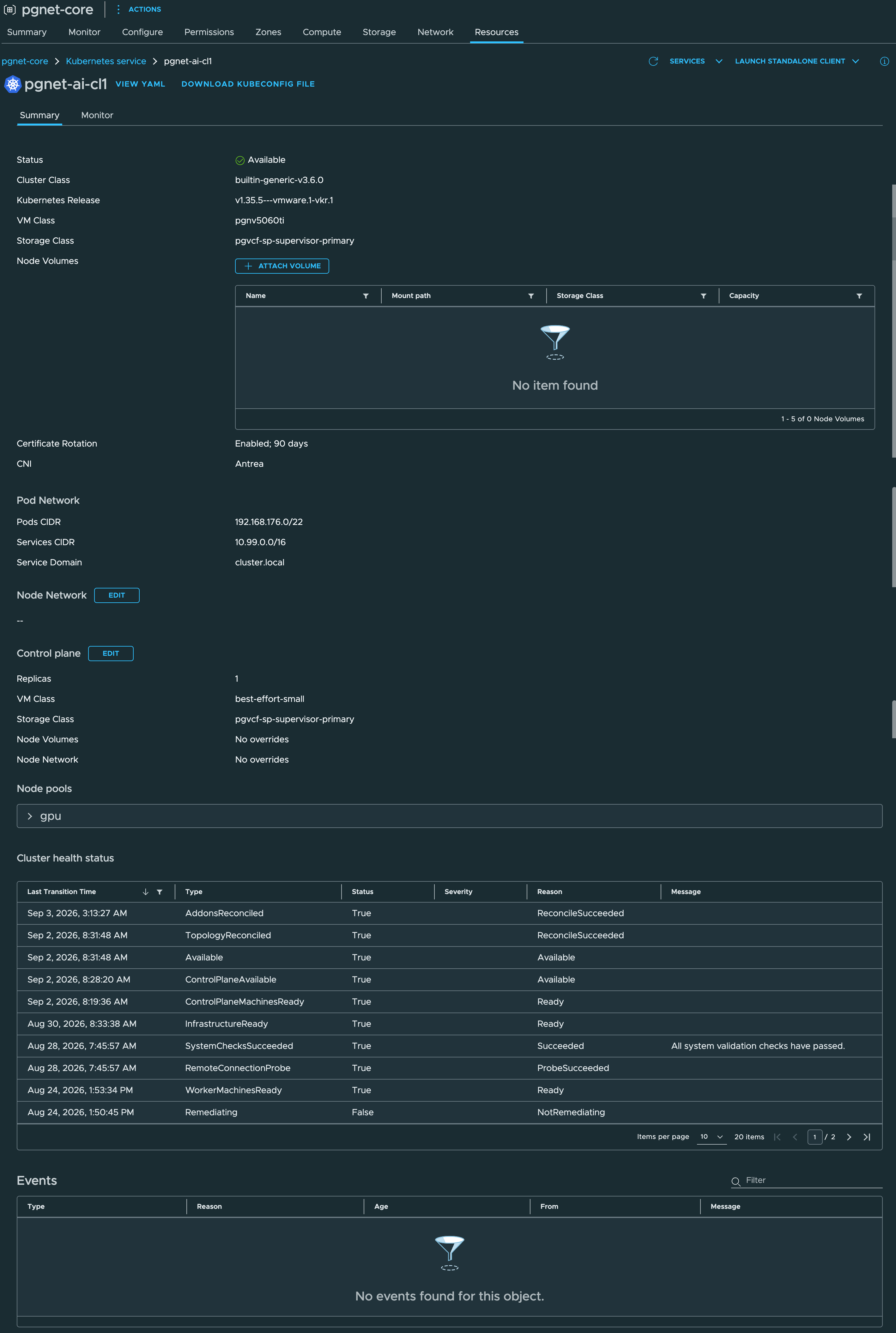
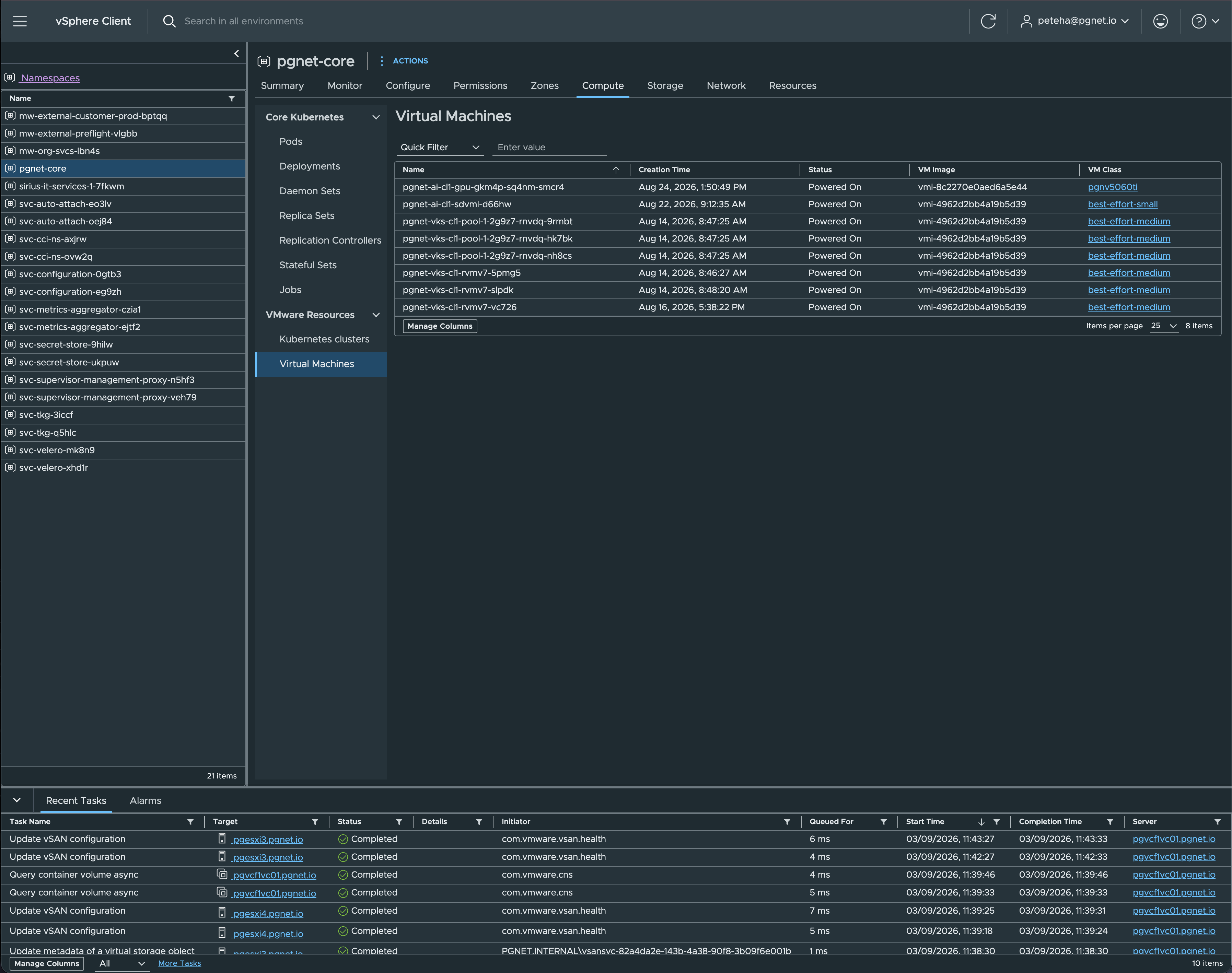
The gpu node pool pins its own OS image — in vCenter the GPU worker runs a different VM image from every other node:
Part B — Serving
Forty minutes for drivers, ingress, TLS and the model server. The card starts doing work at the end of step 5.
5 · GPU Operator
guest-cluster context · ~8 minutes, the driver is compiled on the node
#!/usr/bin/env bash
# scripts/gpu-enable.sh
# NVIDIA GPU Operator: open kernel module (mandatory on RTX 50-series),
# container toolkit, device plugin, NFD, dcgm-exporter.
# cdi.enabled=false is deliberate: the VKS containerd has no CDI support in
# its CRI config, and the chart's default (true) yields
#   "CDI device injection failed: unresolvable CDI devices".
set -euo pipefail
DRIVER_VERSION="${DRIVER_VERSION:-580.105.08}"
NS=gpu-operator
kubectl get nodes -o jsonpath='{range .items[*]}{.metadata.name}{"\t"}{.status.nodeInfo.osImage}{"\n"}{end}' \
  | grep -i ubuntu || { echo "no Ubuntu node - the operator needs Ubuntu, not Photon" >&2; exit 1; }
kubectl create ns "$NS" --dry-run=client -o yaml | kubectl apply -f -
kubectl label ns "$NS" pod-security.kubernetes.io/enforce=privileged --overwrite
helm repo add nvidia https://helm.ngc.nvidia.com/nvidia >/dev/null 2>&1 || true
helm repo update >/dev/null
helm upgrade --install gpu-operator nvidia/gpu-operator -n "$NS" --wait --timeout 20m \
  --set driver.enabled=true --set driver.version="$DRIVER_VERSION" --set driver.useOpenKernelModules=true \
  --set toolkit.enabled=true --set cdi.enabled=false \
  --set dcgmExporter.enabled=true --set dcgmExporter.serviceMonitor.enabled=true
for i in $(seq 1 40); do
  n=$(kubectl get nodes -o jsonpath='{.items[*].status.allocatable.nvidia\.com/gpu}' | tr ' ' '+')
  [ -n "$n" ] && [ "$n" != "0" ] && break; sleep 30
done
kubectl get nodes -o custom-columns='NODE:.metadata.name,GPU:.status.allocatable.nvidia\.com/gpu'
# scheduling is not compute: prove it with nvidia-smi from a pod
kubectl run nvidia-smi --rm -it --restart=Never --image=nvidia/cuda:12.8.1-base-ubuntu24.04 \
  --overrides='{"spec":{"containers":[{"name":"nvidia-smi","image":"nvidia/cuda:12.8.1-base-ubuntu24.04","command":["nvidia-smi"],"resources":{"limits":{"nvidia.com/gpu":1}}}]}}'
Expect the node to report nvidia.com/gpu: 1 and a nvidia-cuda-validator pod that completes with cuda workload validation is successful. The node console will show nvidia-modeset: Failed to initialize DMA — that is the display path on a headless card, not the compute driver. Ignore it.
6 · Ingress and TLS
guest-cluster context
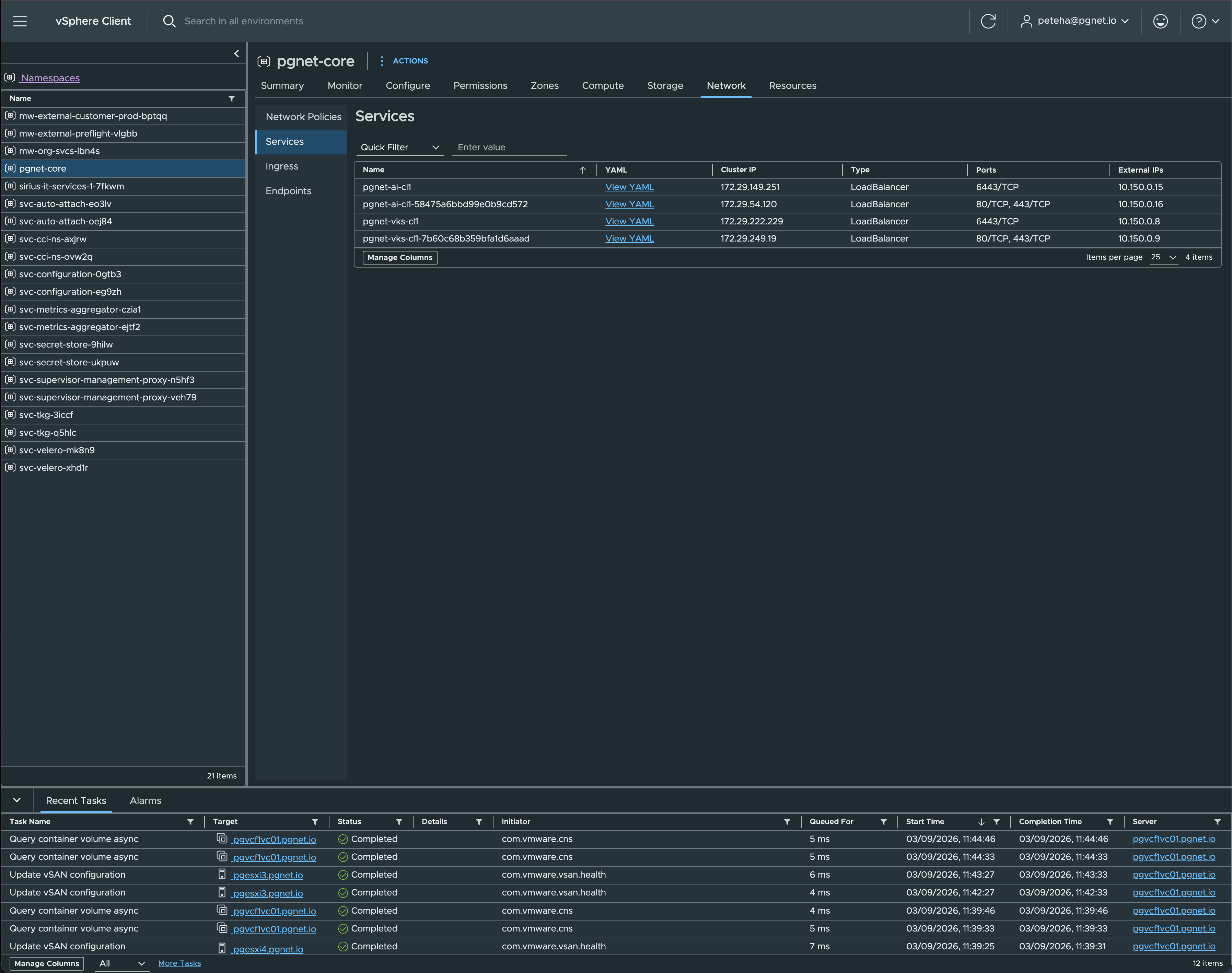
Two platform facts drive this step. The Supervisor turns any Service type=LoadBalancer into an L4 virtual service with a VIP from the namespace’s external block — that is your edge. But the VKS AKO addon came up bound to Default-Cloud with an empty VIP network in this lab and never allocated an address, and the Contour addon’s envoy is NodePort-only. So: upstream Contour, with its envoy Service as the LoadBalancer.
#!/usr/bin/env bash
# scripts/contour-install.sh
set -euo pipefail
CONTOUR_VERSION="${CONTOUR_VERSION:-v1.33.0}"
# VKS enforces PodSecurity "restricted" cluster-wide; the quickstart is not
# restricted-clean. baseline is enough - nothing here is privileged.
kubectl create ns projectcontour --dry-run=client -o yaml | kubectl apply -f -
kubectl label ns projectcontour pod-security.kubernetes.io/enforce=baseline pod-security.kubernetes.io/warn=restricted --overwrite
kubectl apply -f "https://raw.githubusercontent.com/projectcontour/contour/${CONTOUR_VERSION}/examples/render/contour.yaml"
# The quickstart envoy DaemonSet binds hostPorts 80/443/8002 - baseline refuses
# them and the LoadBalancer path does not need them.
kubectl -n projectcontour get ds envoy -o json | python3 -c '
import json,sys
d=json.load(sys.stdin)
for c in d["spec"]["template"]["spec"]["containers"]:
    for p in c.get("ports",[]): p.pop("hostPort",None)
d.pop("status",None)
for k in ("resourceVersion","uid","creationTimestamp","generation","managedFields"): d["metadata"].pop(k,None)
print(json.dumps(d))' | kubectl apply -f -
kubectl -n projectcontour rollout status deploy/contour --timeout=10m
kubectl -n projectcontour rollout status ds/envoy --timeout=10m
for i in $(seq 1 40); do
  ip=$(kubectl -n projectcontour get svc envoy -o jsonpath='{.status.loadBalancer.ingress[0].ip}' 2>/dev/null)
  [ -n "$ip" ] && break; sleep 15
done
echo "envoy VIP: ${ip:-<none>}"
Then the certificate. Upstream cert-manager, not the addon — the addon exposes no controller options and depends on the Contour addon. The issuer shown is a Vault/OpenBao PKI mount, which is what this lab runs: one AppRole per cluster whose only permission is to sign against one role. If you have no PKI, use the self-signed issuer commented out below it.
helm repo add jetstack https://charts.jetstack.io >/dev/null 2>&1 || true
helm repo update >/dev/null
helm upgrade --install cert-manager jetstack/cert-manager -n cert-manager --create-namespace \
  --version "${CM_VERSION:-v1.19.4}" --set crds.enabled=true --wait --timeout 5m
# OpenBao / Vault side (admin, once)
# policy: sign-only against the PKI role your servers use
bao policy write cert-manager-pgnet-ai-cl1 - <<'EOF'
path "pki_int/sign/server" { capabilities = ["create","update"] }
EOF
bao write auth/approle/role/cert-manager-pgnet-ai-cl1 \
token_policies=cert-manager-pgnet-ai-cl1 token_ttl=600 token_max_ttl=1200 \
secret_id_ttl=0 secret_id_num_uses=0 bind_secret_id=true
bao read -field=role_id auth/approle/role/cert-manager-pgnet-ai-cl1/role-id # goes in the manifest
# secret_id: mint it and pipe it straight into the cluster - never on argv, never in a file
bao write -field=secret_id -f auth/approle/role/cert-manager-pgnet-ai-cl1/secret-id \
| kubectl -n cert-manager create secret generic openbao-approle --from-file=secretId=/dev/stdin# deploy/30-ingress.yaml
# --- Issuer A: Vault/OpenBao PKI (what this lab runs) -----------------------
apiVersion: cert-manager.io/v1
kind: ClusterIssuer
metadata:
name: openbao-pki
spec:
vault:
server: https://bao.pgnet.io
namespace: pgnet # drop if your Vault has no namespaces
path: pki_int/sign/server
auth:
appRole:
path: approle
roleId: <ROLE_ID>
secretRef: { name: openbao-approle, key: secretId }
# --- Issuer B: self-signed fallback (use ONE of A or B) ----------------------
# apiVersion: cert-manager.io/v1
# kind: ClusterIssuer
# metadata: { name: selfsigned }
# spec: { selfSigned: {} }
---
apiVersion: networking.k8s.io/v1
kind: Ingress
metadata:
name: localai
namespace: localai
annotations:
cert-manager.io/cluster-issuer: openbao-pki # or: selfsigned
# PKI roles with require_cn reject a CSR without a CN; ingress-shim sets
# none unless told.
cert-manager.io/common-name: ai.pgnet.io
projectcontour.io/websocket-routes: "/"
projectcontour.io/response-timeout: "600s" # long generations
spec:
ingressClassName: contour
tls:
- hosts: [ai.pgnet.io, llm.ai.pgnet.io]
secretName: localai-tls
rules:
- host: ai.pgnet.io
http:
paths:
- path: /
pathType: Prefix
backend: { service: { name: open-webui, port: { number: 80 } } }
- host: llm.ai.pgnet.io
http:
paths:
- path: /
pathType: Prefix
backend: { service: { name: ollama, port: { number: 11434 } } }Check with kubectl get clusterissuer openbao-pki — expect Vault verified — and, after step 7, kubectl -n localai get certificate → Ready=True.
7 · Ollama and Open WebUI
guest-cluster context · kubectl apply -k deploy/
# deploy/00-namespace.yaml
# Both stock images run as root, which PodSecurity "restricted" refuses.
# baseline still forbids privileged containers and host namespaces; the GPU
# arrives through the device plugin's resource request, not through privilege.
apiVersion: v1
kind: Namespace
metadata:
  name: localai
  labels:
    pod-security.kubernetes.io/enforce: baseline
    pod-security.kubernetes.io/warn: restricted
# deploy/10-ollama.yaml
apiVersion: v1
kind: PersistentVolumeClaim
metadata: { name: ollama-models, namespace: localai }
spec:
accessModes: ["ReadWriteOnce"]
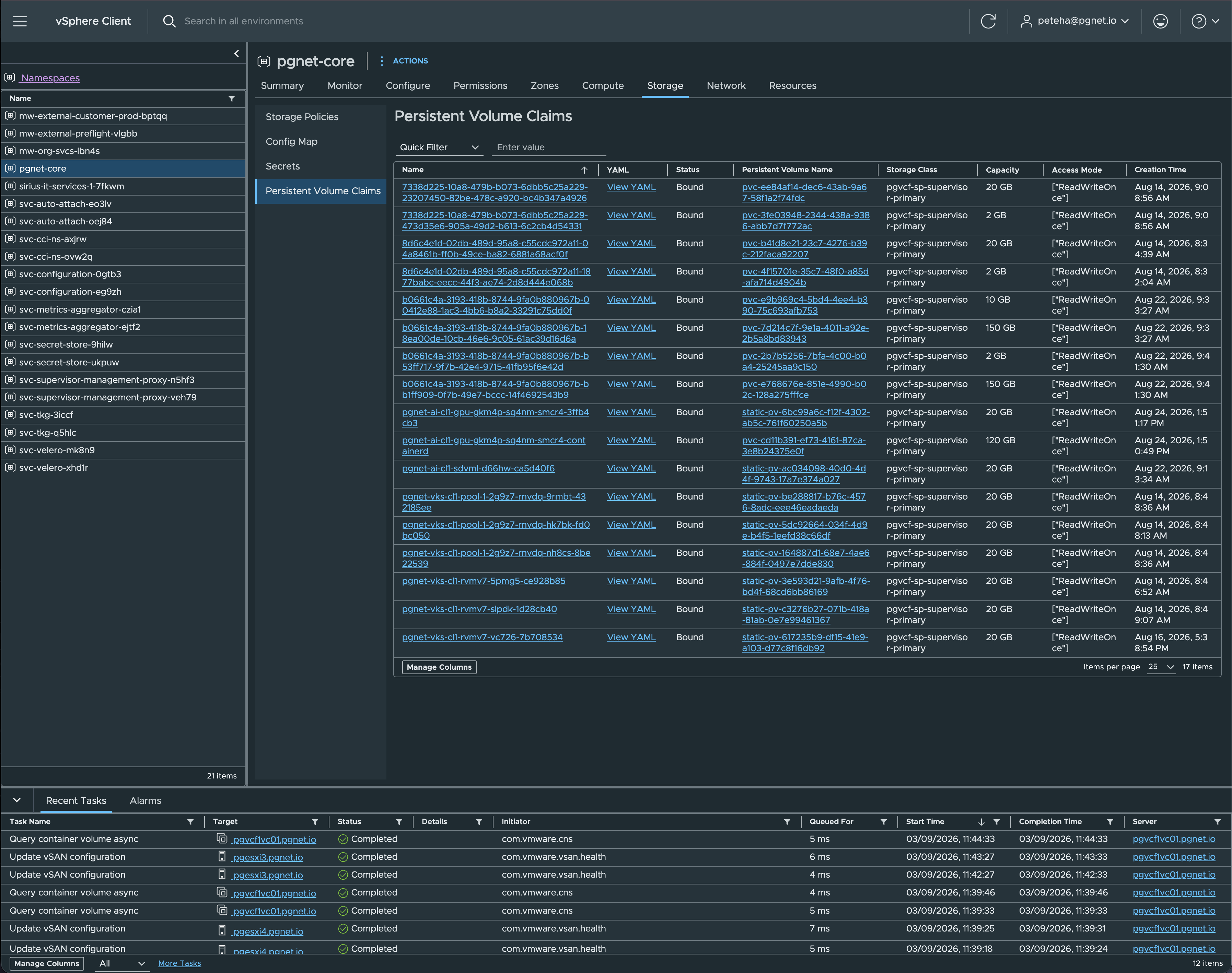
storageClassName: pgvcf-sp-supervisor-primary
resources: { requests: { storage: 150Gi } }
---
apiVersion: apps/v1
kind: Deployment
metadata:
name: ollama
namespace: localai
labels: { app: ollama }
spec:
replicas: 1
strategy: { type: Recreate } # one GPU: a rolling update would wait forever for a second
selector: { matchLabels: { app: ollama } }
template:
metadata: { labels: { app: ollama } }
spec:
runtimeClassName: nvidia
containers:
- name: ollama
image: ollama/ollama:0.32.15
ports: [ { containerPort: 11434, name: http } ]
env:
- { name: OLLAMA_HOST, value: "0.0.0.0:11434" }
- { name: OLLAMA_KEEP_ALIVE, value: "30m" }
# See "Model residency" below for the evidence behind these three.
- { name: OLLAMA_NUM_PARALLEL, value: "1" } # KV scales with slots
- { name: OLLAMA_MAX_LOADED_MODELS, value: "2" } # large model + embedder
- { name: OLLAMA_CONTEXT_LENGTH, value: "12288" } # largest that stays on the card
- { name: OLLAMA_FLASH_ATTENTION, value: "1" }
- { name: OLLAMA_KV_CACHE_TYPE, value: "q8_0" }
resources:
limits: { nvidia.com/gpu: 1, memory: 24Gi }
requests: { cpu: "2", memory: 8Gi }
volumeMounts: [ { name: models, mountPath: /root/.ollama } ]
readinessProbe: { httpGet: { path: /api/version, port: http }, periodSeconds: 10 }
livenessProbe: { httpGet: { path: /api/version, port: http }, initialDelaySeconds: 60, periodSeconds: 30 }
volumes:
- name: models
persistentVolumeClaim: { claimName: ollama-models }
---
apiVersion: v1
kind: Service
metadata: { name: ollama, namespace: localai }
spec:
selector: { app: ollama }
ports: [ { port: 11434, targetPort: http, name: http } ]# deploy/20-open-webui.yaml
apiVersion: v1
kind: PersistentVolumeClaim
metadata: { name: open-webui-data, namespace: localai }
spec:
accessModes: ["ReadWriteOnce"]
storageClassName: pgvcf-sp-supervisor-primary
resources: { requests: { storage: 10Gi } }
---
apiVersion: apps/v1
kind: Deployment
metadata:
name: open-webui
namespace: localai
labels: { app: open-webui }
spec:
replicas: 1
strategy: { type: Recreate }
selector: { matchLabels: { app: open-webui } }
template:
metadata: { labels: { app: open-webui } }
spec:
containers:
- name: open-webui
# ghcr.io ran at ~1 MB/s from this lab, and kubelet pulls serially, so the
# big layer at the head of the queue wedges every image behind it. Stage
# slow-registry images in your own Harbor and point the Deployment there.
image: build.pgnet.io/localai/open-webui:v0.11.0 # upstream: ghcr.io/open-webui/open-webui:v0.11.0
ports: [ { containerPort: 8080, name: http } ]
env:
- { name: OLLAMA_BASE_URL, value: "http://ollama.localai.svc:11434" }
- { name: WEBUI_URL, value: "https://ai.pgnet.io" }
- { name: ENABLE_SIGNUP, value: "false" } # first login still creates the admin
resources:
requests: { cpu: "500m", memory: 1Gi }
limits: { memory: 4Gi }
volumeMounts: [ { name: data, mountPath: /app/backend/data } ]
readinessProbe: { httpGet: { path: /health, port: http }, periodSeconds: 10 }
volumes:
- name: data
persistentVolumeClaim: { claimName: open-webui-data }
---
apiVersion: v1
kind: Service
metadata: { name: open-webui, namespace: localai }
spec:
selector: { app: open-webui }
ports: [ { port: 80, targetPort: http, name: http } ]Model residency — why those three settings
This service holds two models at once: the large chat model on the GPU and the small embedding model the search index depends on. Getting them to coexist is where the tuning above comes from.
| Configuration | Placement of the 24B model | Throughput |
|---|---|---|
| 2 parallel slots, 16k context | 15 % spilled to system RAM | 1.9 tok/s |
| 1 slot, 12k context | 100 % GPU | 28 tok/s |
| 1 slot, 12k context + embedder resident | 100 % GPU | 24.5 tok/s |
Two behaviours drive that. The KV cache scales with slots × context, so a second parallel slot costs as much as doubling the context — that is what pushed a 14 GB model to 17 GB and off the card, and a dense model pays roughly 15× for spilled layers. And Ollama protects the larger model: with both loaded it kept the 24B entirely on the GPU and placed the 0.4 GB embedder on the CPU, which is the correct priority and costs the embedder nothing measurable. Ten consecutive embedding calls averaged 31 ms.
OLLAMA_MAX_LOADED_MODELS=2 is a deliberate trade. Keeping the embedder resident costs the chat model about 12 % throughput. Setting it back to 1 does not break the search tool — but every query following a chat request then pays a ~1.7 s model reload, which is the difference between an interactive tool and a sluggish one. Decide it knowingly.
8 · DNS and the models
your DNS · guest-cluster context
Point ai.<domain> and llm.ai.<domain> at the envoy VIP from step 6 on your internal view — here, two A records to 10.150.0.16. Then pull the model set and prove they run on the card.
K="kubectl -n localai exec deploy/ollama --"
$K ollama pull devstral:24b        # agentic coding
$K ollama pull gpt-oss:20b         # fast general agent
$K ollama pull nomic-embed-text    # embeddings, stays resident

$K ollama run devstral:24b --verbose "Write a Python function to validate an IPv4 address. Code only."
#   eval rate: 24.47 tokens/s

$K ollama ps
#   devstral:24b              15 GB    100% GPU           12288
#   nomic-embed-text:latest   397 MB   74%/26% CPU/GPU     2048    <- both resident

curl https://llm.ai.DOMAIN/api/version    # {"version":"0.32.15"}
curl https://ai.DOMAIN/health             # {"status":true}
curl https://llm.ai.DOMAIN/v1/chat/completions -H 'Content-Type: application/json' \
  -d '{"model":"devstral:24b","messages":[{"role":"user","content":"One sentence: what is VCF?"}]}'
curl https://llm.ai.DOMAIN/api/embeddings -H 'Content-Type: application/json' \
-d '{"model":"nomic-embed-text","prompt":"hello"}' # 768 dims, ~31 ms warm| Role | Model | Why this one |
|---|---|---|
| Agentic coding | devstral:24b · 14 GB | Built for repo navigation and file edits. Needs a system prompt telling it to use the tools — without one it answers in prose and calls nothing. Verified both ways |
| General agent, planner | gpt-oss:20b · 13 GB | MoE, ~90 tok/s, emits tool calls with no coaxing |
| Light chat | qwen3:14b · 9.3 GB | Leaves the most room for context |
| Embeddings | nomic-embed-text · 274 MB | 768 dimensions, small enough to stay resident permanently alongside a large model |
Tempting but too large for 16 GB at Q4: qwen3-coder:30b (18.5 GB) and nemotron-3-nano:30b (24.3 GB). Both would run split across RAM and VRAM, and the residency table above shows what spilling costs a dense model.
One thing not to design around: Ollama cannot pull models from your own registry. Its blob downloader requires the registry to answer with a cross-host redirect, and Harbor — like registry:2 on filesystem storage — serves the bytes inline instead, so the pull fails with no Location header in response. It is an open upstream bug, not an auth or TLS problem; I confirmed it against a plain unauthenticated registry. If you need models to come from somewhere you control, package them with KitOps/ORAS and use ollama create -f Modelfile against the unpacked GGUF, which never touches the registry protocol.
Keep a declared list of models. ollama pull is imperative and leaves no record, so after a rebuild nobody knows what was meant to be here or why. A small models.yaml naming each model, its role and its size — plus a script that pulls the list — costs ten minutes. It matters more than it sounds the moment a second person or a tool starts using the endpoint and adds a model nobody else knows about.
Part C — Knowledge
Forty minutes plus a fifteen-minute first index build, to turn product PDFs into a searchable, citable corpus.
9 · Ingest the documentation
your workstation · once per document, then whenever a document is revised
A PDF is useless to a search index as one 900-page blob. Ingestion splits each document along its own table of contents, so a chunk is a real section rather than an arbitrary slice, and stamps every chunk with the metadata a citation needs: document, product, version, and the page range it came from.
The VCF 9.1 documentation is published on Broadcom TechDocs and downloads as PDF, per guide or as a set. The reference build indexed five sets: VCF 9.1, the VCF Security and Compliance Guidelines, the Avi Load Balancer documentation, vDefend Firewall, and the design-diagram templates. Anything with a table of contents and selectable text works — product documentation, reference architectures, your own design documents.
# pymupdf is the only dependency; uv fetches it per-invocation
uv run --with pymupdf python rag/ingest_pdf.py \
    "VCF-9.1-Architectural-Guide.pdf" sources --tables \
    --product "VCF" --doc-version "9.1" --pairs-with "VCF 9.1" \
    --doc-type "Architectural Guide" --published "2026-07" \
    --source-url "https://techdocs.broadcom.com/..."

# pull the design-decision tables out into their own records
uv run --with pymupdf python rag/extract_decisions.py \
    "VCF-9.1-Architectural-Guide.pdf" sources/vcf-91-architectural-guide

# regenerate the library registry
python3 rag/update_library_index.py sources--product, --doc-version and --pairs-with are mandatory. The tool refuses to produce an unversioned artifact, and that refusal is the single most valuable design decision in the pipeline. An answer that cannot tell you which version it came from is worse than no answer, because it looks authoritative. Every chunk carries this metadata in YAML frontmatter and the query tool reads citations from it rather than reconstructing them from file paths.
Two kinds of passage, deliberately
Ingestion produces prose chunks — sections of running text, ~800 tokens with 100 tokens of overlap so a sentence spanning a boundary is not lost. But it also flattens every row of design-decisions.tsv and any control tables into one passage per row:
VSAN-STRETCH-CFG-004 (Design Decision) — Provision a minimum of 2 Mbps per 1,000 components.
Justification: Ensures resynchronisation completes within the RTO...
Implication: Bandwidth must be validated before stretching the cluster.
This matters more than it looks. PDF table extraction turns a decision table into semantic mush — fragments like iSCSI / • / Principal* / • that embed to nothing meaningful. A flattened row reads like a sentence, so it embeds like a sentence and retrieves like one. In the reference build these flattened records are 1,629 of 15,770 passages, and they are the ones that answer “what does the design guide say I should do about X”.
Source PDFs stay out of version control; only the derived markdown and TSVs are committed.
10 · Build the index
your workstation · ~15 minutes for a first build, seconds thereafter
This is the only step that needs the GPU service. It reads the corpus, splits it into windows, sends them to the embedding model in batches, and writes four files.
export RAG_ENDPOINT=https://llm.ai.<domain>/v1
export RAG_CA_BUNDLE=~/.config/pki/internal-ca.pem   # if you use a private CA

rag/rag_index.py                # incremental
rag/rag_index.py --dry-run      # show what would change, embed nothing
rag/rag_index.py --force # rebuild everything| File | Size (reference build) | What it holds |
|---|---|---|
passages.jsonl | 48.7 MB | One row per passage: the text plus every citation field |
vectors.f32 | 48.4 MB | A flat little-endian float32 matrix, row-aligned to the JSONL. No header, no database |
fts.sqlite | 67.1 MB | SQLite FTS5 table for keyword search, rowid-aligned to the same rows |
manifest.json | 392 KB | Model, dimensions, window settings, and a SHA-256 per source file |
There is no vector database here, on purpose. 15,770 passages × 768 dimensions is a 48 MB matrix, and a full cosine scan takes about 1.5 ms in numpy. FAISS, sqlite-vec or a hosted vector store would add a component to operate, back up and upgrade in exchange for no measurable improvement at this scale. Reach for one when you outgrow a flat scan, not before.
Incrementality comes from those per-file hashes. A re-run keeps passages whose source file is unchanged — slicing their vectors straight out of the existing matrix by row offset — re-embeds only files whose hash moved, and drops rows whose source disappeared. Ingesting one new document therefore costs one document’s worth of embedding, not fifteen minutes. The reuse is voided automatically if the embedding model changes, because a mixed-model index would silently return nonsense.
11 · Ask it questions
your workstation · this is the thing you built
# plain search — returns passages with citations
rag/rag_query.py "witness bandwidth for a stretched cluster" --k 5

# narrow to a product or a document version
rag/rag_query.py "edge node sizing" --product NSX --version 9.1

# only design decisions, or only hardening controls
rag/rag_query.py "vSAN encryption" --kind decision

# let the model write the answer — evidence is still printed underneath
rag/rag_query.py "how do I size the witness appliance?" --answer
How the search actually ranks
Every query runs twice: once as a vector similarity search, once as a BM25 keyword search over the FTS5 index. The two result lists are combined with Reciprocal Rank Fusion — each result scores 1/(60 + rank) in each list, weighted and summed — rather than by blending the raw scores, because a cosine similarity and a BM25 score are not on comparable scales and averaging them is meaningless.
The weighting is not arbitrary. Measured across five real questions with a known-correct passage:
| Retrieval method | Mean rank of the correct passage |
|---|---|
| Vector similarity alone | 5.0 |
| BM25 keyword alone | 2.4 |
| RRF fused, equal weight | 3.6 |
| RRF fused, 1 : 3 toward keyword | 2.0 |
Keyword search beat semantic search on this corpus, and the combination beat both. Product documentation has precise, stable vocabulary — “stretched cluster”, “Tier-0 gateway”, “witness appliance” — and the person asking usually reuses it. Exact matching is therefore the stronger signal, and embeddings earn their place as the paraphrase backstop that catches the question phrased in the reader’s own words. If someone proposes a pure-vector RAG over technical documentation, that table is the counter-argument.
A free consequence: the tool survives the GPU being unavailable. BM25 needs no model and no GPU. If the endpoint is unreachable — because you are patching the host the card lives in — the query tool prints a warning and degrades to keyword-only. Reduced ranking quality, not an outage. Design your consumers that way deliberately; it is the difference between an inconvenience and blocked work.
For browsing rather than precision work, Open WebUI at https://ai.<domain> gives the same models a conversational interface, with user accounts, per-model defaults and model administration. It is the right front end for exploration and for showing the system to someone; the CLI is the right one for answers you intend to cite.
Retrieval is trustworthy; synthesis is convenient.
--answerruns the retrieved passages through the chat model at temperature 0 with a cite-only system prompt, and always prints the evidence underneath. Read the evidence for anything that will end up in a design document. The generated paragraph is there to save you reading six passages, not to replace them.
The enterprise path — Private AI Foundation and VCF Automation
Everything above was assembled by hand. That was the exercise. It is worth being precise about what the product path provides instead, because most of what you just built has a supported equivalent — and the VCF 9.1 reference design assumes you will use it.
Where this lab sits
The VKS Consumption Blueprint describes a four-stage adoption journey (VCF 9.1, pp. 1425–1437): stage 1 is VM-centric vSphere, stage 2 is platform foundation, stage 3 is VKS enablement on existing infrastructure, and stage 4 is the full private-cloud operating model with VCF Automation, governance and fleet management. This build is a textbook stage 3, and the documentation is explicit that this is a legitimate place to stand: “organizations do not need to adopt the full private cloud stack immediately in order to begin consuming Kubernetes services.”
Stage 3 is where you learn the mechanics. Stage 4 is where a business consumes them.
What Private AI Foundation provides
Table 51, “Private AI Foundation Platform Models” (VCF 9.1, pp. 709–714), defines three:
| Model | What it is | Documented limits |
|---|---|---|
| Private AI Services | A managed generative-AI platform: model endpoints, knowledge bases and agents deployed from a UI or API, behind an OpenAI-compatible interface. Four modules — Model Gallery (Harbor), Model Runtime (vLLM, Infinity, llama.cpp), Data Indexing & Retrieval, and Agent Builder | LLM and RAG workloads only — no computer vision, time-series, audio or optimisation. Needs a one-time admin namespace activation |
| AI/ML on VKS | Kubernetes with vGPU or DirectPath, deployed from the VCF Automation catalog or by hand with kubectl. Any workload type, including distributed training | Requires Kubernetes knowledge |
| AI/ML on DLVM | A pre-built Deep Learning VM image — Ubuntu with Docker, PyTorch, TensorFlow, Triton, DCGM and the NVIDIA Container Toolkit — where the vGPU driver install is automated and matched to the host version | Manual deployment needs OVF and base64 handling |
Read that first row against what you just built. Model Gallery is a governed model store on Harbor — this build used Harbor only to stage container images, and hit Ollama’s inability to pull models from it. Model Runtime is the serving layer, run here by hand as Ollama. Data Indexing & Retrieval is the RAG pipeline, written here with its vectors in a flat file rather than the PostgreSQL with pgvector that Private AI Services provisions through Data Services Manager (pp. 1458–1462, p. 2201). Agent Builder has no equivalent here at all. The hand-built version taught me what each layer does; the product version is what you support in production.
What VCF Automation adds
The documentation compares consumption models directly (pp. 1425–1437). Multi-tenancy is “operationally through segmentation, namespaces, RBAC” versus “natively organization, project, quota, and policy-driven abstraction built into the platform”. Self-service is “custom automation, APIs” versus “built-in catalog-driven consumption”. Governance is “operationally managed” versus “integrated policy-based governance with quotas and organizational controls”.
Concretely that means projects, namespace classes and organisation-level quotas that namespaces draw from (pp. 6943–6949), approval and resource-quota policies (p. 6994, pp. 7168–7174), and — under the Centralized Connectivity Model — a dedicated VPC per tenant with “chargeback/showback models aligned to organizations and projects” and “centralized platform governance with decentralized consumption” (pp. 1714–1723).
The reference design does not treat this as optional. Its own decisions route through VCF Automation by default: PAIF-PL-RCMD-PAIS-001 deploys Private AI Services into “a namespace created via VCF Automation” (p. 1464), PAIS-010 provisions the Postgres vector database “via VCF Automation rather than the DSM console” (p. 1466), and PAIF-PL-RCMD-VKS-001 makes the VCF Automation catalog “the default option” for VKS clusters, with manual deployment (VKS-002) reserved for customisation and infrastructure-as-code (p. 2210).
What hand-building costs you
- Self-service and quotas. Your service is provisioned by an administrator for people who know it exists. There is no catalogue, no per-team quota, no approval workflow, no showback.
- Model governance. A Harbor-backed model gallery gives provenance, scanning surface and access control over model artifacts. Here, models arrive by
ollama pullfrom the public internet. - Observability, pre-wired. Private AI Services auto-deploys DCGM and vLLM Prometheus endpoints, ships Grafana dashboards, emits OpenTelemetry LLM traces and feeds VCF Operations (PAIS-014 through -018, pp. 1467+), alongside the Private AI GPU dashboards in VCF Operations (pp. 5280–5282). This build wires up DCGM and stops there.
- A validated driver path. The DLVM image matches the guest driver to the host version automatically. The docs describe the manual route this build takes as “error-prone (no validation until deployment)”, noting “the user must know or check the host driver version” (pp. 2208–2211). That is a fair description of step 5.
- Sharing and mobility. DirectPath passthrough means no vMotion (pp. 2227–2231). vGPU is what buys GPU sharing, live migration, DRS placement and HA restart (pp. 2219–2226) — which is exactly the single point of failure documented below.
What the hand-built path does demonstrate well is also documented: manual VKS deployment is credited with “complete control”, support for both vGPU and DirectPath, and “true infrastructure-as-code… enabling GitOps workflows” (pp. 2208–2211) — and PAIF-PL-RCMD-VKS-002 explicitly sanctions it “when an IaC approach is desired”.
Where this stops being appropriate is the moment a second consumer appears. As soon as you need per-team isolation, quotas, approvals, showback, model provenance, or more than one GPU’s worth of capacity, you are re-implementing Private AI Services and the VCF Automation consumption model by hand — without the support contract.
The three licensing layers
They are easy to conflate.
| Layer | Licensed by | Note |
|---|---|---|
| Platform (vSphere, NSX, Supervisor, VKS) | VCF / vSF, cores-based | What this build uses |
| Private AI Foundation | PAIF add-on, cores-based | Requires a primary VCF licence assigned first (p. 2447). Assigned to the management domain it activates the guided-deployment UI; capacity is consumed only by GPU-enabled workload domains (p. 2465) |
| NVIDIA vGPU software and drivers | NVIDIA AI Enterprise | The vGPU compute model “requires NVAIE for C-series licensing” (pp. 2219–2226). The DirectPath model used here requires “no additional GPU software licensing” (pp. 2227–2231) |
One nuance worth quoting exactly rather than paraphrasing: “Starting November 3, 2025, based on your VCF subscription, you might also receive a license for VMware Private AI Foundation with NVIDIA” (p. 2448). Note might, and based on your subscription — check the entitlement rather than assuming it.
GPU support and compatibility
Check the card before you buy it. Consumer GeForce parts work for passthrough but appear on none of the vGPU lists, which is the constraint that shapes this whole build.
Sizing note from the reference design, useful whichever path you take: plan GPU memory as model weights plus KV cache, roughly 2.5× the weights (PAIF-ACC-RCMD-001, p. 1474), and for RAG allow 5–10× the size of the source documents for storage (PAIF-ACC-RCMD-010, p. 1479).
Operating it
Know who depends on it before you take it down
A chat backend and a tool endpoint have different availability expectations, and the same service can quietly become both. Write down the consumers — the dependency that bites is the one nobody recorded.
| Consumer | Uses | If the endpoint is down |
|---|---|---|
| Web UI | chat, model admin | Inconvenience — someone waits |
| Coding agents | /v1, devstral:24b | Work in progress stops |
| Search / RAG tooling | /v1/embeddings | Should degrade to lexical search, not fail |
The GPU is a single point of failure, and HA cannot rescue it. DirectPath already rules out vMotion — but High Availability can only restart the worker on a host advertising a matching PCI device. If that card is the only one of its kind in the cluster, an HA event does not relocate the workload, it fails to place it. Check honestly whether a second host could ever take this VM; if not, every host patch or BIOS change is a declared outage of the endpoint and of everything downstream of it. A second compatible card is the only thing that changes that picture.
- Models: Open WebUI → Admin → Settings → Models for pull, delete and defaults, or the API —
GET /api/tags,POST /api/pull,DELETE /api/delete,GET /api/psfor what is loaded and where. - Any OpenAI client works against
https://llm.ai.<domain>/v1— no key needed inside the lab; put Open WebUI API keys in front if that changes. - GPU telemetry: dcgm-exporter is scraped by the VKS prometheus addon (
DCGM_FI_DEV_GPU_UTIL,DCGM_FI_DEV_FB_USED). - Host maintenance: announce it, then power the worker off first —
kubectl -n $NS patch virtualmachine … powerState Off, or scale the pool to 0. There is no vMotion with a passthrough device. - A TKr upgrade rebuilds the worker and the operator recompiles the driver, about eight minutes. The
maxSurge: 0strategy makes this a delete-then-create. - Trust: the certificate chains to your private CA. Fleet hosts get it from config management; a browser needs it installed once.
Going further
Two VMs is already the documented minimum supported VKS topology, and the control plane VM is the only fat. If you need less:
- Single-node VKS — set
node.taintsto an empty list at controlPlane scope, workersreplicas: 0, and put the GPU VM class on the control plane. The ClusterClass variables exist and are documented; running workloads on an untainted control plane is not a documented VKS configuration. One VM, and control-plane reboots take the LLM down. - A VM Service VM as the “pod” — the Supervisor supports Dynamic DirectPath devices on VM Service VMs with the same PCI VM class; cloud-init installs the driver and runs Ollama under docker. One VM, no Kubernetes, fully supported — and no
kubectlfor the app. - vSphere Pods cannot take a PCI device. Not an option for GPU.
What was actually tested
This page is a build log, not a design proposal. Everything in it ran. It is worth being specific about what that means, because “I built this” and “I asked a model to describe building this” produce documents that look identical from the outside.
Measured on the hardware, not estimated
Every performance number here came from a run on the machine in the footer, and several of them contradicted what I expected going in.
| Figure | How it was obtained |
|---|---|
| 1.9 / 28 / 24.5 tok/s | Three separate Ollama configurations, changed one variable at a time, generation throughput read from --verbose |
| 24.47 tok/s | Eval rate from a real generation, quoted in step 8 with the command that produced it |
| ~31 ms embedding | Ten consecutive embedding calls against the warm endpoint, averaged |
| ~1.5 ms cosine scan | Full scan of the 15,770 × 768 matrix in numpy |
| 15,770 passages · 2,677 files · 1,629 flattened decision records | Counted from the built index, across five ingested documentation sets |
| 48.7 MB · 48.4 MB · 67.1 MB · 392 KB | The four artefacts the index build actually wrote |
The retrieval comparison was an experiment, and it changed the design
The 1:3 keyword weighting is not a default I inherited. Four retrieval methods were run over five real questions, each with a passage I had already confirmed was the correct answer, and the mean rank of that passage recorded. Vector-only came last at 5.0; BM25 alone managed 2.4; naive equal-weight fusion was worse than keyword alone at 3.6. The shipped weighting is the one that won, at 2.0.
I expected semantic search to win. It lost, and the tuning in step 11 is the consequence rather than the premise.
Negative results, kept
A build log that only contains things that worked is a sales page. These did not work, and they stayed in:
qwen3-coder:30b(18.5 GB) andnemotron-3-nano:30b(24.3 GB) do not fit on a 16 GB card at Q4. Tried, measured the spill, rejected.devstral:24bcalls no tools without a system prompt telling it to — it answers in prose instead. Verified in both directions before it went in the model table.- Ollama cannot pull models from Harbor, and it is not an auth or TLS problem. Confirmed against a plain unauthenticated
registry:2before writing it up as an upstream bug. - The lowercase
dynamic_direct_path_io_deviceskey is silently accepted and silently dropped by the vSphere API. That was found by a VM class that reporteddevices: {}with no error, not by reading documentation.
Ten things broke on the way
DiskPressure on an undersized root disk, a surge rollout that could never place a second GPU worker, image pulls wedged behind a slow registry, CDI injection the VKS containerd does not support, a CSR rejected for a missing CN, an ingress that never got an address, PodSecurity refusing stock images, the dropped VM-class key, the Ollama registry bug, and every VIP in the lab vanishing when a router lost its BGP neighbours.
Each fix is inline at the step where you would hit it, in the YAML comments and the callouts, rather than collected into a table at the end — the point is that the file you copy already has the fix in it.
What was not tested — read this before relying on it
- This is n=1. One build, one card, one lab, one pass. Where a figure would change on different hardware, the sizing table says so.
- The retrieval comparison is five questions, not a benchmark. It was enough to overturn my assumption and pick a weighting. It is not a claim about RAG in general, or about your corpus.
- No concurrency or load testing.
OLLAMA_NUM_PARALLEL=1is deliberate on a 16 GB card, so the numbers are single-stream. Nothing here says how it behaves with ten people on it. - The load balancer was only exercised on Avi, because that is what this lab fronts its Supervisor with. The NSX native path is read from the documentation and cited, not measured — it is reasoning, and it is labelled as such where it appears.
- Documentation citations are to one revision of the VCF 9.1 set, published 2026-08-17. Page numbers move between revisions. Check them.
- Image tags move. The version matrix in the footer is what was verified together, not a supported bill of materials.
Disclaimer
This is a personal lab walkthrough that stitches the public sources into one flow — it does not replace Broadcom’s own documentation. Where they differ, the official docs win. It is not an endorsed reference architecture and not a supported configuration, and I am writing in a personal capacity.
- Verify before you rely on it. Documentation citations are given as document, version and page so you can check them against the source. Do that before repeating any of it to a customer or putting it in a design document — page references move between revisions, and PDF table extraction can garble a decision record.
- Consumer hardware is not on the compatibility list. A GeForce card passed through to a VM works, and is not something you should expect support for.
- Third-party software carries its own licences. Ollama, Contour, cert-manager and the NVIDIA GPU Operator are separately licensed; Open WebUI is source-available rather than OSI-approved open source, with a restriction on rebranding above 50 users. Review them for your own use case.
- Models have licences too, and they differ. Check the terms of any model you pull before using its output commercially.
- Generated answers are not authoritative. Retrieval returns real passages with real page numbers; the synthesis step can still misread them. Read the cited passage.
Test it in a lab. Take the ideas, not the liability.
Measured on VCF 9.1 / VKS with Kubernetes v1.35.5+vmware.1, ESXi 9.1, NVIDIA GeForce RTX 5060 Ti 16 GB, driver 580.105.08 (open modules), CUDA 13.0, GPU Operator v26.7.0, Ollama 0.32.15, Open WebUI v0.11.0, Contour v1.33.0 with Envoy v1.35.2, cert-manager v1.19.4. Corpus: 15,770 passages across 2,677 files from five product documentation sets. Documentation citations are to the VMware Cloud Foundation 9.1 documentation set, published 2026-08-17. Every throughput and latency figure was measured on this build. Image tags move quickly — pin what you verify.
Links
- VMware Cloud Foundation 9.1 documentation — Broadcom TechDocs
- Requirements for deploying VMware Private AI Foundation with NVIDIA
- NVIDIA — GPUs supported by vGPU — the authoritative list. If a card is not on it, vGPU and MIG are not options regardless of licensing.
- NVIDIA AI Enterprise product support matrix
- Broadcom Compatibility Guide — verify the card and server combination against your ESXi version.
- NVIDIA GPU Operator
- Ollama · Open WebUI · Project Contour · cert-manager