Avi Load Balancer: One Controller, NSX Cloud in VPC Mode
A run-through: deploy the Avi controller, register it with NSX and finish its cloud, so that a Supervisor activated afterwards gets Avi with nothing further to do.
VCF 9.1.1 lab rebuild. Part of the follow-along guide, published live as the build happens.
📘 Official documentation. This is a lab walkthrough, not a replacement for the vendor docs. For the authoritative, supported procedures, follow Broadcom’s VMware Cloud Foundation 9.1 documentation. Where this guide and the official docs differ, the official docs win.
What you end up with: an Avi controller registered with NSX, its cloud ready to place Service Engines, and a Supervisor activated afterwards getting Avi as its load balancer with nothing further to do.
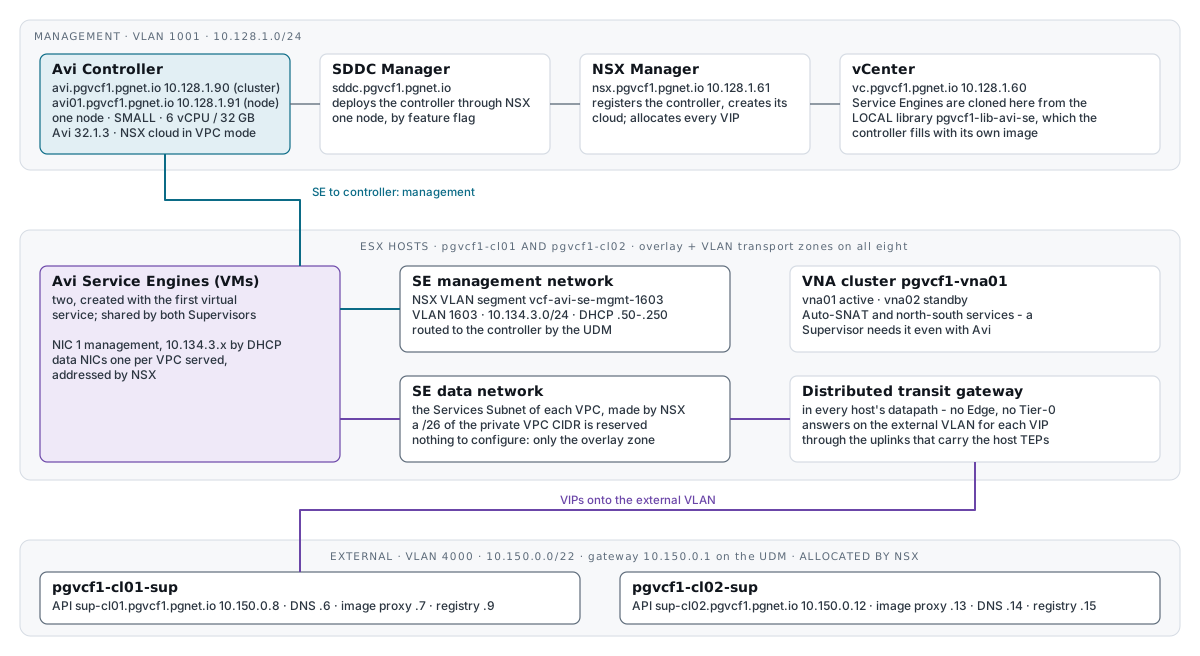
It works on a distributed transit gateway with no Edge cluster. Service Engine management rides an NSX VLAN segment, Service Engine data sits on each VPC’s own Services Subnet, and the VIPs come out of the external IP block and are answered on the external VLAN by the hosts themselves.
What must already exist
| Needed | From |
|---|---|
A distributed VLAN connection, the external IP block 10.150.0.0/22, the VNA cluster, and a default connectivity profile with Auto-SNAT | Distributed connectivity and the VNA cluster |
| Both clusters prepared for NSX, with the overlay transport zone on all eight hosts | Bring-up and attaching the second cluster |
| The Avi 32.1.3 bundle in the depot, downloaded in SDDC Manager | The Installer |
The values
| Setting | Value | Why |
|---|---|---|
| Version | 32.1.3 (build 9105) | The version in the VCF 9.1.1 bill of materials |
| Controllers | One · SMALL (6 vCPU, 32 GB, 512 GB) | A lab choice. A single controller supports SMALL only. Lab only |
| Cluster name and address | avi.pgvcf1.pgnet.io · 10.128.1.90 | The instance zone, on the VM management network, VLAN 1001 |
| Node name and address | avi01.pgvcf1.pgnet.io · 10.128.1.91 | Static |
| Admin password | Generated into the secret store before deployment | The controller is set from the store. Nothing in the repository or on a command line holds it |
| Service Engine management | VLAN 1603 · 10.134.3.0/24 · DHCP .50–.250 · NSX VLAN segment vcf-avi-se-mgmt-1603 | Its own network, routed to the controller. DHCP because Service Engines are created on demand |
| Service Engine data | Nothing to choose | In VPC mode NSX makes a Services Subnet in each VPC and addresses the Service Engine on it |
| Content library | pgvcf1-lib-avi-se · LOCAL · no security policy · on vcf-content | The controller uploads its own Service Engine image here. The datastore must be one every host can reach |
| VIP addresses | Nothing to choose | In VPC mode the controller asks NSX for each VIP out of the external IP block |
1. The Service Engine management network
An NSX VLAN segment cannot reach a host that has only the overlay transport zone, which is what bring-up leaves behind.
- Create VLAN 1603 on the physical network with a gateway and a DHCP scope — here
10.134.3.1/24, handing out.50–.250— trunked to every host uplink. - Give every host the VLAN transport zone:
uv run scripts/nsx_vlan_tz.py            # shows the two cluster transport node profiles and what would change
uv run scripts/nsx_vlan_tz.py --apply # adds nsx-vlan-transportzone; waits for all eight hosts- In NSX, Networking › Segments › Add segment: name
vcf-avi-se-mgmt-1603, transport zonensx-vlan-transportzone, VLAN1603, no gateway — the physical network routes it. It appears as a port group on both distributed switches.
What you should see: a VM or VMkernel interface on that port group, on any host in either cluster, takes a lease from 10.134.3.0/24 and can reach 10.128.1.90 and .91.
2. Names and the password
- Create forward and reverse DNS for
avi.pgvcf1.pgnet.io→10.128.1.90andavi01.pgvcf1.pgnet.io→10.128.1.91. The deployment script refuses to run without both. - Generate the admin password into the secret store, under
infrastructure/vcf/pgvcf1/avi.
3. Allow a single controller
On the SDDC Manager appliance, as root, after taking a VM snapshot:
cp -p /home/vcf/feature.properties /home/vcf/feature.properties.bak-$(date +%Y%m%d-%H%M%S)   # -p keeps owner and mode
echo 'feature.vcf.vgl-41078.alb.single.node.cluster=true' >> /home/vcf/feature.properties
echo y | /opt/vmware/vcf/operationsmanager/scripts/cli/sddcmanager_restart_services.sh        # it asks for confirmation
Restart only while no SDDC Manager task is running. The services take a few minutes to come back. Remove the snapshot once the controller is up.
🔗 Community — the feature flag is documented by William Lam. Community work for lab use, not Broadcom guidance, and not supported.
4. Deploy the controller
uv run scripts/avi_deploy.py            # checks DNS, the bundle and the password; runs SDDC Manager's own validation
uv run scripts/avi_deploy.py --apply    # POST /v1/alb-clusters; watches the task
SDDC Manager hands the work to NSX, which deploys the controller VM, sets its password, forms the one-node cluster, registers it, and creates an NSX cloud on it. About 25 minutes.
What you should see:
| Where | State |
|---|---|
| SDDC Manager task | Successful, 23 of 23 |
https://avi.pgvcf1.pgnet.io/ | Answers |
| NSX › System › Appliances › Avi Load Balancer | Node Connected and Leader, and the cluster Degraded — one node measured against three |
| Avi controller | Cluster CLUSTER_UP_NO_HA; clouds Default-Cloud and Cloud-nsx, the NSX cloud, VPC mode on |
5. The welcome wizard
Log in as admin with the password from the store.
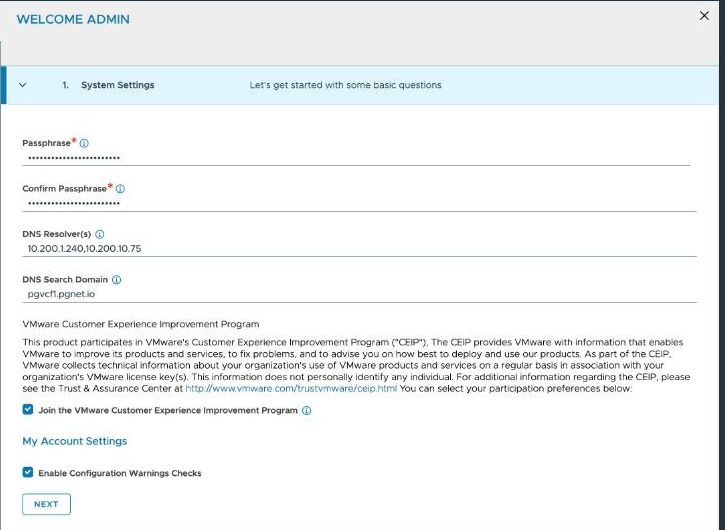
| Step | Value |
|---|---|
| System settings | A backup passphrase, stored as its own key in the secret store — a backup cannot be restored without it, and it does not follow a later password change. DNS is pre-filled; set the search domain to pgvcf1.pgnet.io |
| Email/SMTP | None, unless there is a relay |
| Multi-tenant | Share IP route domain across tenants · Service Engines managed within the Provider · tenant Read access |
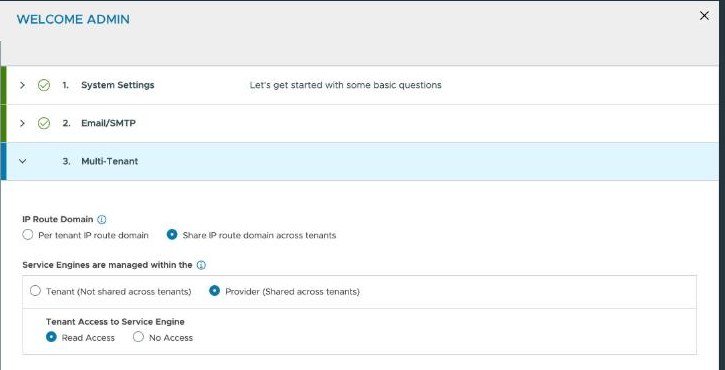
Leave Setup cloud after unticked, because the cloud already exists.
Those tenancy defaults suit VCF: isolation between organisations comes from NSX VPCs, and the controller keeps one VRF per VPC in its admin tenant. A single SMALL controller could not afford a Service Engine pair per tenant.
6. Finish the cloud
The cloud NSX creates is not finished. Three things are set on it afterwards, and the third is the one a Supervisor depends on.
uv run --group vsphere scripts/avi_cloud.py            # reports what is set and what is missing
uv run --group vsphere scripts/avi_cloud.py --apply # sets it and waits for the cloud to be ready| Item | Set to | What it is for |
|---|---|---|
| Content library | pgvcf1-lib-avi-se, created LOCAL with no security policy, on vcf-content | Service Engines are cloned from the image the controller uploads here |
| Management network | VLAN · nsx-vlan-transportzone · segment vcf-avi-se-mgmt-1603 | A Service Engine’s first NIC. Without it the cloud reports Configured management transport zone '' of type '' |
| Data network | OVERLAY · overlay-tz-mgmt-nsxt — the zone the hosts and VPCs use. No tier-1, no segment | The controller accepts the cloud without it, but a Supervisor’s Avi operator finds its cloud by matching on this transport zone. Set it now — see below |
What you should see: CLOUD_STATE_PLACEMENT_READY within a minute or two, and soon after an item in the library — the controller’s own Service Engine image.
The data network is the one to get right before activating a Supervisor. With the cloud’s data_network_config unset, the Supervisor’s Avi operator logs:
Failed to derive cloud, err: cloud not found matching transport zoneThe activation finishes once the zone is set. That dependency is not stated in the documentation; it is what this build observed.
7. Enable a VPC for Avi
A VPC is eligible for Avi only when it says so: in NSX, VPCs › the VPC › Advanced settings › Enable for Avi Load Balancer, which is load_balancer_vpc_endpoint.enabled in the API. It needs no Edge cluster. The controller then discovers the VPC and keeps a VRF for it.
A Supervisor turns this on for its own VPCs. For a VPC of your own:
uv run scripts/vpc_test.py --vpc pgnet-core --apply # a VPC with the Avi endpoint on, a public and a private subnet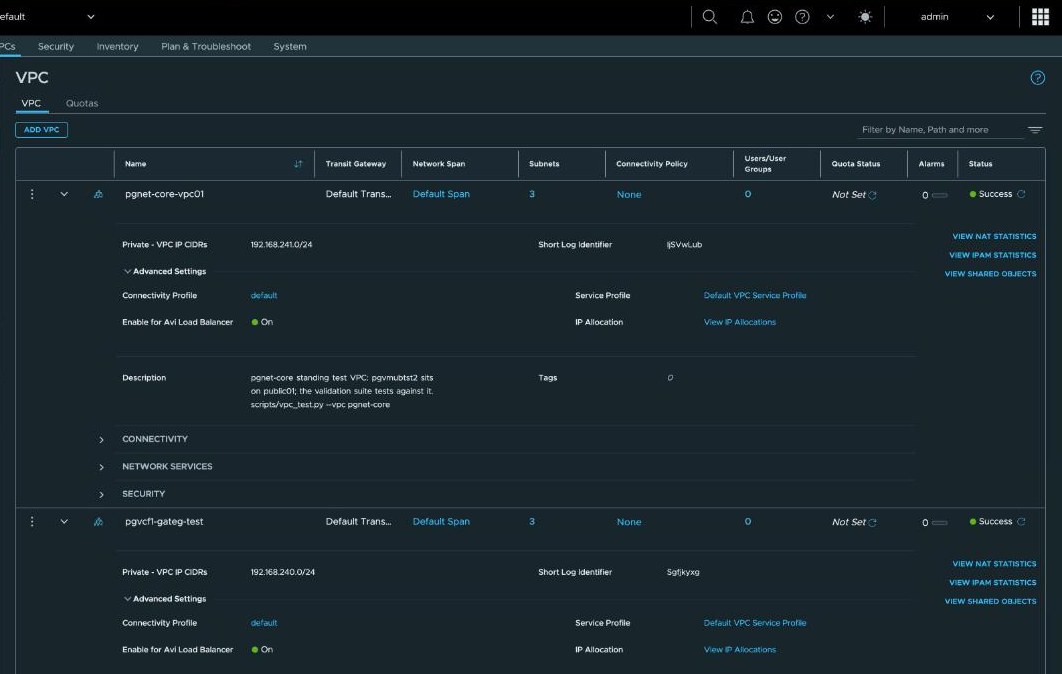
Result
Measured 2026-09-20, after both Supervisors were activated against this controller.
- Controller 32.1.3, cluster up, cloud
Cloud-nsxplacement-ready, and the library holding the Service Engine image. - Two Service Engines, created by the controller with the first virtual service, on
pgvcf1-cl02, taking management addresses10.134.3.93and10.134.3.228by DHCP. They are shared: the second Supervisor’s services were placed on the same pair. - Eight virtual services up, four per Supervisor — API, DNS, image proxy and registry. Their VIPs,
10.150.0.6–.9and.12–.15, were allocated by NSX from the external IP block and are reachable from outside the VPCs. - The Avi licence is leased on demand: two service cores in use, for the two one-vCPU Service Engines.
Lab-only conditions
| What | Note |
|---|---|
| One controller, by an unsupported feature flag | Production is three, with anti-affinity. NSX shows the cluster Degraded permanently as a result |
| Consumer hardware, vSAN encryption off | The hardware |
References
📖 Reference — VMware Cloud Foundation 9.1 documentation, Design › Load Balancer Detailed Design › Avi Load Balancer Model, pp. 1911–1925. It states that this model needs no Edge cluster and that Service Engine management can use an NSX VLAN segment rather than an overlay segment. Requirements
VCF-AVI-LB-REQD-CFG-01to-04are in Table 598, p. 1919: configure the NSX cloud, register Avi as an endpoint with NSX, one Avi to one NSX Manager, and “Avi Load Balancer must be integrated with NSX before Supervisor activation” — whose justification reads “If Avi Load Balancer integration is not detected, Supervisor defaults to utilizing NSX load balancer.” RecommendationsVCF-AVI-LB-RCMD-CFG-04(enable VPC mode in the NSX cloud account) and-05(Service Engine DHCP addressing) are in Table 599, p. 1919, as is-01, which recommends three controllers.How the load balancer is chosen: vSphere Supervisor Platform › Deploy a Supervisor with VPC Networking, p. 6861 — “If NSX does not detect the Avi Load Balancer, it uses the NSX Edge load balancer” — and p. 6853, “You can only use one load balancer”. The VNA cluster a Supervisor needs for north-south services and Auto-SNAT:
VCF-WLDCON-DTGWVLAN-REQD-CFG-013and-014, Table 575, p. 1844.VMware Avi Load Balancer 32.1 documentation, Installation Guide › Integration with NSX Multi-Tenancy, pp. 898–927: VPC mode in the NSX cloud configuration (pp. 901–902), the per-VPC
load_balancer_vpc_endpointsetting (p. 902), and a dedicated VRF for each NSX VPC (p. 904). Administration Guide › Create a Tenant, pp. 235–239, for the IP route domain and Service Engine context options.
About the references
Page numbers elsewhere in this guide are from the September 2026 build of the VMware Cloud Foundation 9.1 PDF.