Attaching the Second Cluster to NSX
In VCF 9.1 a cluster is attached to NSX from vCenter. pgvcf1-cl02 was built in vCenter, so the five inputs SDDC Manager would supply were entered by hand.
VCF 9.1.1 lab rebuild. Part of the follow-along guide, published live as the build happens.
📘 Official documentation. This is a lab walkthrough, not a replacement for the vendor docs. For the authoritative, supported procedures, follow Broadcom’s VMware Cloud Foundation 9.1 documentation. Where this guide and the official docs differ, the official docs win.
Where we are: after the second cluster. pgvcf1-cl02 exists in vCenter — four hosts on the distributed switch pgvcf1-cl02-vds01, NFS storage, HA and DRS on — but it is not a set of NSX transport nodes, so it cannot carry VPC workloads. The management cluster was prepared by SDDC Manager at bring-up.
Status: done, 2026-09-19. All four hosts are NSX transport nodes, state success, with tunnel endpoints on VLAN 1305. Every figure on this page was read back from NSX and the hosts after preparation.
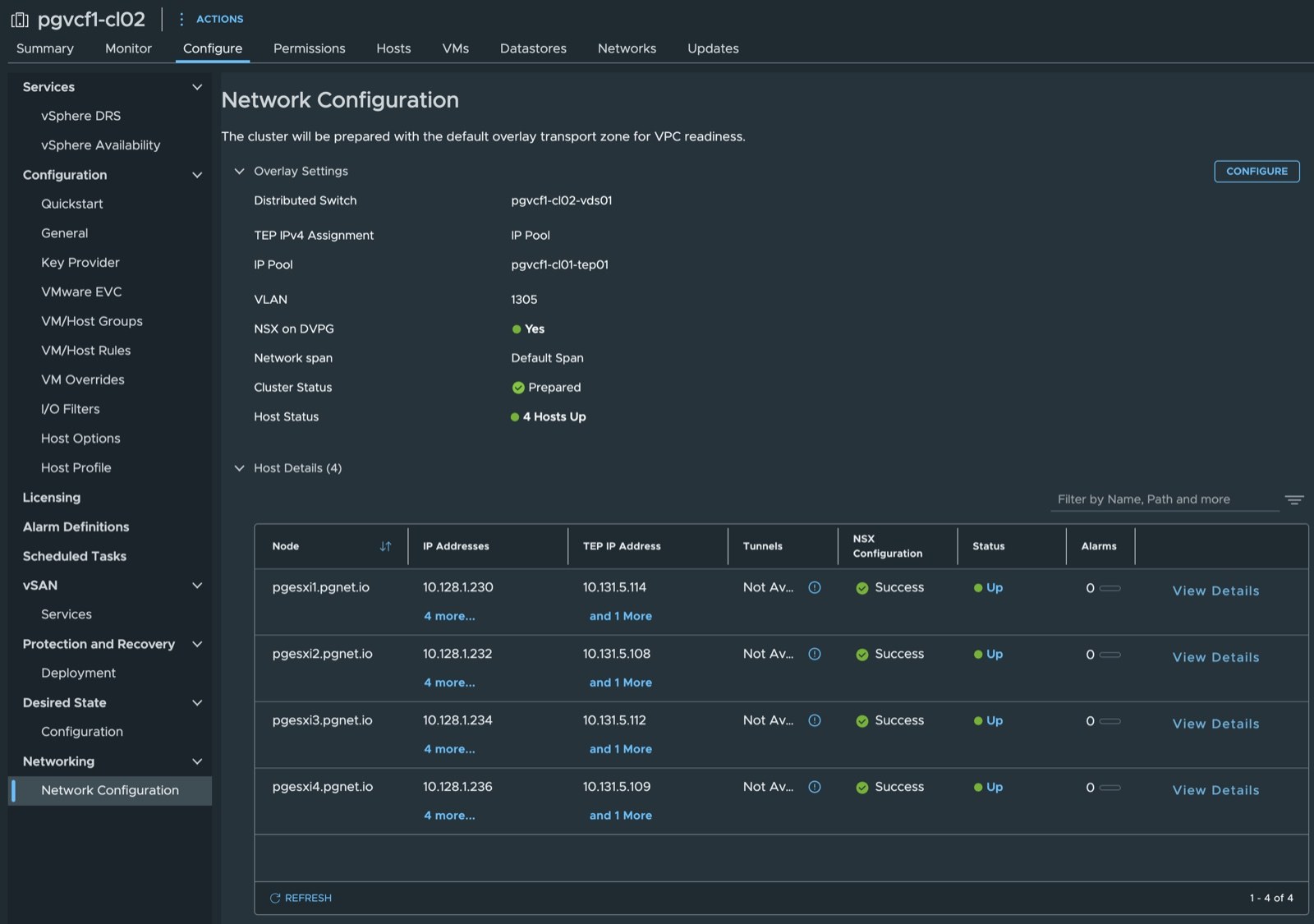
Where a cluster is attached to NSX
In VCF 9.1 a vSphere cluster is attached to NSX from vCenter, not from NSX Manager.
Where: vCenter › cluster pgvcf1-cl02 › Configure › Networking › Network Configuration › Configure.
The page states what it will do — “The cluster will be prepared with the default overlay transport zone for VPC readiness” — and takes five inputs. For a cluster SDDC Manager built, SDDC Manager supplies them. pgvcf1-cl02 was built in vCenter, so they are entered here.
Before preparation:
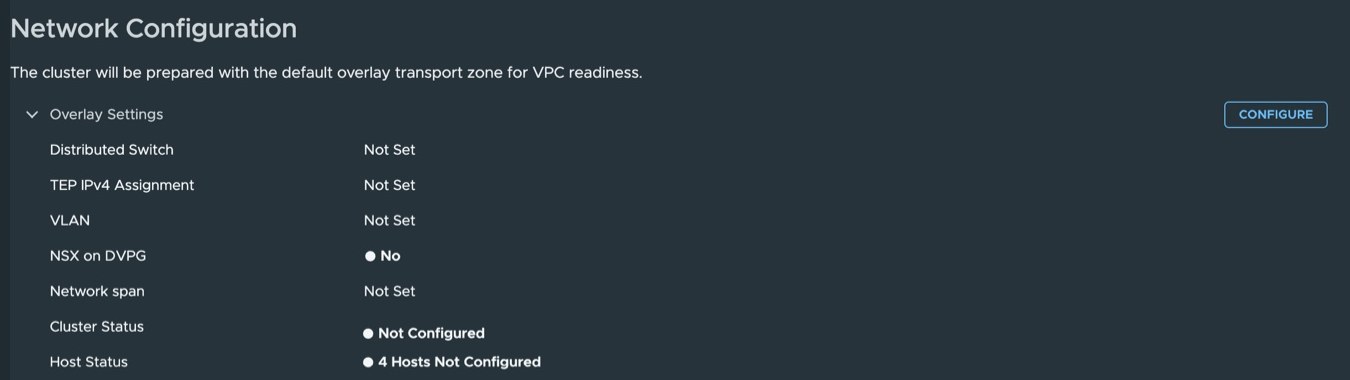
The dialog names the decision that matters: the cluster “can be configured with TEPs for full stack VPC networking or TEP IP assignment as none for VLAN Backed VPC configuration”. This instance is full-stack VPC — private subnets and SNAT depend on it — so the cluster gets TEPs.
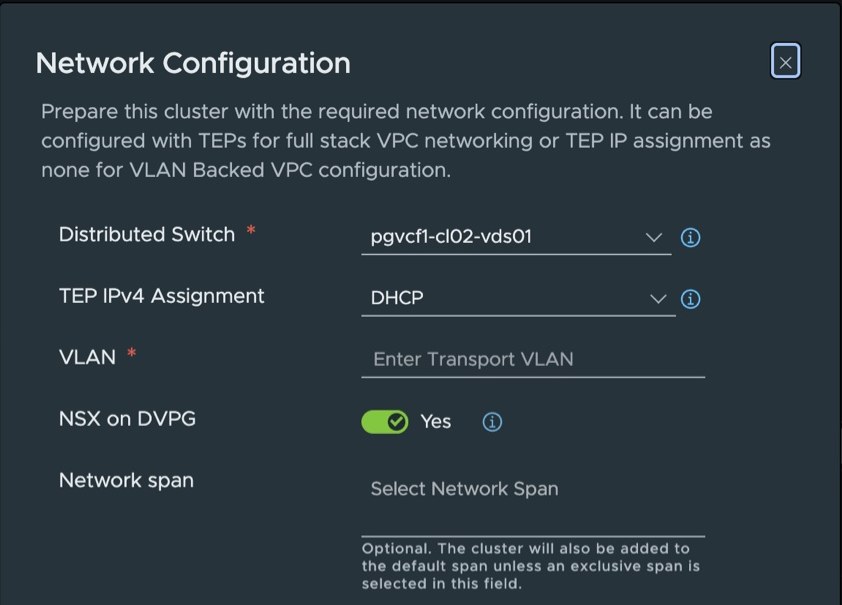
The five inputs
The dialog as it opens:
As submitted:
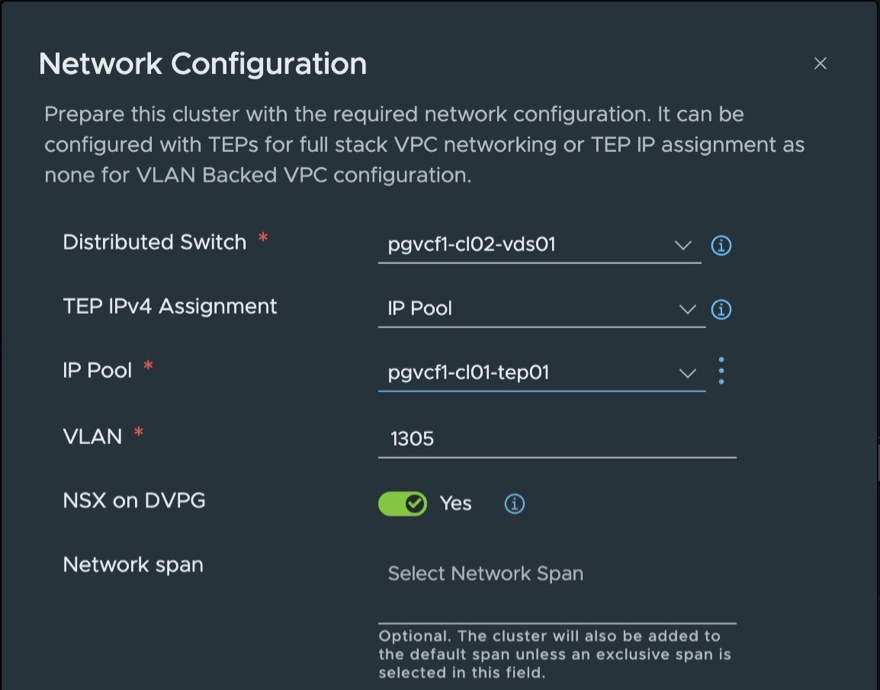
| Field | Dialog default | Entered | Why |
|---|---|---|---|
| Distributed Switch | pgvcf1-cl02-vds01 | Unchanged | The cluster’s only switch |
| TEP IPv4 Assignment | DHCP | IP Pool | There is no DHCP scope for tunnel endpoints in this lab. The management cluster uses a static pool |
| IP Pool | — | pgvcf1-cl01-tep01 | The pool SDDC Manager created: 10.131.5.100–.199, gateway 10.131.5.1. 8 of 100 addresses were allocated, all to pgvcf1-cl01. The name says cl01, but it covers the whole host-overlay subnet, and both clusters’ endpoints belong on that one layer-2 network |
| VLAN | Empty | 1305 | The transport VLAN in the management cluster’s uplink profile. Proven on every pgvcf1-cl02 uplink at MTU 9000 beforehand |
| NSX on DVPG | Yes | Yes | Left on. See below |
| Network span | Empty | Empty | ”Optional. The cluster will also be added to the default span unless an exclusive span is selected.” NSX has one span, Default Span |
The pool and the transport VLAN were read from NSX — the management cluster’s transport node profile and its uplink profile — before the dialog was filled in.
NSX on DVPG
The single deployment mode allows you to configure the Distributed Firewall (DFW) on Distributed Virtual Portgroups (DVPGs) alongside network virtualization features on the same ESX host.
When it is active, NSX creates a system-owned security transport zone for each distributed switch and presents the switch’s existing port groups as segments under it. It is independent of overlay and VPC networking, which need only TEPs.
The NSX documentation describes it as disabled by default on a fresh NSX installation, and as something that “can be manually enabled after cluster preparation”. The vCenter dialog in this build opened with it set to Yes. pgvcf1-cl01 was prepared with it off. It was left on here, and is being turned on for pgvcf1-cl01 to match.
The firewall rules at the time, read from NSX: the default layer-3 and layer-2 rules are allow any–any; one drop rule is enabled, matching sources in NSX’s malicious-IP feed group; and the exclusion list holds the group VCF-Created-Virtual-Machines. So a VM on a newly covered port group is not dropped by anything present today, and a deny rule written later applies to it.
📖 Reference — VMware Cloud Foundation 9.1 documentation. NSX › Host Transport Nodes › Configure an ESX Host Transport Node …, pp. 3230–3234: the single deployment mode, and NSX on DVPG disabled by default on a fresh installation and enabled manually after preparation. NSX › Transport Zones and Profiles › Create Transport Zones, pp. 3200–3204: one security transport zone per distributed switch in the transport node profile — “zones are system-generated only and cannot be created by users”.
What preparation created
| Transport node profile | tnp.1 |
| Uplink profile | uplink-profile.1 — transport VLAN 1305, teaming with uplink1 and uplink2 both active |
| Host switch mode | ENS_INTERRUPT, as on pgvcf1-cl01 |
| Transport nodes | pgesxi1 to pgesxi4, state success, node status UP |
| Tunnel endpoints | Two per host, vmk10 and vmk11, on the vxlan TCP/IP stack |
| Pool usage afterwards | 16 of 100 addresses |
| Host | vmk10 | vmk11 |
|---|---|---|
pgesxi1 | 10.131.5.114 | 10.131.5.115 |
pgesxi2 | 10.131.5.108 | 10.131.5.110 |
pgesxi3 | 10.131.5.112 | 10.131.5.113 |
pgesxi4 | 10.131.5.109 | 10.131.5.111 |
pgvcf1-cl01, for comparison, holds 10.131.5.100–.107, two per host, unchanged by this work.
Two endpoints, one uplink
The uplink profile the workflow created makes both of the switch’s uplinks active, and NSX creates one tunnel endpoint per active uplink. pgvcf1-cl02-vds01 defines uplink1 and uplink2, but only uplink1 has a physical NIC behind it on these hosts (vmnic1). So each host has a second endpoint, vmk11, mapped to an uplink with no NIC. That is the “and 1 More” in the host table.
It works. NSX teams by link state, an uplink with no NIC counts as down, and vmk11 is carried by uplink1. Measured: vmk11 on every host reaches a pgvcf1-cl01 endpoint at 8972 bytes with the don’t-fragment bit set, with no loss.
It adds no bandwidth and no redundancy — both endpoints share one 10 Gb/s link. When a second 10 Gb/s NIC is attached to uplink2, as planned, the second endpoint gets a path of its own with no NSX change.
Evidence
Pings are from the host, on the vxlan TCP/IP stack, at 8972 bytes with the don’t-fragment bit set — the size that proves MTU 9000 end to end — unless stated.
| Check | Result |
|---|---|
Transport node state, pgesxi1 to pgesxi4 | 4 of 4 success, status UP |
| Open NSX alarms about these hosts | None. The four open alarms are about the NSX Manager node: remote logging not configured (3), and a capacity threshold (1) |
Each host’s vmk10 → pgvcf1-cl01 endpoint 10.131.5.100 | pgesxi1, pgesxi3, pgesxi4: no loss. pgesxi2: lost 10–20% at first, none after the fix below |
Each host’s vmk11 → 10.131.5.100 | 4 of 4, no loss |
Within the cluster: pgesxi1 → both of pgesxi4’s endpoints | No loss |
| Tunnels | 0 up, 0 down. A tunnel forms when two hosts have workloads on the same overlay segment, and there are no workloads yet — the same as on the management cluster |
Resolved: packet loss from pgesxi2
After preparation, 8972-byte pings from pgesxi2 to other hosts lost 10–20%, while the other three hosts lost none. It was not an NSX fault and not specific to tunnel endpoints: wider testing showed the same loss on that host’s vMotion and NFS VMkernels.
The cause was one setting on a switch port. pgesxi1 and pgesxi2 do not connect to a UniFi switch. They connect to a separate switch that the UniFi controller cannot see, which uplinks into the UniFi fabric. Its three ports in use were set to media-type fiber-auto, and every cable on it is direct-attach copper.
The port facing pgesxi2 had counted 12.5 million input errors, 11.4 million of them jabber — oversized frames with a bad checksum, so large frames were hit hardest. A switch port’s input is the host’s output, so only traffic leaving pgesxi2 was affected.
| iperf3 between two test VMs on VLAN 1104, 30 s, 4 streams | Before | After |
|---|---|---|
Leaving pgesxi2, 1500-byte MTU | 1,925 Mb/s, 114,894 retransmits | 9,389 Mb/s, 0 retransmits |
Leaving pgesxi2, 9000-byte MTU | 91 Mb/s | 9,896 Mb/s, 7 retransmits |
Arriving at pgesxi2, 9000-byte MTU | 9,600 Mb/s | 9,895 Mb/s |
The same VM on pgesxi3, not behind that switch, 9000-byte MTU, either direction | 9,895 Mb/s | — |
After the media type on each port was set to match its cable, the port’s error counter did not move across the test, and pings from pgesxi2 to the other hosts and to the storage server lost 0 of 50 at 1472, 4000 and 8972 bytes.
Two further facts from the investigation:
- The neighbouring host was clean with the same wrong setting.
pgesxi1sits on the same switch with the same port setting and showed no errors. Its Intel X710 tolerated whatpgesxi2’s Intel 82599 did not. - ESX reported zero transmit errors throughout. The frames left the NIC intact and were discarded by the switch port they arrived at, so only that switch’s own counters showed it.
What differs from a cluster SDDC Manager prepares
Nothing failed. Two things differ, and both are recorded above:
- The dialog’s DHCP default has to be changed to the static pool.
- The generated uplink profile assumes two populated uplinks.
📖 Reference — the external VLAN has to be present on the switch and NICs where the host TEPs connect:
VCF-WLDCON-DTGWVLAN-REQD-CFG-002, VMware Cloud Foundation 9.1 documentation, p. 1840. Onpgvcf1-cl02that isvmnic1, and VLAN 4000 was proven there at MTU 9000.
Lab-only conditions
| What | Note |
|---|---|
| The cluster was built in vCenter, not by SDDC Manager | Which is why these inputs were entered by hand. See the second cluster |
| One 10 Gb/s uplink per host | Both tunnel endpoints, management, vMotion and NFS share it |
| Consumer CPUs and NICs | None on the hardware compatibility guide |
About the references
Page numbers are from the September 2026 build of the VMware Cloud Foundation 9.1 PDF. Broadcom rebuilds the PDF from time to time and the page numbers move, so each reference also gives the section name.