Bring-Up: Five and a Half Hours, 320 Subtasks
What happens after Deploy is pressed — eight milestones, no failures, and the two things an operator actually needs during the run.
VCF 9.1.1 lab rebuild. Part of the follow-along guide, published live as the build happens.
📘 Official documentation. This is a lab walkthrough, not a replacement for the vendor docs. For the authoritative, supported procedures, follow Broadcom’s VMware Cloud Foundation 9.1 documentation. Where this guide and the official docs differ, the official docs win.
Where we are: the Installer page ends with the specification validated and Deploy pressed. This page is what happens next: 2026-09-17 23:00 to 2026-09-18 04:21.
Result: 8 milestones, 320 subtasks, 0 failed, no retries, 5 h 21 m unattended.
Every decision was made in the specification. Once Deploy is pressed there is nothing to operate, so what is useful during the run is knowing which interruptions are normal, and having a way to check progress that does not depend on the browser session staying alive. Both came up.
The timeline
| # | Milestone | Subtasks | Duration |
|---|---|---|---|
| 1 | Deploy vCenter | 13 | 11 m 51 s |
| 2 | Deploy SDDC Manager | 18 | 13 m 21 s |
| 3 | Configure vSphere cluster | 133 | 4 m 50 s |
| 4 | Deploy and configure NSX | 103 | 18 m 55 s |
| 5 | Deploy and configure VCF Management Platform | 14 | 1 h 32 m 54 s |
| 6 | Deploy and configure the operations appliance | 15 | 38 m 24 s |
| 7 | Deploy and configure VCF Management Services | 17 | 51 m 43 s |
| 8 | Deploy and configure VCF Automation | 7 | 1 h 29 m 29 s |
Subtask count predicts nothing about duration. Milestone 3 has 133 subtasks and finishes in under five minutes: configuring vSAN ESA on the NVMe, building the distributed switch and migrating vmnic1 off vSwitch0 is many small API calls and little waiting. Milestones 5 to 8 have 7 to 17 subtasks each and run for over an hour, because they deploy and boot appliances. Appliance boots dominate the clock.
These durations are a shape, not a benchmark. This is four consumer mini-PCs, one of them with half the memory of the others.
Where: the VCF Installer’s progress page, throughout.


The distributed choice is visible in the task list
During the NSX milestone the task list names the two subtasks that make this build distributed rather than centralized:
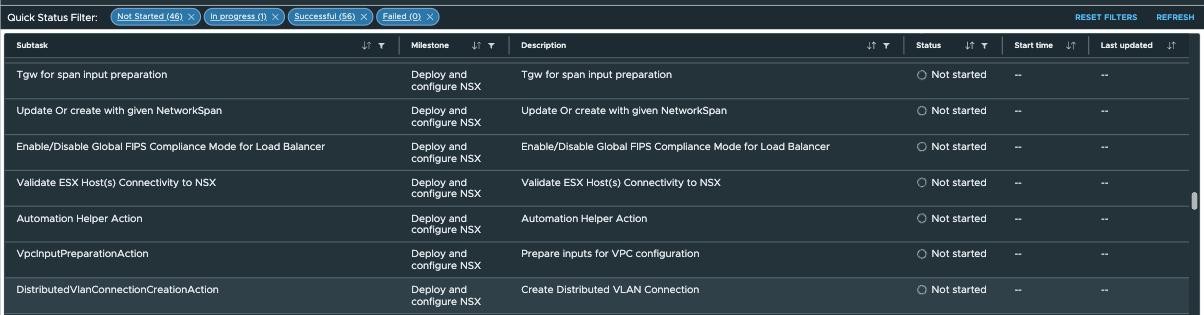
VpcInputPreparationAction and DistributedVlanConnectionCreationAction. No Edge deployment subtask appears at any point in the run, because there is no Edge cluster in this model.
The interruption that is not a failure
At about 23:55 the progress page raised a Connectivity Issue dialog — “This could happen when certificate is changed, mis-configured proxy, firewall” — and a red banner reading Http failure response for /v1/sddcs/<id>: 0 Unknown Error.
Nothing was wrong. After a browser reload the page showed NSX at 103/103 and the management platform at 4/14, with 0 failed:

The cause is in the subtask immediately before it: Generate and Install VMCA Certificate on SDDC Manager, at 23:50. The Installer appliance had just started serving a certificate issued by the VMCA of the vCenter it had built minutes earlier, and the browser’s existing session broke on the swap.
If the progress page throws a connectivity error during the management-platform milestone, reload it. The Installer’s certificate has just been replaced by one from the vCenter it built.
Watching it without the browser
Two things time out over five hours: the screen, and the Installer’s web session. Neither means the deployment stopped, and neither is a good way to check.
A small read-only script reads SDDC Manager’s task list instead, listing tasks with their status and any error text. It works from milestone 2 onward, once SDDC Manager exists, which is most of the run.
uv run scripts/bringup_status.py        # the 8 most recent tasks
uv run scripts/bringup_status.py --all # every task SDDC Manager holdstoken request refused … not retrying (account lockout) and stops. A monitor that retries a failed login on a schedule will lock the account out, and it will do it overnight while nobody is watching.Complete at 04:21

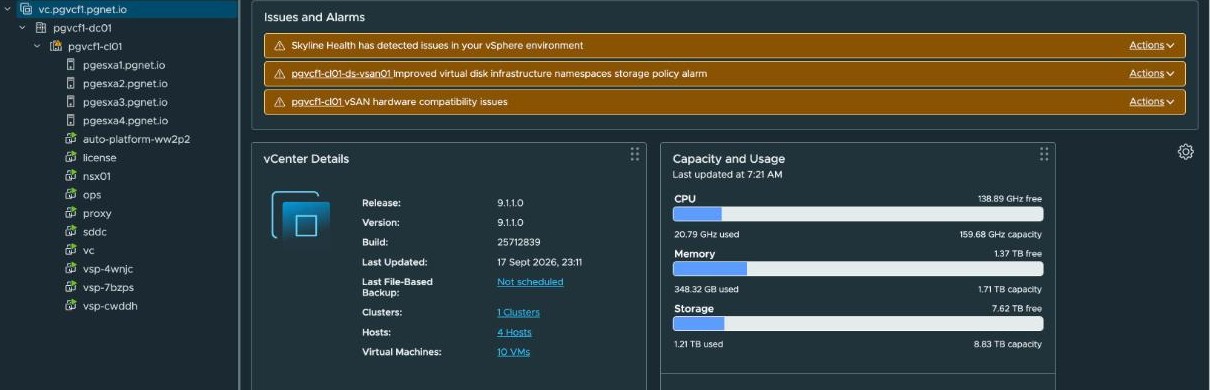
vCenter, straight after bring-up:
And VCF Operations:
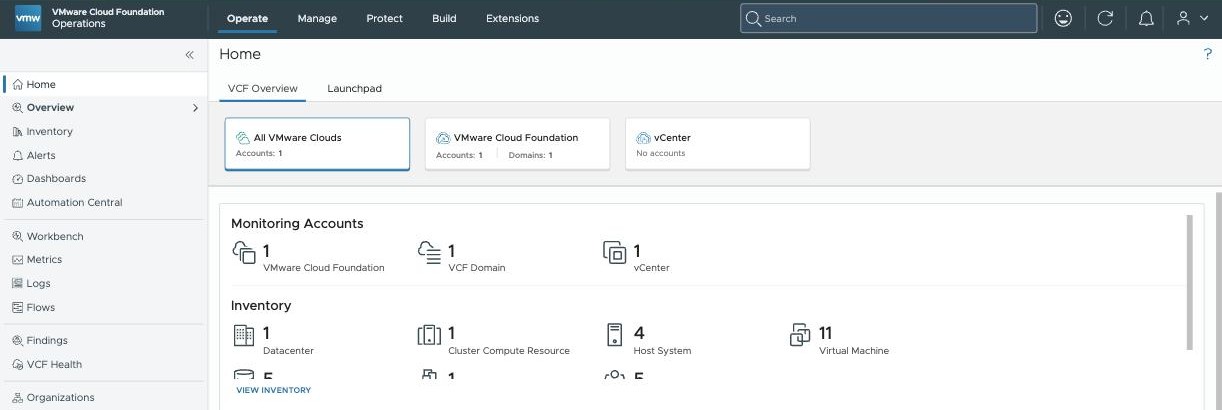
The vSAN alarms are lab conditions, tracked separately from the build. Nothing on this page depends on them.
What bring-up did not do
The instance came up complete and every component answered on 443. At the same moment, none of the physical network requirements for distributed connectivity had been met.
The Installer neither configures nor validates them, and its own network validation had passed with the external VLAN unbuilt, because no management component uses that VLAN. That is the next page.
Also not done: no VNA cluster, so no stateful services at all; the second cluster not onboarded; identity and tenancy untouched.
Credentials afterwards
Eleven credentials that bring-up consumed match the secret store byte for byte. That is the evidence that the Installer used what the specification carried and rotated nothing in flight.
Two things are easy to get wrong in opposite directions:
- The FTP backup account is created by bring-up, not supplied to it. It does not exist in the store until it is put there.
- Five service accounts return no password at all through the API — one per ESX host, one for NSX, one for vCenter SSO. SDDC Manager mints and auto-rotates them. That is not a permissions failure and not a gap to fill: a copy would go stale silently at the next rotation, and a stale credential is indistinguishable from a live one until something fails with it.
Lab-only conditions
| What | Note |
|---|---|
| Consumer hardware throughout, with vSAN ESA claiming unlisted NVMe | The hardware |
| vSAN alarms in the as-built screens | Consumer-hardware conditions, tracked separately |
| One host with roughly half the memory of the other three | Part of why the durations are a shape rather than a benchmark |
About the references
Page numbers elsewhere in this guide are from the September 2026 build of the VMware Cloud Foundation 9.1 PDF. This page reports what the deployment did, so it cites the product rather than the documentation.