Distributed Connectivity: What the Physical Network Owes the Instance
Distributed VPC connectivity puts the north-south datapath on every ESX host and asks things of the fabric that the VCF Installer neither configures nor checks. Six requirements, six checks, and the evidence each one produces.
VCF 9.1.1 lab rebuild. Part of the follow-along guide, published live as the build happens.
📘 Official documentation. This is a lab walkthrough, not a replacement for the vendor docs. For the authoritative, supported procedures, follow Broadcom’s VMware Cloud Foundation 9.1 documentation. Where this guide and the official docs differ, the official docs win.
Where we are: after bring-up. The instance is up and every component answers. This page is about the other half of distributed connectivity, the half that lives on the physical gateway and the switch. The Installer configures none of it and validates none of it.
A green validation says nothing about this network, so the requirements have to be enumerated from the documentation and checked one at a time.
Everything here was done on the gateway over SSH, in its controller interface, and read-only through the vSphere API from the build workstation.
Pattern: measure before you configure
The documented prerequisite says to disable ICMP redirects on the external gateway. The obvious response is to write a sysctl file and move on. Here that would have been wrong twice over.
- The setting was already correct on every interface, including the
defaulttemplate that new interfaces inherit. - A file in
/etc/sysctl.d/on this gateway is unmanaged state that a firmware update replaces. It would have read as correct right up until it silently was not, and nothing reports its absence.
So the output was a check, not a change: something that reports whether the setting is correct whenever it is run, rather than an edit that sets it once.
What is involved
Neither of these is part of VCF.
| Component | What it is | What it does here |
|---|---|---|
| The gateway | A UniFi Dream Machine Pro, on UniFi OS 6.0.7 (Debian 13) | The lab’s only router, and the external gateway for VPC traffic. The platform is named because the finding below is specific to it. |
| A VLAN trunk check | A script written for this, which reads vCenter and changes nothing | Proves the external VLAN reaches the right uplinks on every host. |
Three ways out, and why this one has no BGP
VCF 9.1 offers three types of external connection:
| Type | How north-south leaves | Needs |
|---|---|---|
| Centralized | A Tier-0 gateway on an Edge cluster | Edge nodes, and BGP or OSPF to the fabric |
| Distributed VLAN | A gateway leg on every ESX host | No Edge nodes and no routing protocol. The external subnet is on-link to the physical router |
| Distributed VXLAN | A gateway leg on every ESX host | No Edge nodes, but Multiprotocol BGP-EVPN through a Route Controller cluster, and an EVPN fabric to peer with |
This lab uses distributed VLAN, and BGP is not used in this configuration. Everything the VPC exposes northbound is addressed out of the external VLAN’s own subnet. The router owns that subnet as a directly connected interface and resolves addresses in it by ARP. Nothing is advertised, so nothing has to converge.
📖 Reference — VMware Cloud Foundation 9.1 documentation. NSX › External Connections, pp. 3301–3308. Design › Distributed VXLAN Connectivity Model for Version 9.1.0, pp. 1851–1858: “a decoupled Multiprotocol BGP-EVPN control plane and VXLAN data plane”.
What is configured on the gateway
One VLAN interface. That is the entire external-connectivity contract on the fabric side.
| Setting | Value | Why it matters |
|---|---|---|
| VLAN ID | 4000, set manually | Must equal the dtgwSpec.vlan in the deployment spec exactly |
| IPv4 address | 10.150.0.1/22 | The address NSX was given as its next hop. It is excluded from the external IP block automatically |
| DHCP mode | None | NSX allocates inside this subnet from the external IP block. A DHCP server would hand out addresses NSX believes it owns |
| Auto-Scale Network | Off | It resizes the subnet by client count. NSX has this CIDR pinned in two places and is never told it changed |
| Isolate Network | Off | Isolation blocks the host-to-host path outright |
| Allow Internet Access | On | Needed for VPC egress once Auto-SNAT is on |
Auto-Scale is on by default. It is the setting on that screen that can break the rule that the external IP block must be a subset of the VLAN’s subnet, without reporting that it has.
Six requirements, six checks
| Requirement | The check | Result |
|---|---|---|
| The VLAN and gateway address match what the instance was given | ip -br addr show | br4000 UP 10.150.0.1/22 |
| ICMP redirects are off | Three sysctl reads — see below | 0 on all 139 interfaces |
| The gateway may hairpin | iptables -S on the forward path | Policy ACCEPT, no same-interface drop |
| The subnet is zoned as local | ipset membership | Present in the LAN and local-zoned sets |
| The external VLAN is trunked to the TEP uplinks, on every host | The VLAN trunk check, through vCenter | VLAN 4000 on vmnic1 and vmnic2, 4 hosts of 4 |
| The hairpin works with live traffic | Needs workloads with external addresses on two hosts | Still open. The VNA cluster is deployed and the data path is measured, but no packet has crossed host to host |
Read all three sysctl scopes
The kernel enables redirects if at least one of conf/all or conf/<interface> is true. It is a logical OR, not an override. A check that reads only the interface passes while redirects fire.
sysctl net.ipv4.conf.all.send_redirects \
       net.ipv4.conf.default.send_redirects \
       net.ipv4.conf.br4000.send_redirects
Read default as well. It is the template every new interface inherits, so it is what the next VLAN will start with.
Why redirects matter
A workload in a VPC on host A sends to an external address or a load-balancer VIP belonging to a VPC on host B. Both hosts have a distributed gateway leg on the external VLAN, both are in the same subnet, and the physical gateway is the next hop for both. So host A sends to the gateway, and the gateway has to send it back out of the same interface to host B. That is a hairpin.
A router’s reflex on a hairpin is an ICMP redirect: “you are on the same subnet, talk to each other directly”. Here that advice is wrong. The destination is not a host reachable by ARP on the VLAN. It is an address owned by the distributed transit gateway’s datapath. There is nothing on the wire to redirect to.
This is the requirement most worth proving deliberately, because it fails intermittently. It only breaks host to host, and only once VPCs exist on more than one host. Tested from the LAN, a fabric with redirects on looks perfect.
Proving the trunk without opening SSH on a host
The requirement that the external VLAN rides the same uplinks as the host TEPs is per-host, and management SSH is closed on these hosts once VCF takes them over.
There is a read-only way. For each physical NIC, ESX reports the VLAN IDs it has observed tagged traffic on — the switch’s trunk configuration as seen from the wire. It is available through vCenter, so nothing has to be run on a host:
pgesxa1    uplinks carrying TEP VLAN 1305: vmnic1, vmnic2
           VLAN 4000 (Distributed gateway external): OK on vmnic1, vmnic2
...
all 4 host(s): every required VLAN observed on a TEP-carrying uplink📖 Reference — VMware Cloud Foundation 9.1 documentation. NSX › Set up Distributed Network Connectivity, pp. 3296–3298: dedicated VLANs on every top-of-rack switch where VPC-hosting hosts connect, “Disable ‘ICMP redirect’ on external gateway for these VLAN(s)”, the gateway must forward packets received from ESX back out to the same or a different ESX, and external IP blocks must be the same as or a subset of the dedicated VLAN subnets. Design › Distributed VLAN Connectivity Model, pp. 1837–1844:
VCF-WLDCON-DTGWVLAN-REQD-CFG-001and-002(p. 1840),-004and-005(p. 1841).
Where the cluster shows its side of this
Where: the vSphere Client › the cluster › Configure › Networking › Network Configuration.
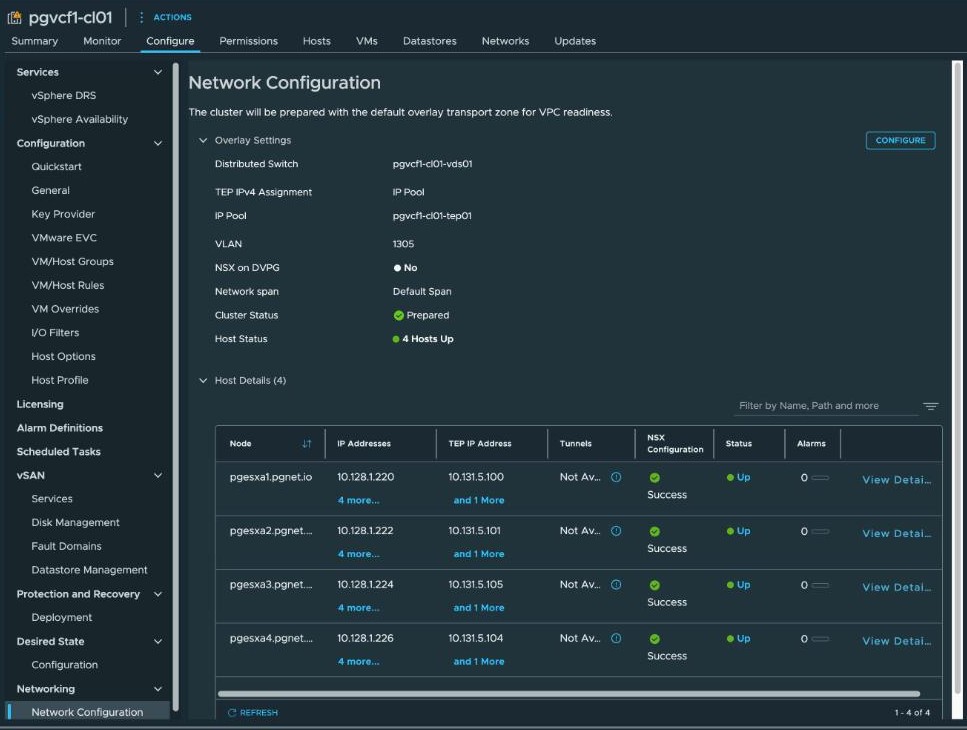
TEP IPv4 Assignment: IP Pool is the row that matters. It is the visible proof that the host TEPs came from a declared pool and not from DHCP. This connects back to the Installer page: with no ipAddressPoolSpec in the specification the Installer defaults host TEPs to DHCP, and a TEP VLAN with no DHCP server leaves the hosts prepared with no overlay. This screen is where you confirm the specification actually took.
The optional field that changes the topology
The same screen in edit mode has a Network span field. Its help text:
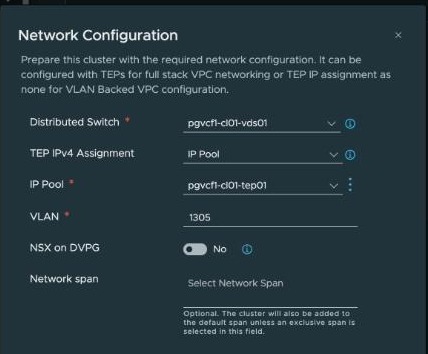
Optional. The cluster will also be added to the default span unless an exclusive span is selected in this field.
That is not an additive setting. An exclusive span removes the cluster from the default span. Empty and filled are two different topologies, not a default and a refinement, and the word “optional” hides the distinction.
A network span is defined on the distributed transit gateway and applies to every VPC connected to it. It confines VPC subnets to particular vSphere clusters. The recommendation is conditional: restrict the span “to allow for granular application placement”, which is “typically required for remote vSphere clusters or DMZ deployments”.
With a single cluster, leave it on the default span. There is nothing to isolate from, and an exclusive span adds a way for VPC subnets to be scoped somewhere their workloads are not. It earns its place when a second cluster joins and workloads are placed deliberately — which is exactly a tenancy model that puts organisations on their own cluster.
One implication survives either choice: it remains “the administrator’s responsibility to ensure external VLAN IP gateway reachability for every ESX host”. A span narrows which clusters carry VPC subnets. It does not relieve any host in scope of needing the external VLAN.
📖 Reference —
VCF-WLDCON-DTGWVLAN-RCMD-CFG-002(a recommendation), VMware Cloud Foundation 9.1 documentation, Design › Distributed VLAN Connectivity Model, p. 1843.
The five-CIDR limit on external IP blocks
The external IP block is sourced from the external VLAN’s CIDR, and if a range runs out more can be added — up to a total of five CIDRs. A per-tenant design, where each organisation has its own external VLAN, is bounded by that limit.
📖 Reference —
VCF-WLDCON-DTGWVLAN-REQD-CFG-004, VMware Cloud Foundation 9.1 documentation, p. 1841: “If a range is exhausted additional CIDRs can be added up to a total of 5.”
Lab-only choices
| What | Why it is here | What a supported build does |
|---|---|---|
| One gateway is both the lab router and the VPC external gateway | It is the only router here | The external VLAN terminates on a pair of top-of-rack switches. The hairpin and redirect requirements apply there instead |
| One external VLAN for everything | Simplicity | A per-tenant design gives each organisation its own external VLAN, within the five-CIDR cap above |
| Consumer hardware throughout, vSAN ESA claiming unlisted devices | The hardware | Listed devices |
| vSAN data-in-transit encryption off | Lab choice | On |
What is not here yet
Every stateful service. Under distributed connectivity, NAT, Auto-SNAT, the load balancer and DHCP relay do not exist until a VNA cluster is deployed. That is the next page.
About the references
Page numbers are from the September 2026 build of the VMware Cloud Foundation 9.1 PDF. Broadcom rebuilds the PDF from time to time and the page numbers move, so each reference also gives the section name.