Networks, Names and Addresses
Every VLAN, gateway, name and address the VCF 9.1.1 Installer will ask for — as built, with the rules behind them. The page to keep open in another tab.
VCF 9.1.1 lab rebuild. Part of the follow-along guide, published live as the build happens.
📘 Official documentation. This is a lab walkthrough, not a replacement for the vendor docs. For the authoritative, supported procedures, follow Broadcom’s VMware Cloud Foundation 9.1 documentation. Where this guide and the official docs differ, the official docs win.
Where we are: between kickstart and the VCF Installer. The hosts exist. Before the Installer is opened, every VLAN, gateway, name and address it will ask for has to exist too. This is the page to keep open in another tab for the rest of the guide.
Status: as built on 2026-09-17. DNS is created and proven, the Installer’s validation passed against it, and the deployment is running.
The build is a new fleet, Simple and Small, on four vSAN hosts, with Full Stack VPC and distributed gateway connectivity. The previous build routed VPC traffic through an Edge cluster with BGP. This one does not.
What is involved
None of these is part of VCF.
| Component | What it is | What it does here |
|---|---|---|
| The physical gateway | A UniFi gateway | The first hop for every VLAN. No routing protocol. |
| The DNS and NTP servers | The lab’s two resolvers, which also serve time | Every host and component uses them. Neither runs on these hosts, so the rebuild does not depend on itself. |
| NetBox | The lab’s address and DNS record manager | The source of truth for every address and DNS record. |
| Salt | The lab’s automation | Makes the records. See how the records are made. |
labparams.yaml | One file in the build repo holding every expected value for the lab | Two read-only check scripts test the live lab against it. |
| The VCF Design Studio | A design tool of mine, not public yet | Takes a design as a JSON file and draws it. Two diagrams on this page are its output, generated from the lab’s real values. They are not drawn by hand, so the picture cannot drift from the numbers. |
The build, in one picture
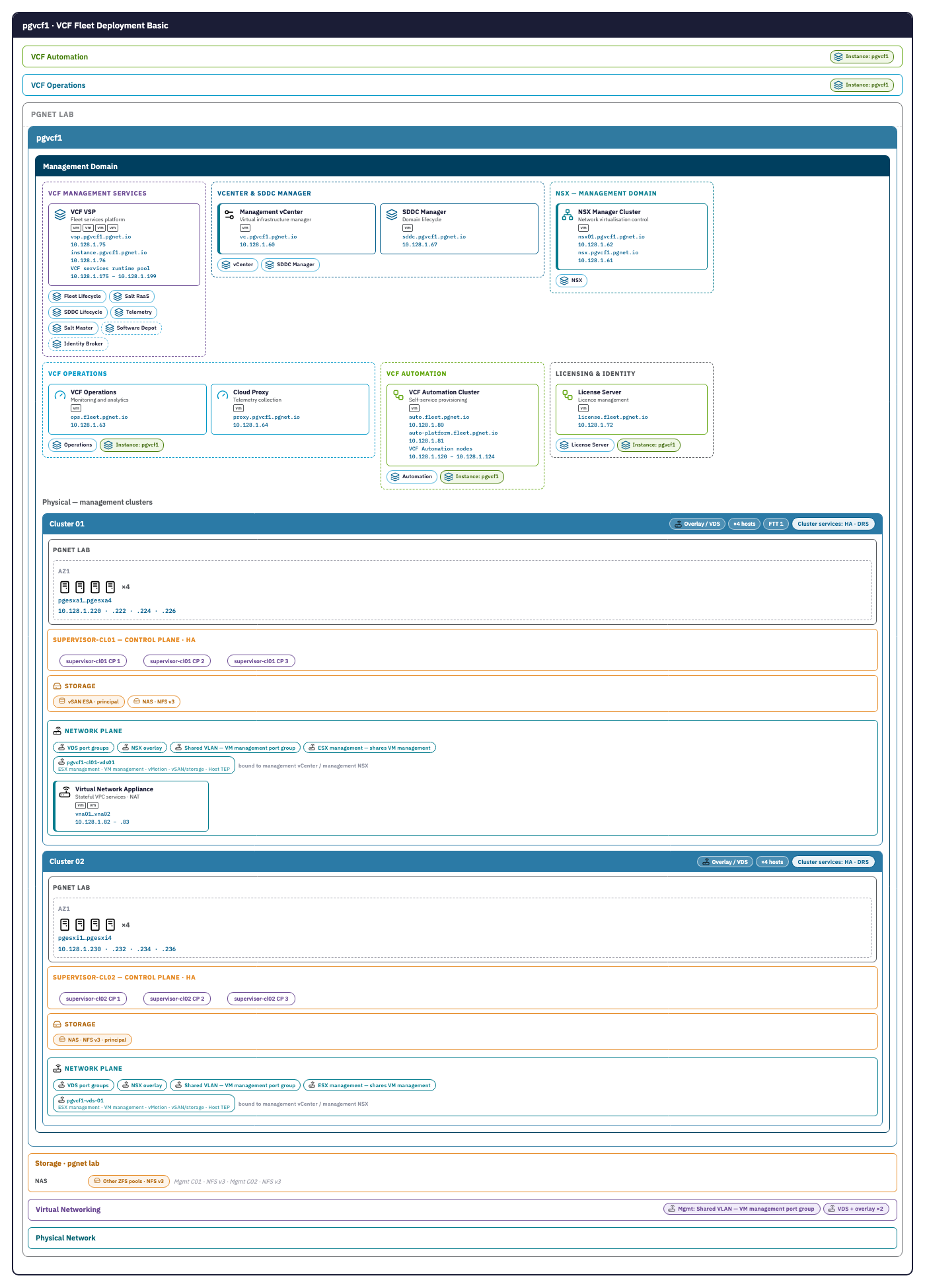
This is the build as the Design Studio draws it, each component with its name and address. The top half, the management domain, is what the Installer deploys.
Not everything in this picture exists yet. Cluster 02, both Supervisors and the VNA nodes are drawn as designed. At this point of the build only the management domain on cluster 01 is being deployed. The Supervisors carry role labels, supervisor-cl01 and supervisor-cl02, because their names are not decided.
What the external VLAN serves
One of the five VLANs is different in kind from the other four. Management, vMotion, vSAN and the host overlay each carry one job for a fixed set of interfaces. VLAN 4000 is the pool that everything VCF creates later is addressed from.
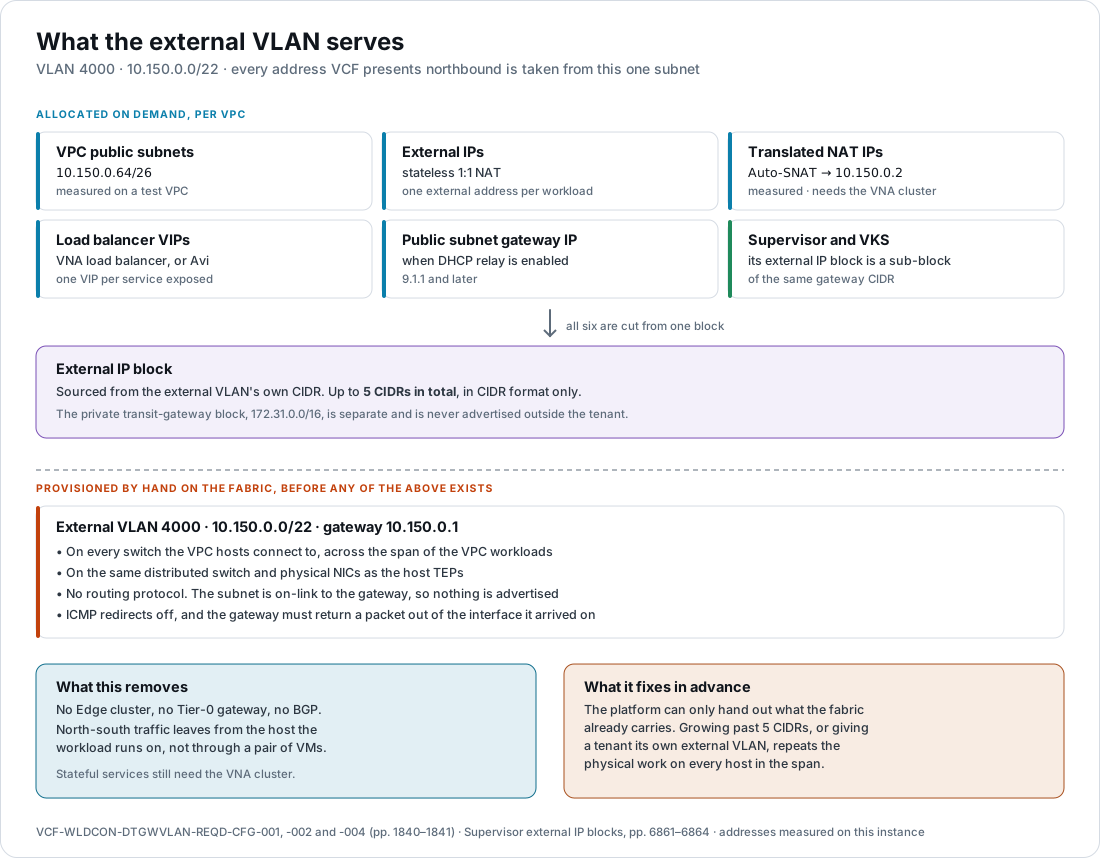
The documentation lists what comes out of it in the same words three times over, in the requirements for creating the VLAN, for presenting it to the right uplinks, and for sizing the block: VPC public subnets, External IPs for stateless 1:1 NAT, translated NAT addresses, load balancer VIPs, and the public subnet gateway address when DHCP relay is in use. A Supervisor deployed on VPC networking takes external IP blocks too, and they must be “the same as, or a sub-block of, the configured Gateway CIDRs”.
So a tenant creating a VPC, a service exposed through a load balancer, and a VKS cluster getting an API address are all drawing from this one subnet, without anyone touching the fabric again.
Dynamic above the line, static below it
Everything above the line in that picture appears on demand. The VLAN below it does not.
In this model the external subnet is on-link to the physical gateway. There is no routing protocol, so nothing is advertised: the fabric has to already carry the subnet before the platform can hand out a single address from it. That has three consequences worth knowing before the addressing is fixed.
- The block cannot grow past five CIDRs. More ranges can be added when one is exhausted, to a total of five.
- A second external VLAN is physical work, repeated. Giving a tenant organisation its own external network means another VLAN created and extended across the span of the VPC workloads, present on the same distributed switch and NICs as the host TEPs on every host in that span, with its own gateway, ICMP redirects off and the hairpin allowed. The requirements are the same ones each time.
- The span is a commitment. Any host that will run VPC workloads needs the VLAN. Adding a cluster later means extending it there first.
The other two connectivity models move that boundary. A centralized design advertises its prefixes from a Tier-0 gateway on an Edge cluster, over BGP or OSPF. The distributed VXLAN model advertises them over Multiprotocol BGP-EVPN through a Route Controller cluster, into an EVPN fabric. Both let the platform introduce a prefix the fabric did not previously know about; both need the corresponding machinery — Edge nodes in the first case, an EVPN fabric to peer with in the second. This lab has neither, which is the trade it is making.
📖 Reference — VMware Cloud Foundation 9.1 documentation. What the external VLAN carries:
VCF-WLDCON-DTGWVLAN-REQD-CFG-001and-002, p. 1840, and the external IP block with its five-CIDR limit,-004, p. 1841. Supervisor external IP blocks: vSphere Supervisor Platform › Deploy a Supervisor with VPC Networking, pp. 6861–6864.
The networks
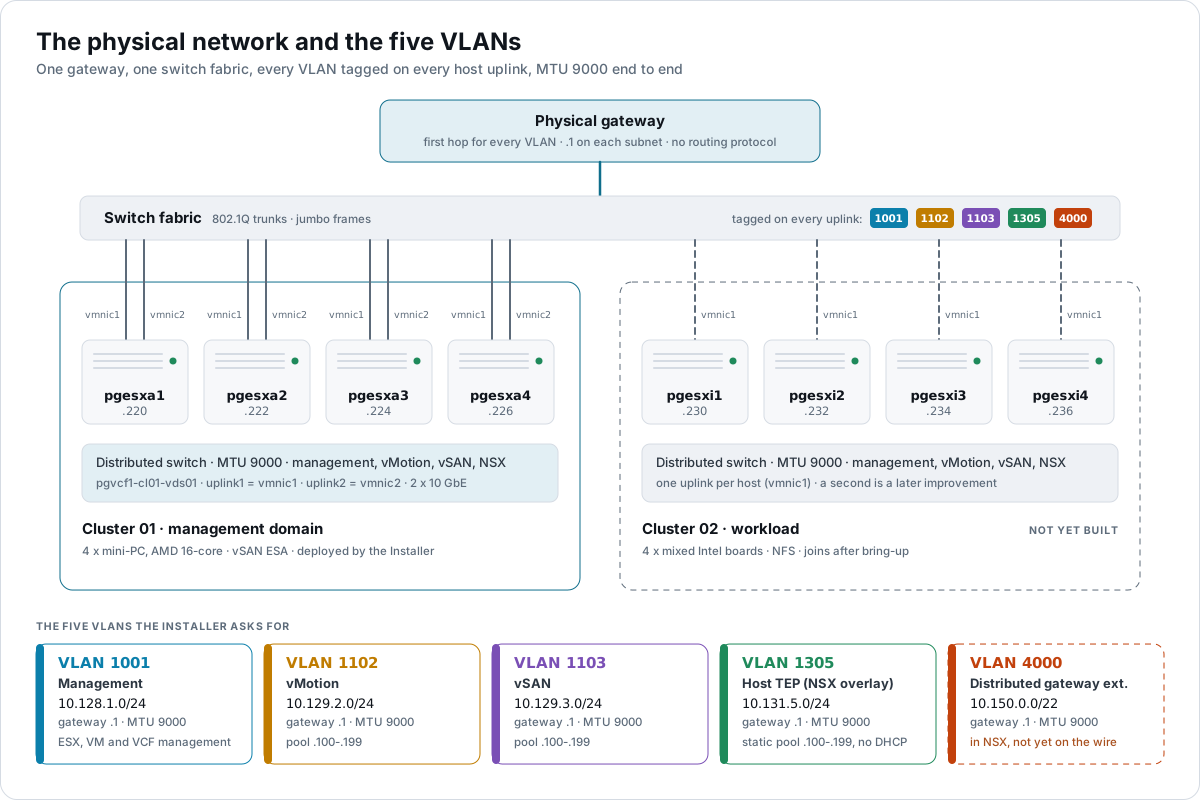
Cluster 02 is dashed because it is not built yet. VLAN 4000 is dashed because it is in the instance but not yet on the physical network. Both are true at this point of the build.
The Installer asks for ESX Management, VM Management, VCF Management, vMotion, vSAN and NSX Host Overlay, then on its NSX Manager page a VLAN ID and a gateway address for the distributed gateway. Every VLAN needs a first-hop gateway. With this build’s choices made, the Installer’s own prerequisites screen lists exactly five VLANs.
| Network | VLAN | Subnet | Gateway | MTU in the lab | MTU the docs require | Addressing | Status |
|---|---|---|---|---|---|---|---|
| ESX Management — vmk0 on every host | 1001 | 10.128.1.0/24 | 10.128.1.1 | 9000 | min 1500, recommended 1500 | Static, one per host, set by kickstart | in place |
| VM Management — vCenter, NSX, SDDC Manager, cloud proxy | 1001 | 10.128.1.0/24 | 10.128.1.1 | 9000 | min 1500; 9000 recommended for component VMs | Static. Shares the ESX Management VLAN, which the docs allow | in place |
| VCF Management — management services, Operations, Automation, licence server | 1001 | 10.128.1.0/24 | 10.128.1.1 | 9000 | as VM Management | Shared VLAN model: same port group as VM Management. No extra VLAN | in place |
| vMotion | 1102 | 10.129.2.0/24 | 10.129.2.1 | 9000 | min 1500, recommended 9000 or greater | Pool .100–.199, one per host | in place |
| vSAN — ESA, single rack, dedicated VLAN | 1103 | 10.129.3.0/24 | 10.129.3.1 | 9000 | min 1500, recommended 9000 or greater | Pool .100–.199, one per host | in place |
| NSX Host Overlay — host TEPs; also the distributed gateway’s forwarding path | 1305 | 10.131.5.0/24 | 10.131.5.1 | 9000 | min 1700, recommended 9000 or greater. Overlay segments run at TEP MTU minus 200 | Static IP pool .100–.199. One per active uplink: 8 for cl01, 16 with cl02 | in place |
| Distributed gateway external — VPC public subnets, NAT addresses, load-balancer VIPs | 4000 | 10.150.0.0/22 | 10.150.0.1 | 9000 | min 1500, preferred 9000 | No pool. The VPC external IP block is cut from this subnet; the gateway address is excluded automatically | in the instance, not yet on the wire |
The lab runs MTU 9000 on every segment. That meets the 1700 floor for the host overlay and the rule that no segment exceeds the fabric MTU. Two statements in the docs disagree on the recommended MTU for management VMs, 1500 in one table and 9000 in a recommendation on the same pages. 9000 satisfies both.
📖 Reference — VMware Cloud Foundation 9.1 documentation. Design › Network Fabric Detailed Design, pp. 2301–2306:
VCF-NET-REQD-MTU-002,-004,-005and-006(p. 2303) andVCF-NET-REQD-GTW-001(p. 2306). Deployment › Start a New VCF Fleet or a New VCF Instance, pp. 2436–2446. Design › Single-Rack vSAN ESA Storage Model, pp. 858–867.
The Design Studio draws the same plan with what rides each network and what each gateway has to do:
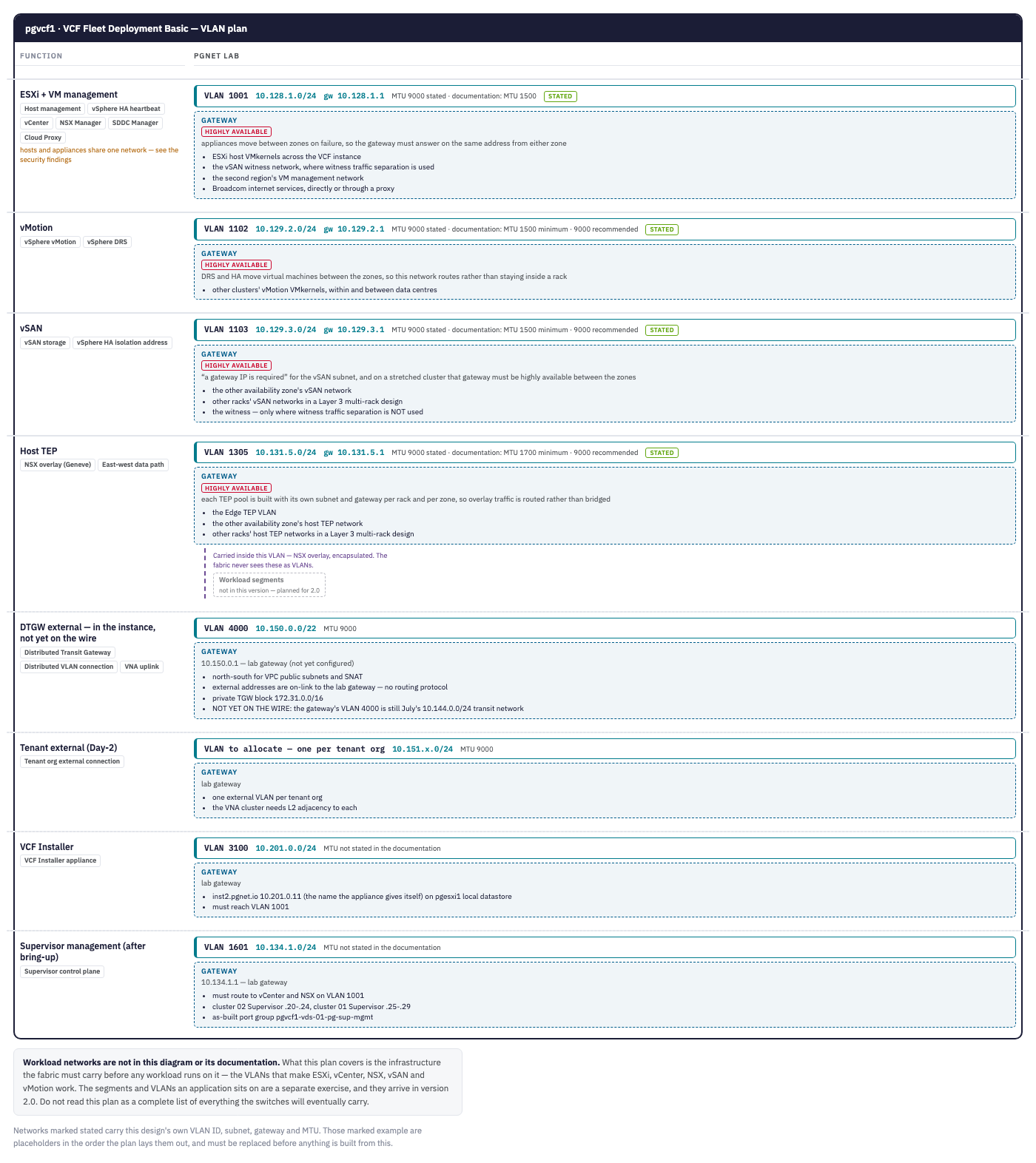
Two things to read correctly on that plan:
- Tracks marked stated carry the lab’s own values. The tool can also draw example tracks as placeholders. It drew one for an IP storage network this lab does not have, and that track is removed from this picture.
- The tracks below host TEP are not bring-up networks. The Installer’s VLAN is temporary and outside the instance. Tenant and Supervisor networks come after bring-up.
Why the management network is a VLAN, not an overlay
This choice is forced as much as chosen. Putting the management components on an NSX overlay segment needs an Edge cluster, a Tier-0 and BGP, which is exactly what the distributed design removes.
| Model | Where the components sit | Needs an Edge cluster | Fit |
|---|---|---|---|
| Shared VLAN | The VM Management port group, with vCenter, NSX and SDDC Manager | No | Chosen. No extra VLAN, deployed on day 0. Cost: one VLAN means no firewalling between management tiers |
| Dedicated VLAN | Its own VLAN, subnet and port group, created by the Installer. Cloud proxy still lands on VM Management | No | Available later. One more VLAN and subnet buys isolation |
| Dedicated VLAN plus NSX overlay segment | Operations, Automation and the licence server on an overlay segment, deployed day 2 | Yes, with a Tier-0, a Tier-1 and BGP, built by hand first | Ruled out by the distributed design |
📖 Reference — VMware Cloud Foundation 9.1 documentation, Design › VCF Operations Models and VCF Domain Models, pp. 760–773. Design › VCF Management Shared VLAN Network Model, pp. 1940–1948.
What this rebuild changes
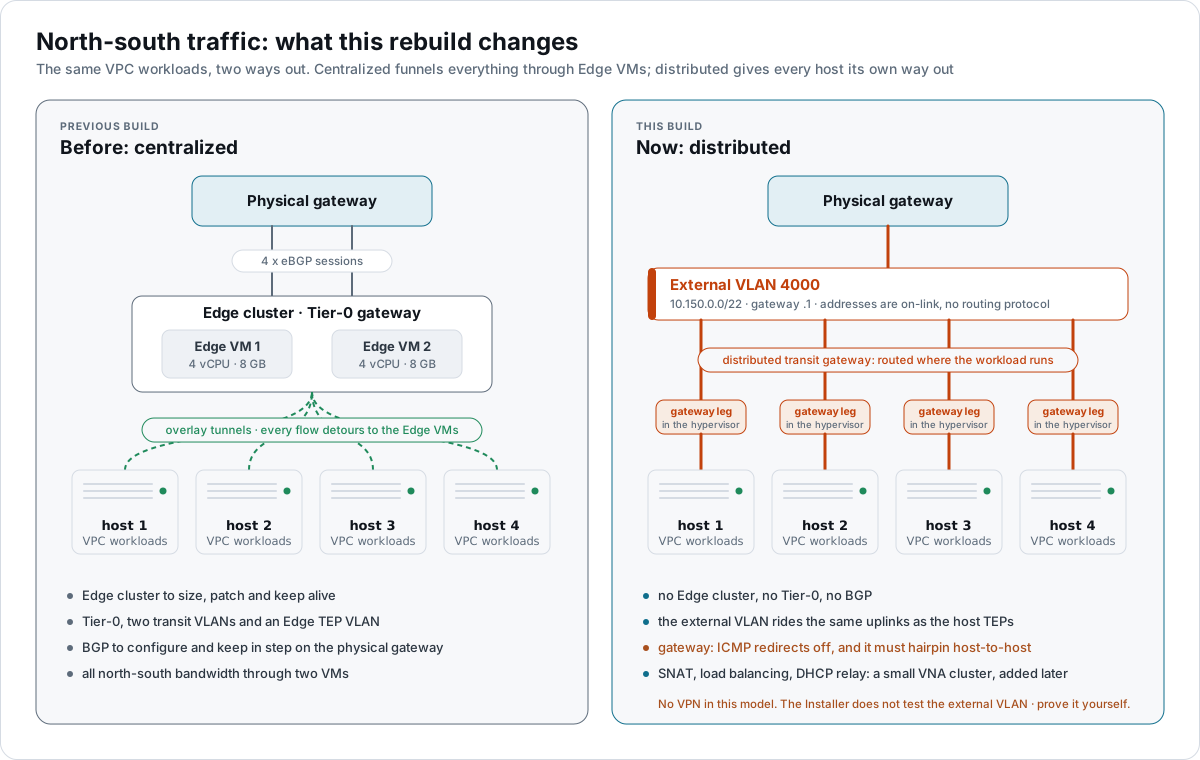
The left panel is the previous build, shown only to explain the change. With Distributed Connectivity there is no Edge cluster, no Tier-0 and no BGP. SNAT, load balancing and DHCP relay come from a small VNA cluster, added after bring-up.
What the external VLAN demands of the physical network
This is the one network the Installer will not check for you.
- The same VLAN on every switch the hosts connect to, reachable by every host that will run VPC workloads, on the same distributed switch and physical NICs as the host TEPs. On cluster 01 that is both 10 GbE ports. On cluster 02 it is the single uplink.
- ICMP redirect disabled on the gateway for this VLAN.
- The gateway must forward a packet received from one ESX host on this VLAN back out to the same or another ESX host.
- Nothing else should live on this VLAN. The docs warn that traffic between a device on the external VLAN and a VPC address from the block “may be asymmetric”.
- The external IP block is the same as, or a subset of, the VLAN’s subnet. The gateway’s own address is excluded by default. Addresses of any other physical device on the VLAN need an exclude range.
- Up to five address blocks per connection, in CIDR form, a /24 or larger preferred.
📖 Reference — VMware Cloud Foundation 9.1 documentation, NSX › Set up Distributed Network Connectivity, pp. 3296–3298. Design › Distributed VLAN Connectivity Model, pp. 1837–1844,
VCF-WLDCON-DTGWVLAN-REQD-CFG-001to-014; the exclusion rule is-005, p. 1841.
Address blocks that are not VLANs
| Block | Value | What it is | Rule | Status |
|---|---|---|---|---|
| VPC external IP block | 10.150.0.0/22 | Public subnets, 1:1 NAT, SNAT and load-balancer addresses | Same as, or a subset of, the external VLAN subnet. /24 or larger preferred | in the instance, not yet on the wire |
| Private transit gateway block | 172.31.0.0/16 | Inter-VPC traffic without NAT. Never advertised | /23 or larger preferred | in place |
| VPC private blocks | 10.138–10.142, 10.145 /16 per org | Private subnets inside a VPC; need NAT to leave | No size stated in the docs. Need not be unique between VPCs | in place |
| Management services internal cluster | 198.18.0.0/15 | Pod and service network inside the management-services and Automation runtimes | Default. Alternatives 240.0.0.0/15 or 250.0.0.0/15. Must not be in use elsewhere | in place |
| Inter-tier transit links | within 100.64.0.0/10 | Links between the transit gateway and each VPC gateway | Taken automatically. Changing it later means redeploying NSX routing | in place |
| Supervisor service network | 10.96.0.0/23 | Kubernetes services, when Supervisor is enabled | Must not overlap pods, ingress, egress or anything in the data centre | in place |
📖 Reference — VMware Cloud Foundation 9.1 documentation, Design › Distributed VLAN Connectivity Model, pp. 1837–1844 (
VCF-WLDCON-DTGWVLAN-REQD-CFG-012, p. 1844). Deployment › Planning and Preparation, pp. 2400–2409. Design › Minimum Requirements for VCF Fleet in a Single Site with Minimal Footprint, pp. 809–810.
After bring-up
| Network | When | Detail | Status |
|---|---|---|---|
| VNA node management | With the VNA cluster | Two nodes, one static address each, MTU 1500 minimum. In the management domain the docs place it on the VM Management port group, so VLAN 1001 and no new network | proposed |
| VNA data path | With the VNA cluster | No VLAN. NSX creates an overlay segment for each VNA cluster. The cluster must sit within the external VLAN’s span | in place |
| Supervisor management | With Supervisor and tenancy | VLAN 1601, 10.134.1.0/24, gateway .1. Five consecutive addresses for each Supervisor’s control plane. Not an Installer input, so it is easy to leave off a bring-up list. Supervisor API addresses come out of the VPC external block, which is intended under distributed connectivity and worth stating | in place |
| One external VLAN per tenant org | With Supervisor and tenancy | Six more VLANs with a gateway each, 10.151.0.0/24 upward, each meeting the same physical requirements. Added as further distributed VLAN connections | to allocate |
Supervisor management is not an Installer input, so it is easy to leave off a bring-up list.
DNS and NTP
| Server | Address | Used by |
|---|---|---|
| Primary DNS and NTP server | 10.200.1.240 | The Installer appliance, every ESX host, every VCF component, the VNA node profile. The Installer pre-fills its own values into the wizard |
| Secondary DNS and NTP server | 10.200.10.75 | The Installer appliance, every ESX host, every VCF component, the VNA node profile. The Installer pre-fills its own values into the wizard |
- Two DNS servers at most. The Installer appliance says “Do not specify more than two servers”.
- Forward and reverse for everything. The docs require both records for all management components, and the Installer verifies each host and the NTP servers by looking them up both ways.
- Records exist before deployment. The fleet, instance, runtime and identity broker names must be created first.
- NTP from an internal source, by name or address, started automatically on every component. ESX hosts are checked to be within five minutes of SDDC Manager.
- Neither server runs on these hosts. Both answered with all eight hosts powered off.
📖 Reference — VMware Cloud Foundation 9.1 documentation. Deployment › Deploy VCF Installer, pp. 2426–2427, and Downloading Binaries to VCF Installer, pp. 2428–2435. Design › Infrastructure IP Addressing Detailed Design, pp. 2313–2320:
VCF-NET-REQD-IPA-001and-002(p. 2315). Design › External Services Detailed Design, p. 2287:VCF-NET-REQD-NTP-001and-002.VCF-MS-REQD-FIRST-001and-002, p. 826.
Three DNS zones
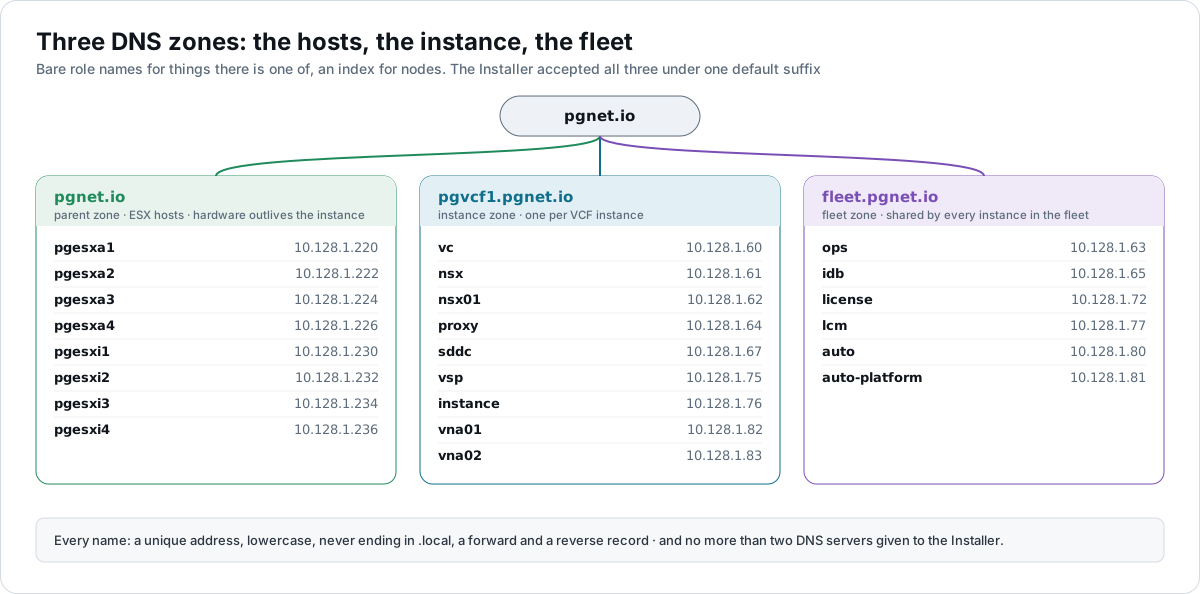
A zone per instance, a zone for the fleet, and the hosts left alone. Bare role names for things there is one of, and an index for nodes: vc.pgvcf1.pgnet.io, ops.fleet.pgnet.io, pgesxa1.pgnet.io.
| Zone | Holds |
|---|---|
pgnet.io | The eight ESX hosts, the depot, the DNS and NTP servers. Hardware outlives an instance |
pgvcf1.pgnet.io | Instance-level components: vCenter, SDDC Manager, NSX, the services runtime, instance components, cloud proxy, VNA nodes |
fleet.pgnet.io | Fleet-level components: Operations, Automation, identity broker, fleet components, licence server |
1.128.10.in-addr.arpa | A PTR for every address below |
The Installer has one DNS domain field, which here becomes pgvcf1.pgnet.io. The docs do not say a component’s name must sit inside it. The Installer’s DNS validation accepted all three zones.
ESX hosts
| Name | Management address, VLAN 1001 | Role |
|---|---|---|
pgesxa1.pgnet.io | 10.128.1.220 | cl01 · management |
pgesxa2.pgnet.io | 10.128.1.222 | cl01 · management |
pgesxa3.pgnet.io | 10.128.1.224 | cl01 · management |
pgesxa4.pgnet.io | 10.128.1.226 | cl01 · management |
pgesxi1.pgnet.io | 10.128.1.230 | cl02 · workload · hosts the Installer |
pgesxi2.pgnet.io | 10.128.1.232 | cl02 · workload |
pgesxi3.pgnet.io | 10.128.1.234 | cl02 · workload |
pgesxi4.pgnet.io | 10.128.1.236 | cl02 · workload |
vMotion and vSAN addresses come from the pools 10.129.2.100–.199 and 10.129.3.100–.199, one per host. Host TEPs come from the static pool 10.131.5.100–.199, one per active uplink: eight for the management cluster, sixteen once cluster 02 joins. There is no custom DNS suffix on any host, and each host’s certificate carries its full name.
VCF components
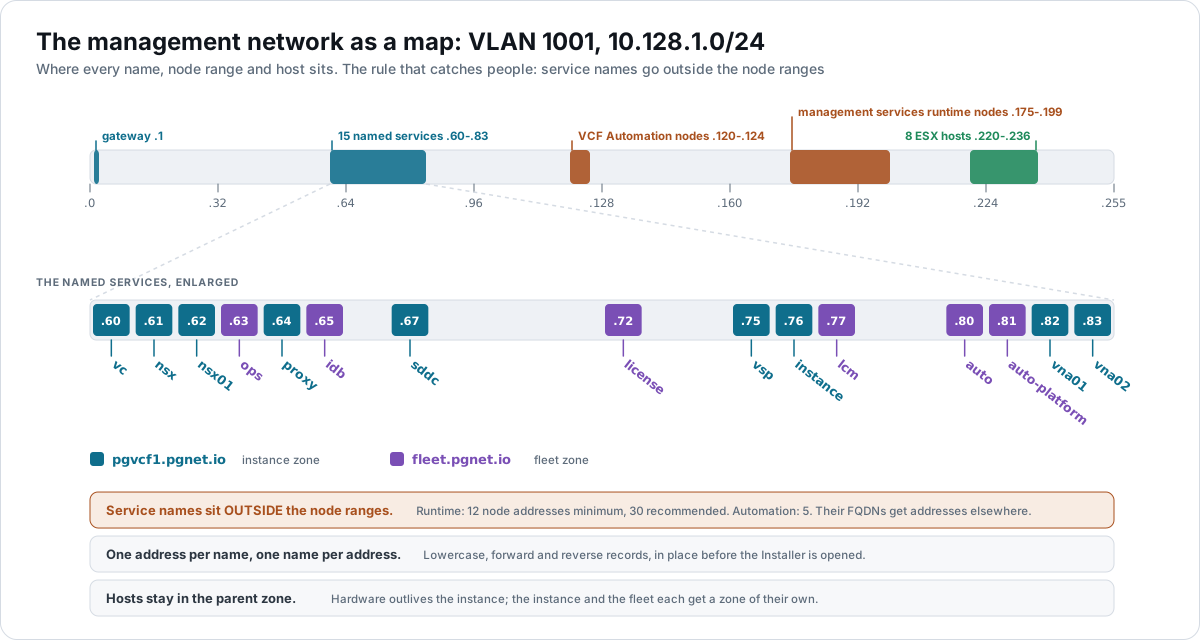
All on VLAN 1001, 10.128.1.0/24, gateway 10.128.1.1.
Instance zone — pgvcf1.pgnet.io
| Component | Name | Address | Note |
|---|---|---|---|
| vCenter | vc.pgvcf1.pgnet.io | 10.128.1.60 | |
| NSX Manager cluster VIP | nsx.pgvcf1.pgnet.io | 10.128.1.61 | Needed even with one node |
| NSX Manager node | nsx01.pgvcf1.pgnet.io | 10.128.1.62 | Simple: one node, medium |
| Cloud proxy | proxy.pgvcf1.pgnet.io | 10.128.1.64 | Always on VM Management |
| SDDC Manager | sddc.pgvcf1.pgnet.io | 10.128.1.67 | |
| Services runtime (platform) | vsp.pgvcf1.pgnet.io | 10.128.1.75 | Its short name prefixes the node VM names |
| Instance components | instance.pgvcf1.pgnet.io | 10.128.1.76 | SDDC lifecycle, Salt master, metrics, telemetry |
| VCF Installer appliance | inst2.pgnet.io | 10.201.0.11 | On VLAN 3100, outside the instance. The appliance names itself inst2.pgnet.io, and checks that name against DNS, so the record has to match what the appliance calls itself. Temporary: it goes away after bring-up |
Fleet zone — fleet.pgnet.io
| Component | Name | Address | Note |
|---|---|---|---|
| VCF Operations, primary node | ops.fleet.pgnet.io | 10.128.1.63 | Mandatory in the first instance from 9.1.1 |
| Identity broker | idb.fleet.pgnet.io | 10.128.1.65 | First instance only |
| Licence server | license.fleet.pgnet.io | 10.128.1.72 | IPv4 only at deploy. |
| Fleet components | lcm.fleet.pgnet.io | 10.128.1.77 | Fleet lifecycle, Salt RaaS, software depot |
| VCF Automation | auto.fleet.pgnet.io | 10.128.1.80 | Outside the Automation node range |
| VCF Automation runtime | auto-platform.fleet.pgnet.io | 10.128.1.81 | Outside the node range. Dedicated to Automation; prefixes its node VMs |
After bring-up
| Component | Name | Address | Note |
|---|---|---|---|
| VNA node 1 | vna01.pgvcf1.pgnet.io | 10.128.1.82 | One address per node, static |
| VNA node 2 | vna02.pgvcf1.pgnet.io | 10.128.1.83 | Two nodes for availability |
Ranges with no names
| Range | Addresses | What the docs ask for |
|---|---|---|
| Management services nodes | 10.128.1.175–.199 (25) | 12 minimum, 30 recommended. Simple runs one control-plane and three worker nodes. Log management and real-time metrics each take 6 more from this range later: 12 + 6 + 6 = 24 |
| VCF Automation nodes | 10.128.1.120–.124 (5) | 5. Three for the nodes, two spare for redeployment and rolling updates |
| vMotion pool | 10.129.2.100–.199 | At least one per host, all free, none of them network or broadcast |
| vSAN pool | 10.129.3.100–.199 | As vMotion |
| Host TEP pool | 10.131.5.100–.199 | One per active uplink per host. A static pool is the recommendation, and it removes a DHCP server from the path. In the previous build a pool sized to exactly eight ran dry |
The rule that reverses a habit. The docs say: “The FQDNs for VCF management services must point to unique IP addresses that are not assigned and the FQDNs must not be in the IP Ranges assigned to VCF management services nodes.” The same holds for VCF Automation. The lab first had both Automation names inside Automation’s own node range. They moved out, to .80 and .81, and the range was cut to the documented five. The Design Studio now enforces this as a rule.
📖 Reference — VMware Cloud Foundation 9.1 documentation, Deployment › Start a New VCF Fleet or a New VCF Instance, pp. 2443–2446. Deployment › Planning and Preparation, pp. 2400–2409. Design › VCF Fleet Sizing Models, pp. 732–734.
The naming rules
- Each name points to its own address. No two names share one, and no name points into a node range.
- Lowercase only. No
.local. Names must be RFC-compliant. - Static addresses for every management component. Nothing here can use DHCP.
- Two names are special. The services runtime and the Automation runtime each lend their short name as the prefix of their node VMs, so
vspandauto-platformare what appears in the inventory. - IPv4 only. VPC does not support IPv6, and IPv4-only components must not have IPv6 records.
How the records are made
I do not type DNS records or reserve addresses by hand. NetBox is the source of truth, and Salt makes the records from the same list this page is built from.
- The address runner reserves each address in NetBox. It is the only thing that writes addresses there.
- The DNS runner compares the records I declare with what NetBox holds and writes the difference. It creates a new zone when one is needed. Then it publishes to the DNS servers in stages — a staging server first, a test, then the primary, then the secondary — with a validation check between each stage.
The Salt code will be published separately later.
How it was proven
| Check | Result, 2026-09-17 |
|---|---|
| Both zones created, every name forward and reverse | All 16 names answer on both resolvers with a matching PTR. |
| The node ranges hold no names | 10.128.1.175–.199 and .120–.124 have no PTR records and nothing answers on them |
| The Installer accepts names spread over three zones | Its DNS Resolution validation succeeded with hosts in pgnet.io, instance components in pgvcf1.pgnet.io and fleet components in fleet.pgnet.io. The wizard’s “default hostname DNS suffix” is only appended to short names; give every name as a full FQDN and it does not constrain anything |
| The licence server’s zone | Placed in the fleet zone, license.fleet.pgnet.io, and accepted |
| Count check | 16 named addresses plus 30 in two ranges on the management VLAN; the Installer’s capacity and network checks passed |
The checks were run with a read-only check script, first from the build workstation and then from inside each of the eight hosts: MTU 9000 with the don’t-fragment bit set to every gateway and across the full host mesh, DNS forward and reverse, and NTP. From the workstation it reported 98 pass, 0 stale, 0 fail and 1 missing — the external gateway.
Where the lab departs from the documented design
| What the lab does | What the docs say |
|---|---|
| One VLAN for ESX, VM and VCF management. | The docs recommend putting the ESX hosts on an ESX management network separate from the VM management network, for security (VCF-ESX-RCMD-NET-001, a recommendation). A single VLAN also rules out firewalling between management tiers. |
| NFS for the workload cluster rides the management VLAN. | The security guidance asks for NFS datastore traffic to be protected, by Kerberos or by a dedicated VMkernel network (esx-9.nfs-traffic-protection). This lab has neither. |
| The workload cluster is mixed-vendor and sits in the management domain’s vCenter — built there directly, not yet by SDDC Manager. | The docs require a single hardware vendor for every host in the management domain. See the hardware page. |
| vSAN data-in-transit encryption is off. | A lab choice. |
| The instance was built before the external VLAN existed on the physical network. | Build it and prove it first. |
📖 Reference — VMware Cloud Foundation 9.1 documentation.
VCF-ESX-RCMD-NET-001, Design › ESX Model – Single-Rack vSphere Cluster Model, p. 849.VCF-MGMT-SV-NET-REQD-001and-002, p. 843. Deployment › Preparing ESX Hosts for VCF or vSphere Foundation, pp. 2419–2425. NFS traffic: VMware Cloud Foundation Security and Compliance Guidelines 9.1, controlesx-9.nfs-traffic-protection— “Protect NFS datastore traffic on the ESX host using encryption or network isolation.” It is a controls table, so it is cited by control ID, not by page. These departures were raised by the VCF Design Studio’s rule check of this design.
About the references
Page numbers are from the September 2026 build of the VMware Cloud Foundation 9.1 PDF. Broadcom rebuilds the PDF from time to time and the page numbers move, so each reference also gives the section name.