The VNA Cluster: Where Stateful Services Live When There Is No Edge
A distributed transit gateway forwards but holds no state. NAT, Auto-SNAT, DHCP relay and the load balancer all move to a Virtual Network Appliance cluster — and vSphere Supervisor needs it.
VCF 9.1.1 lab rebuild. Part of the follow-along guide, published live as the build happens.
📘 Official documentation. This is a lab walkthrough, not a replacement for the vendor docs. For the authoritative, supported procedures, follow Broadcom’s VMware Cloud Foundation 9.1 documentation. Where this guide and the official docs differ, the official docs win.
Where we are: after distributed connectivity. VLAN 4000 is live, ICMP redirects are off, and the external VLAN is trunked to the uplinks carrying the host TEPs. The instance can forward north-south and can do nothing else: no NAT, no load balancer, no DHCP relay.
Why there is nothing stateful yet
The distributed transit gateway is instantiated on every ESX host. That is what makes north-south traffic leave the host directly, and it is also why there is nowhere for a connection table to live: there is no single appliance holding the state.
So the stateful services move to a Virtual Network Appliance cluster, and each one is a documented dependency rather than an option.
| Capability | Requires | Reference |
|---|---|---|
| North-south services | A VNA cluster | VCF-WLDCON-DTGWVLAN-REQD-CFG-007, p. 1841 |
| Default Outbound NAT (Auto-SNAT), or custom NAT | A VNA cluster and N-S services | -008, p. 1842 |
| DHCP relay to an external DHCP server (9.1.1 and later) | A VNA cluster and N-S services | -009, p. 1842 |
| The VNA load balancer | A VNA cluster and N-S services | -010, p. 1842 |
All three are required for tenancy, and the documentation says so directly. -011, -013 and -014 sit together in a table titled Distributed VLAN Connectivity Model with vSphere Supervisor or VCF-A All Apps Org Design, and their justifications read:
A VNA cluster (-011) | “A VNA cluster is required for stateful network services when using a Distributed TGW with external VLAN” |
N-S services (-013) | “N-S Services is required for vSphere Supervisor and VCF-A All Apps Orgs” |
Auto-SNAT (-014) | “Default Outbound NAT (Auto-SNAT) is necessary for vSphere Supervisor and VCFA All Apps Orgs” |
So there is no vSphere Supervisor and no VCF Automation “All Apps” organisation on this platform without all three.
One exception. A deployment that uses only the Avi load balancer, with no other stateful service, does not need a VNA cluster. That is in -007’s own implication.
📖 Reference — VMware Cloud Foundation 9.1 documentation, Design › Distributed VLAN Connectivity Model, pp. 1837–1844.
What NSX looks like before the VPC work
Where: NSX › Home › Overview.
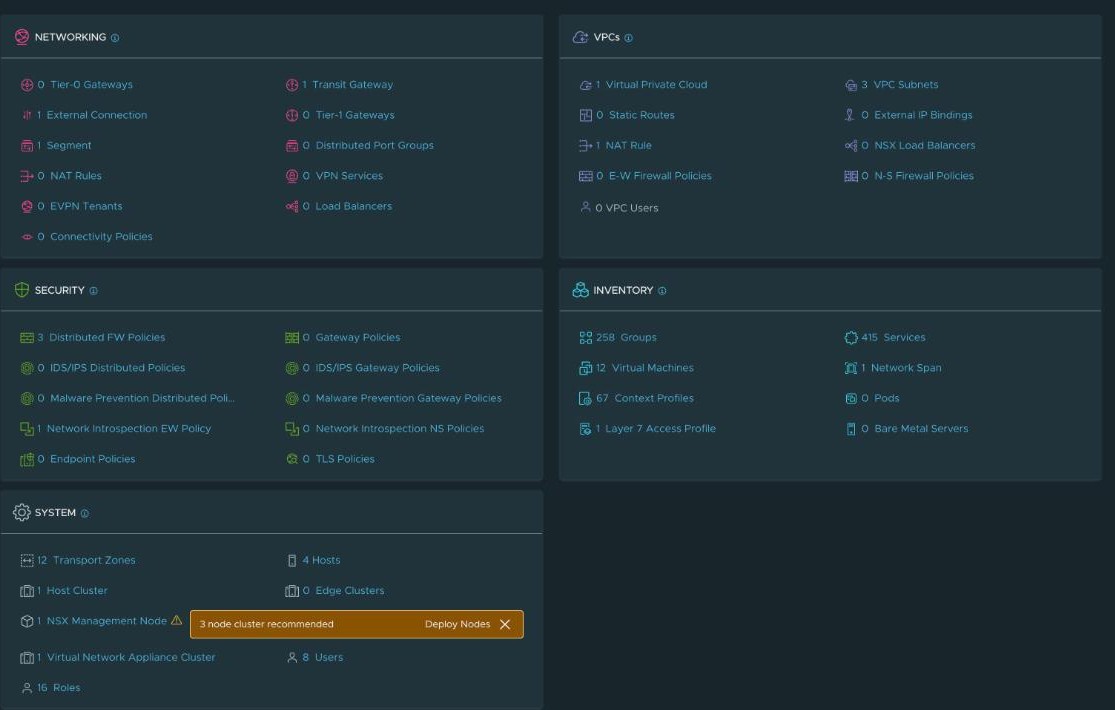
0 Tier-0 Gateways and 0 Edge Clusters, beside 1 Transit Gateway and 1 Virtual Network Appliance Cluster. That is the architecture in one panel. The System Overview says the same:

The single NSX management node is a lab condition, and NSX says so itself: three are recommended.
The deployment
Two nodes. One is the minimum, two is the availability recommendation, and host fault tolerance wants one more ESX host than there are nodes.
Where: NSX › System › Fabric › VNA Clusters.

Four design recommendations are applied as written, all at p. 2256: 100% memory reservation, high CPU shares, static IP allocation for the node management interface, and the port group discussed below.
VCF-VNA-RCMD-COMSAZ-004 (p. 2256) recommends large or x-large, because node size "primarily depends on the stateful network service that is deployed and the volume of redirected traffic", with large "an optimal balance ... particularly when using stateful NAT services". Measured on the deployed appliances, medium is 4 vCPU, 8 GiB RAM and 197 GiB disk per node — 8 vCPU and 16 GiB reserved across the pair, because the memory reservation is 100%. What it gives up is headroom under load, and the symptom of running out would present as a network problem rather than a sizing one.A recommendation that reads like it asks for a new VLAN
VCF-VNA-RCMD-COMSAZ-003 says to create a distributed port group for the VNA node management interface, “separate from the vSphere Distributed Port Group used for ESX host management VMkernel”.
The thing it has to differ from is the ESX VMkernel port group, not the management network. Its implication settles it:
For the management domain, a dedicated vSphere Distributed Port Group for the VNA node management interface exists — this is the same vSphere Distributed Port Group used by the management stack.
On a standard build that port group already exists, so the action is to use it. No new VLAN, no new port group.
Two API details
The field that binds the VNA cluster is called edge_cluster_paths, in a design with no Edge cluster. The schema description is the authority:
Edge cluster path shall be specified when VPC is connected to centralised transit gateway and service cluster path shall be specified when VPC is connected to distributed transit gateway.
The VNA cluster is the service cluster. The same description notes that “relocation of vpc services to new cluster is a disruptive operation and affects traffic”.
PATCH on the VPC connectivity profile validates the whole object, not a delta. A body carrying only service_gateway is rejected with required property transit_gateway_path is missing. Read the live object and carry its required fields through, so a stale constant cannot overwrite one.
Proving the data path
A throwaway VPC with two subnets, created and then destroyed. Everything below was read back from NSX after creation.
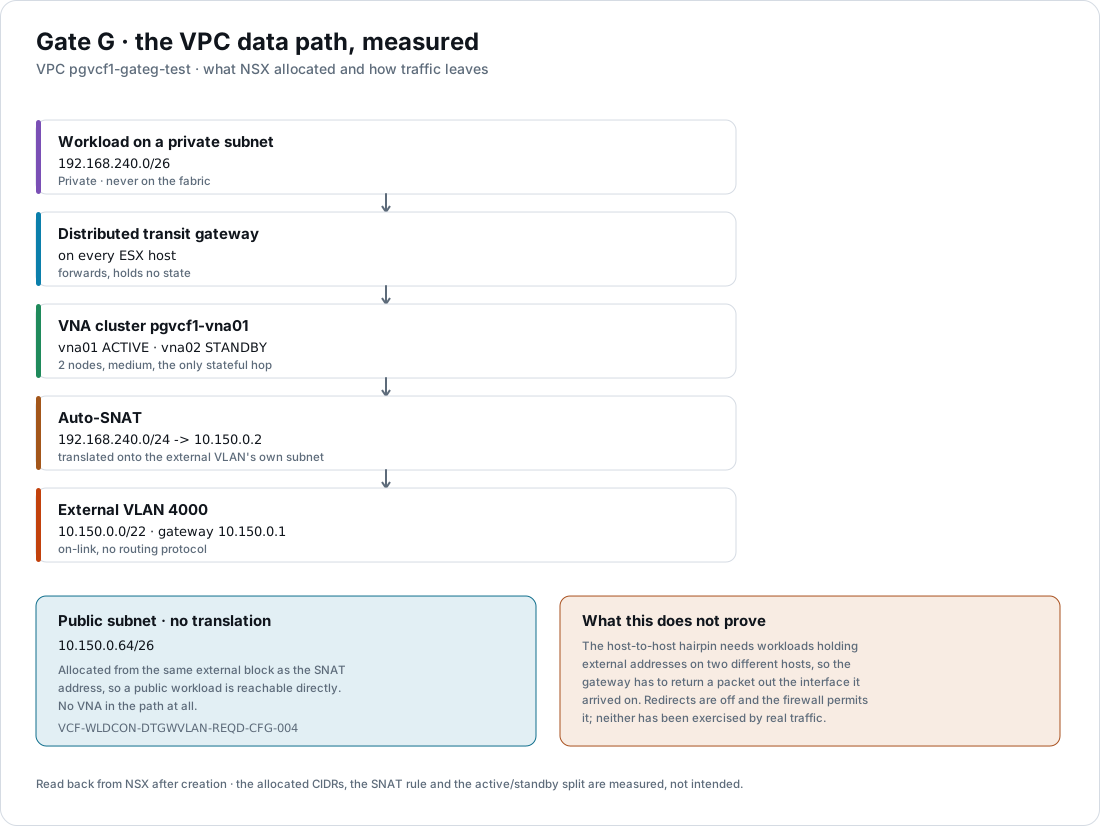
| What it establishes | Evidence |
|---|---|
| A public subnet is addressed out of the external VLAN’s own block | public01 allocated 10.150.0.64/26 from 10.150.0.0/22 |
| A private subnet never reaches the fabric | private01 allocated 192.168.240.0/26 from the VPC’s own private range |
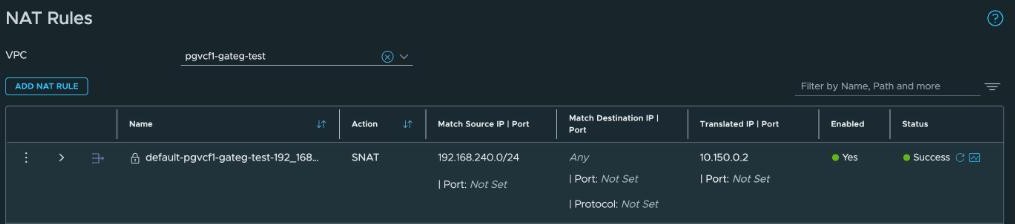
| Auto-SNAT translates onto the external VLAN | SNAT rule 192.168.240.0/24 → 10.150.0.2, enabled, status Success |
| The VNA cluster realizes it | per_node_status names vna01 ACTIVE and vna02 STANDBY, one service gateway |
| The connectivity model | network_stack: FULL_STACK_VPC |
Where: NSX › VPCs › NAT.
The subnets are real vSphere networks, not an NSX-only abstraction. Each appears in vCenter as a distributed port group with an NSX port group ID and its own VNI:
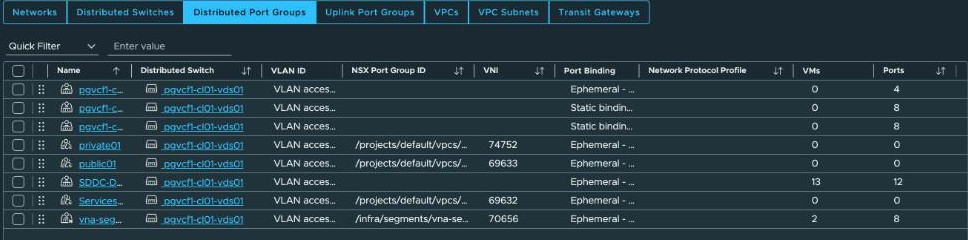
Two things that catch a repeat of this:
- A private subnet needs the VPC’s own private CIDR declared first. Without it NSX rejects the subnet with “Private ip blocks are not configured in parent VPC”.
- Auto-SNAT rules appear under the VPC’s
DEFAULTNAT section, notUSER.USERholds rules an operator adds. Querying it returns nothing.
📖 Reference — the public subnet from the external block is
VCF-WLDCON-DTGWVLAN-REQD-CFG-004, p. 1841. Auto-SNAT in the default profile is-014, and the VNA cluster assignment is-011, both p. 1844.
Tunnel counts follow workload placement
Where: NSX › System › Fabric › Hosts › Clusters, expanded.
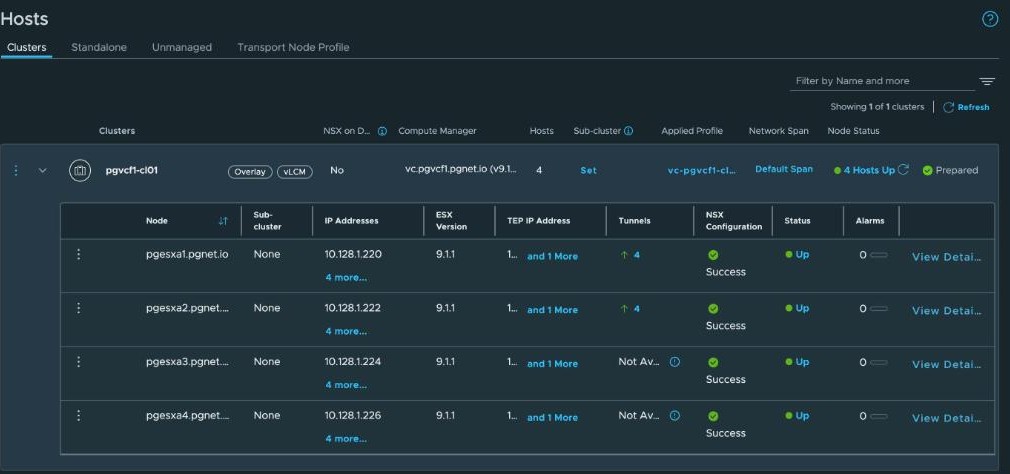
Two hosts show 4 tunnels and two show Not Available, while all four are Up, Prepared, Success and carry no alarms.
Queried directly, pgesxa1 and pgesxa2 each have four tunnels, all up, and all of them between those two hosts — two TEPs each side, so two by two. pgesxa3 and pgesxa4 have none.
The reason is workload placement. Exactly two VMs in the instance sit on an overlay segment: vna01 on one host and vna02 on the other, both on the segment the VNA cluster created for itself. Every other VM is on a VLAN-backed port group. NSX builds tunnels between hosts that have workloads on common overlay segments, so two hosts have tunnels and two have none.
“Not Available” here means there is nothing to tunnel yet. The check that separates this from a fault is whether the hosts are Prepared with TEPs assigned — they are, from the static pool — not whether tunnels exist. The count rises as overlay workloads land on more hosts.
What this does not prove
The host-to-host hairpin has still not been exercised by real traffic. That needs workloads holding external addresses on two different hosts, so the gateway has to return a packet out of the interface it arrived on.
ICMP redirects are off and the firewall policy permits it, both measured on the previous page. Neither has seen a packet. The row stays open.
The instance after this work
Where: the vSphere Client › vCenter › Summary.
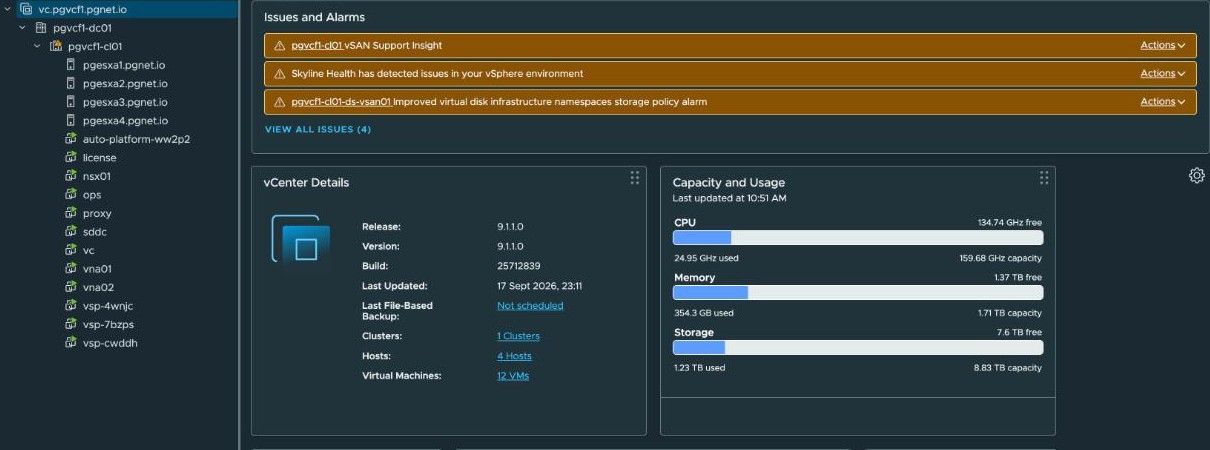
Twelve VMs, with vna01 and vna02 among them, on vCenter 9.1.1.0 build 25712839. The VNA pair costs about 1% of this cluster’s memory.
The vSAN alarms visible here are consumer-hardware conditions tracked separately from this work: the vSAN HCL database is loaded and its device-certification test passes, while the controller-driver test does not, because the in-box NVMe driver is not certified for these consumer devices. Nothing on this page depends on them.
Lab-only choices
| What | What the documentation says |
|---|---|
| VNA node size medium | VCF-VNA-RCMD-COMSAZ-004, p. 2256: large or x-large |
| A single NSX Manager node | Three are recommended, and NSX displays that itself |
| Consumer hardware throughout | The hardware |
What is not covered yet
The VNA load balancer and DHCP relay, both possible now and neither configured. Avi, which is a separate decision. And the tenancy work that depends on all of it.
About the references
Page numbers are from the September 2026 build of the VMware Cloud Foundation 9.1 PDF. Broadcom rebuilds the PDF from time to time and the page numbers move, so each reference also gives the section name.