Two Supervisors on VPC Networking
A run-through: one Supervisor per cluster, each with its Kubernetes API answering on a DNS name through Avi, and every external address handed out by NSX.
VCF 9.1.1 lab rebuild. Part of the follow-along guide, published live as the build happens.
📘 Official documentation. This is a lab walkthrough, not a replacement for the vendor docs. For the authoritative, supported procedures, follow Broadcom’s VMware Cloud Foundation 9.1 documentation. Where this guide and the official docs differ, the official docs win.
What you end up with: each cluster has its own single-cluster Supervisor, its Kubernetes API answers on a DNS name through Avi, and the address space was handed out by NSX without anyone choosing an address.
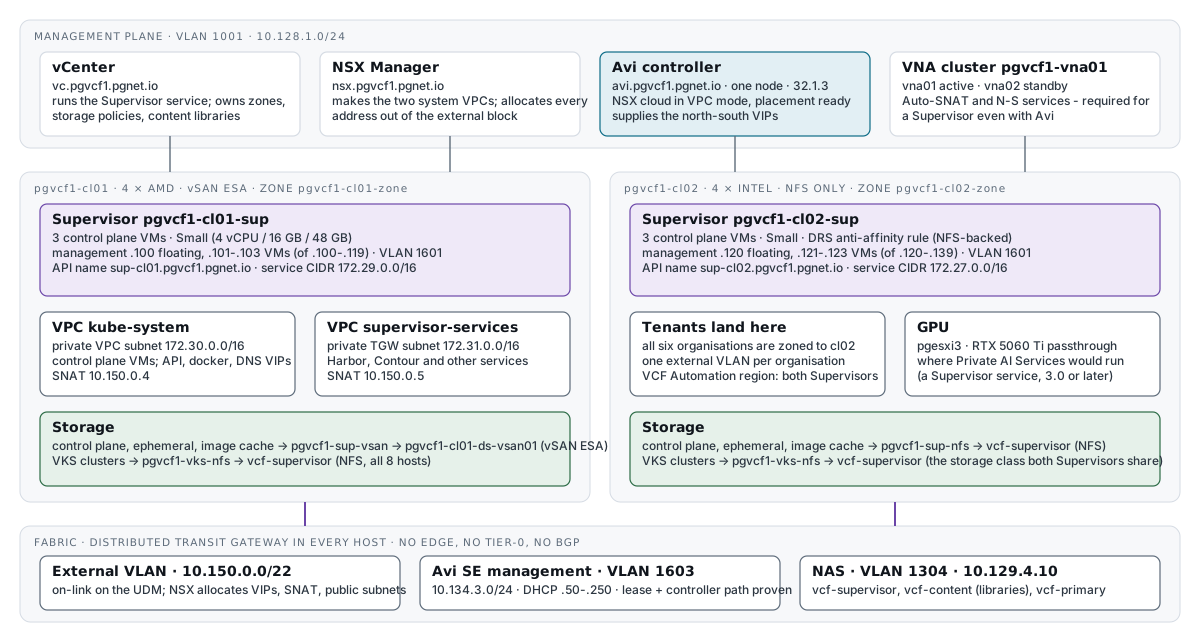
A Supervisor on VPC networking needs no Edge cluster. Its API is reached from outside through a distributed VLAN connection, an Avi virtual service, and a control plane sitting in a private VPC subnet.
One Supervisor per cluster. A three-zone Supervisor needs three clusters, and these two are not interchangeable: AMD with vSAN for management and provider services, Intel on NFS for tenants.
What must already exist
| Needed | From |
|---|---|
The Avi controller registered with NSX, cloud Cloud-nsx placement-ready with its data transport zone set | Avi — do it first. The wizard has no load balancer field, NSX uses its own when it does not detect Avi, and there is one per Supervisor |
The default VPC connectivity profile: external IP block 10.150.0.0/22, private TGW block 172.31.0.0/16, Auto-SNAT on, VNA cluster | Distributed connectivity and the VNA cluster — a Supervisor needs north-south services and Auto-SNAT, so it needs the VNA cluster even with Avi |
| Both clusters: HA on, DRS fully automated, host names in lower case | Bring-up and the second cluster |
A management port group on each cluster’s switch, VLAN 1601 (10.134.1.0/24), with no DHCP on that VLAN | pgvcf1-cl01-vds01-pg-vcf-sup-mgmt-1601 and pgvcf1-cl02-vds01-pg-vcf-sup-mgmt-1601 |
The values
A few of these can never be changed, so they are decided first.
| Setting | pgvcf1-cl01-sup | pgvcf1-cl02-sup | Why |
|---|---|---|---|
| Deployment | Cluster deployment | Cluster deployment | One zone, made and mapped to the cluster by the wizard |
| Zone | pgvcf1-cl01-zone | pgvcf1-cl02-zone | Permanent. A zone belongs to one Supervisor, and VCF Automation regions refer to it |
| Storage policy, three times | pgvcf1-sup-vsan | pgvcf1-sup-nfs | Control plane, ephemeral disks, image cache. cl02 has no vSAN |
| Management network | pgvcf1-cl01-vds01-pg-vcf-sup-mgmt-1601 | pgvcf1-cl02-vds01-pg-vcf-sup-mgmt-1601 | Each cluster’s own switch |
| Management addresses | 10.134.1.100–.119, static | 10.134.1.120–.139, static | Permanent. The first five are taken: a floating address, three VMs, and one held spare for a replacement |
| Gateway · DNS · NTP · search | 10.134.1.1 · 10.200.1.240, 10.200.10.75 · same · pgvcf1.pgnet.io, pgnet.io | Same | DNS is required because vCenter is registered by name |
| NSX project · profile | Default · default | Same | The recommended project, and the profile from the VNA work |
| External IP block | 10.150.0.0/22 | Same | NSX allocates the API VIP, the service VIPs and the SNAT addresses from it |
| Private TGW block · private VPC CIDR | 172.31.0.0/16 · 172.30.0.0/16 | Same | The defaults. Private VPC ranges may overlap, and a /26 is reserved for the Avi Service Engines |
| Service CIDR | 172.29.0.0/16 | 172.27.0.0/16 | Must be unique per Supervisor, and must not overlap a routable network. The wizard does not warn about a clash |
| Control plane | 3 × Small | Same | Scale up only. The wizard describes Small as 4 vCPU, 16 GB and 48 GB of storage; the documentation’s sizing table gives 4 CPUs, 16 GB and 32 GB |
| API DNS name | sup-cl01.pgvcf1.pgnet.io | sup-cl02.pgvcf1.pgnet.io | Goes into the certificate served on port 443 |
1. Storage policies, before anything else
A storage policy’s name becomes the Kubernetes StorageClass name, must follow RFC 1123, and cannot be changed afterwards. The cluster’s own default is called “pgvcf1-cl01 - Optimal Datastore Default Policy - AutoRAID”, so make policies with names worth keeping.
uv run --group vsphere scripts/supervisor_prep.py policies            # reports; changes nothing
uv run --group vsphere scripts/supervisor_prep.py policies --apply| Policy | Backing | For |
|---|---|---|
pgvcf1-sup-vsan | vSAN ESA on cl01 — a copy of the default’s one rule, VSAN autoManagedRAID = true | The cl01 control plane |
pgvcf1-sup-nfs | Tag kubernetes-storage / sup-nfs on datastore vcf-supervisor | The cl02 control plane |
pgvcf1-vks-nfs | Tag kubernetes-storage / vks-nfs on datastore vcf-supervisor | VKS clusters — the class both Supervisors share |
The tags are purpose-made. A tag-based policy places on every datastore carrying the tag, so the tag’s reach is the access control: a descriptive tag such as storage-tier: fast also sits on vcf-primary, and would have made it eligible. To move Kubernetes storage later, move the tag; the class name stays.
The script ends by asking vCenter what each policy matches — here exactly one datastore each. Policies for a one-zone Supervisor are not topology aware.
2. Activate the first Supervisor
Where: vSphere Client › Supervisor Management › Get started. Seven steps, taking the cl01 column above.
Step 1 — vCenter Server and network
Choose VCF Networking with VPC. The diagram on the page is what the Supervisor builds: two system VPCs, outbound NAT, VIPs, and a management network outside them.
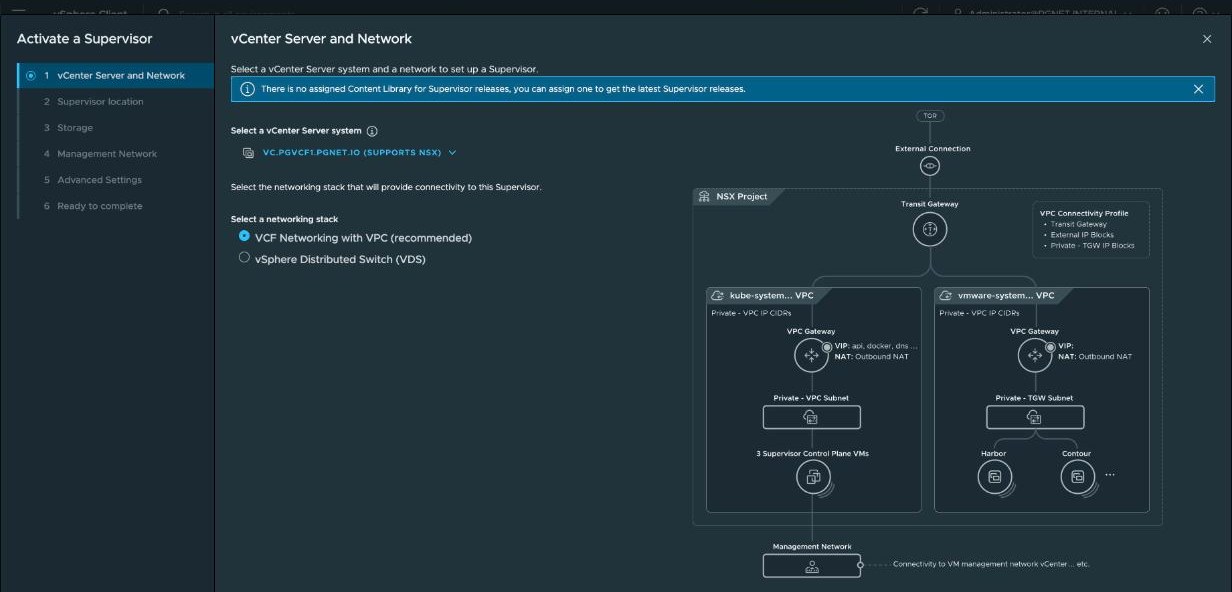
The banner about an assigned content library refers to Supervisor releases. It is optional: without one the Supervisor runs the version bundled with vCenter, and a library can be assigned later without redeploying. Kubernetes releases come from a subscribed library the Supervisor creates for itself against the depot, and the second Supervisor shares it.
Step 2 — Supervisor location
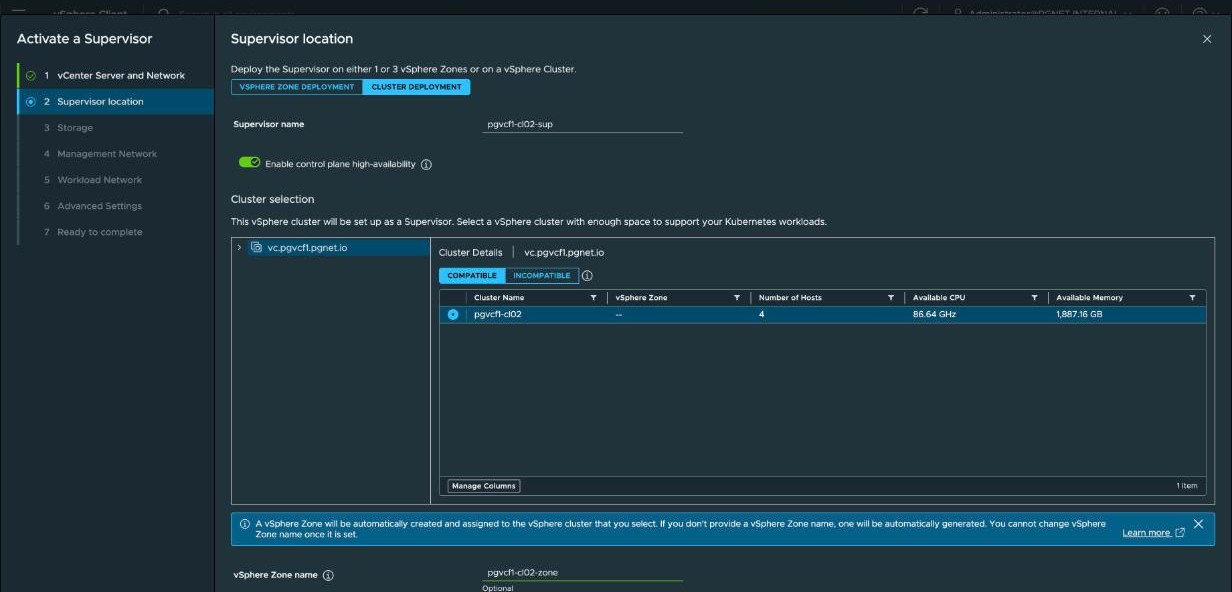
Cluster deployment, the cluster, the Supervisor name, the zone name, and control plane high availability on.
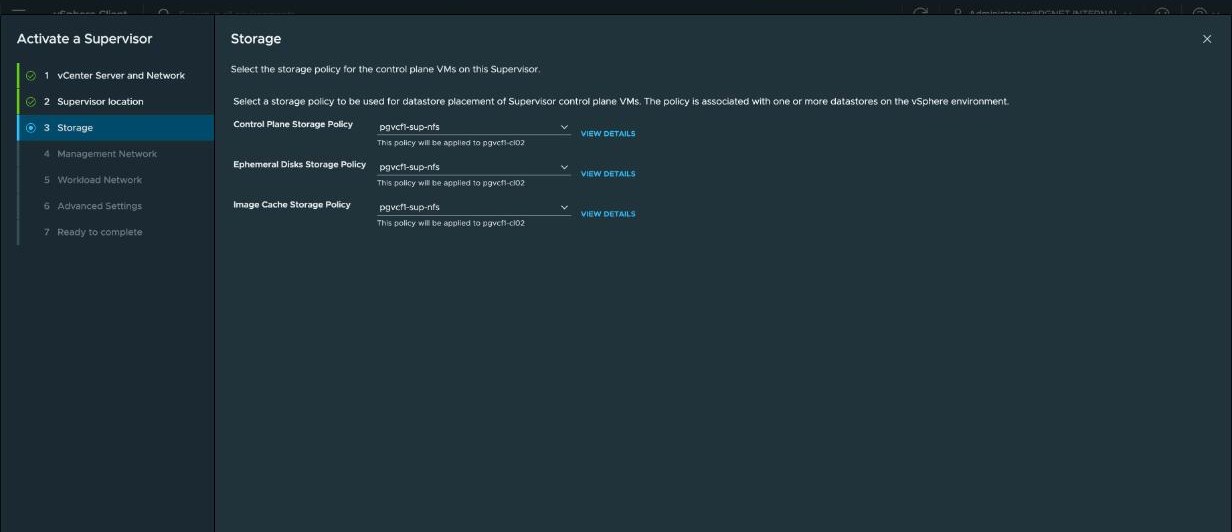
Step 3 — Storage
The same policy three times: control plane, ephemeral disks, image cache.
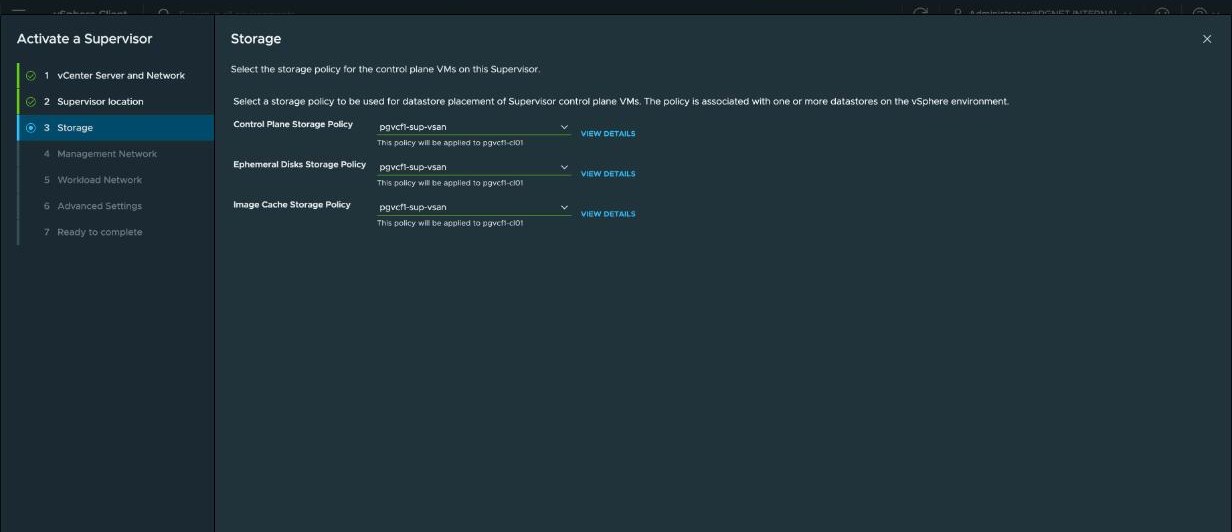
On the NFS-backed cluster the same three take pgvcf1-sup-nfs:
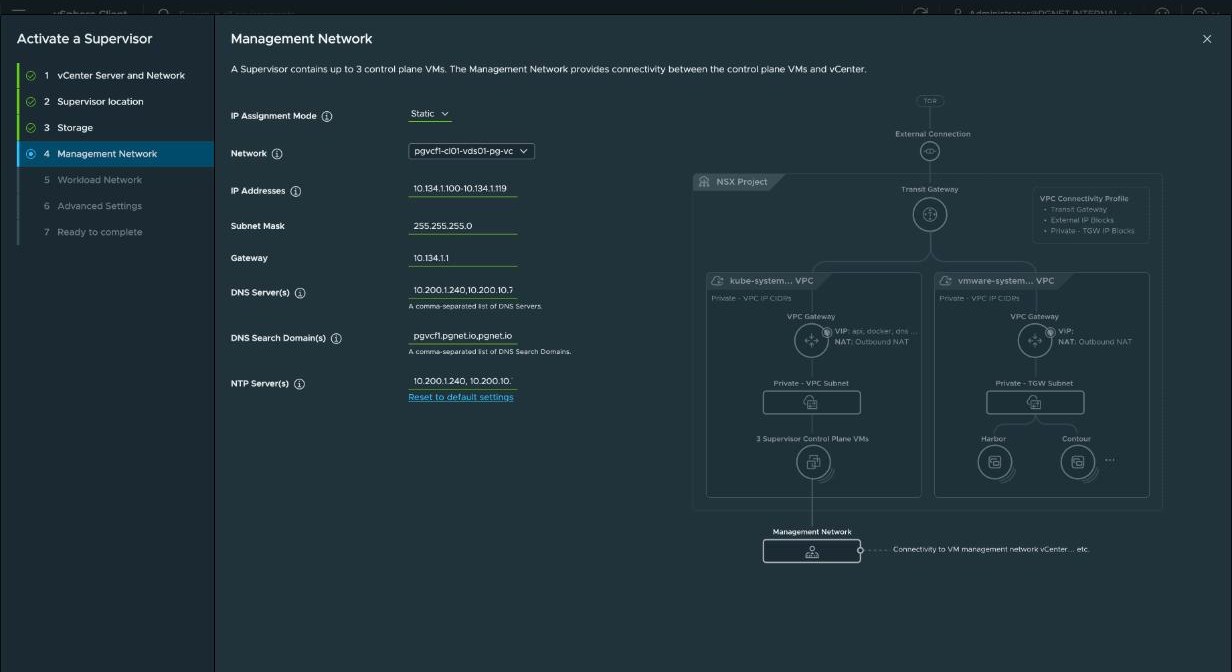
Step 4 — Management network
Static, the 1601 port group, the address block, gateway, DNS, search domains and NTP.
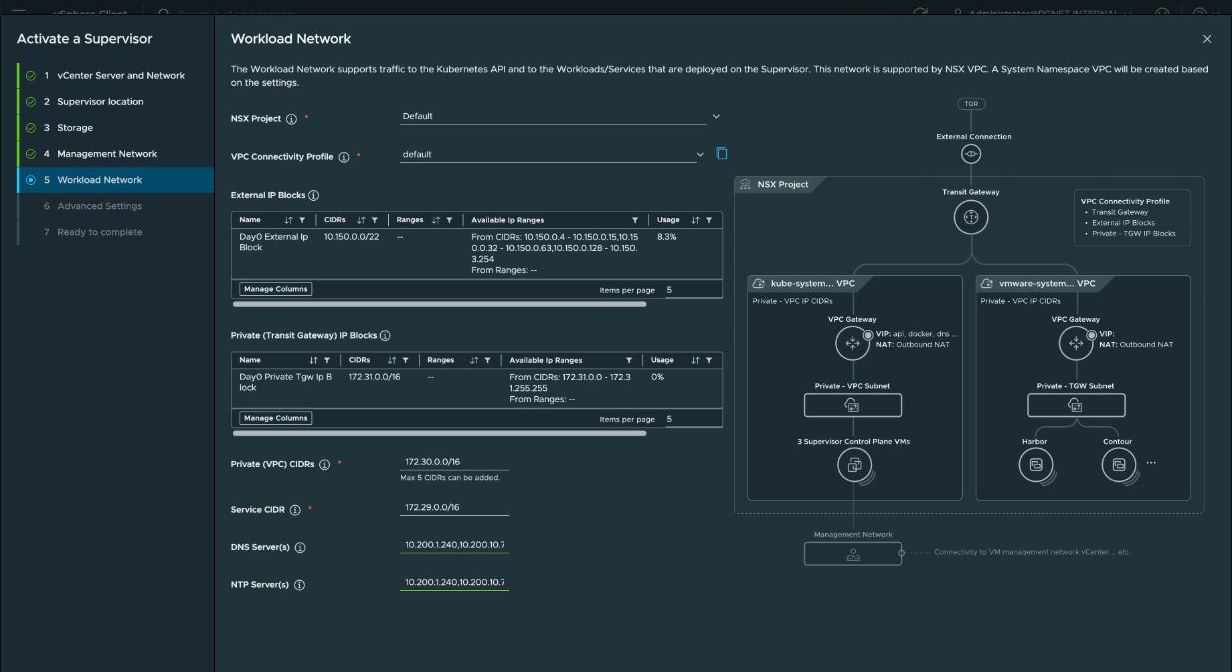
Step 5 — Workload network
The project and profile, then the two IP blocks, which pre-fill with NSX’s live free ranges, the private VPC CIDR, the Service CIDR, DNS and NTP.
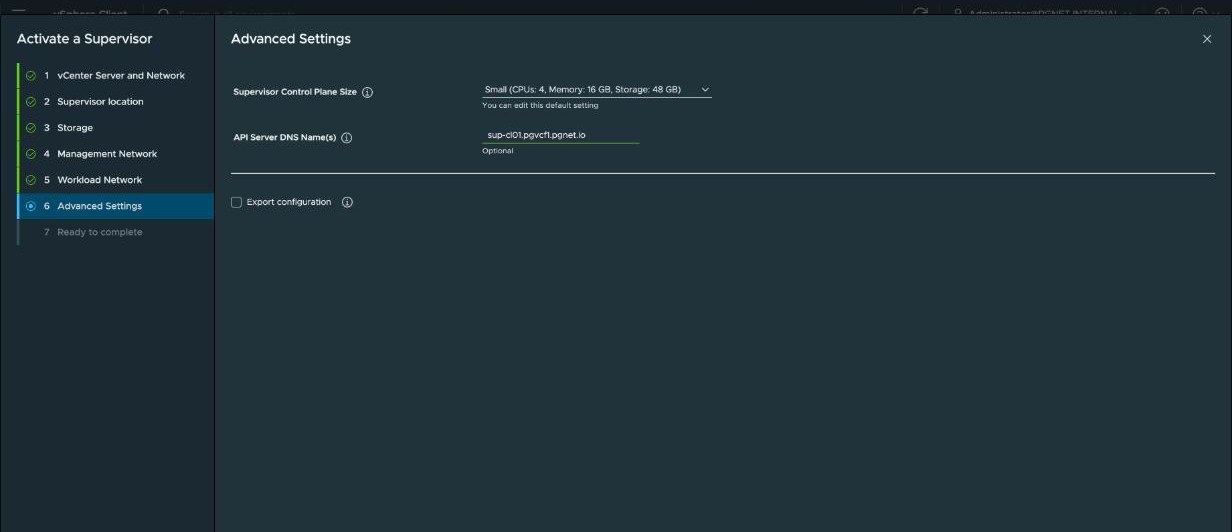
Step 6 — Advanced settings
The control plane size and the API server DNS name.
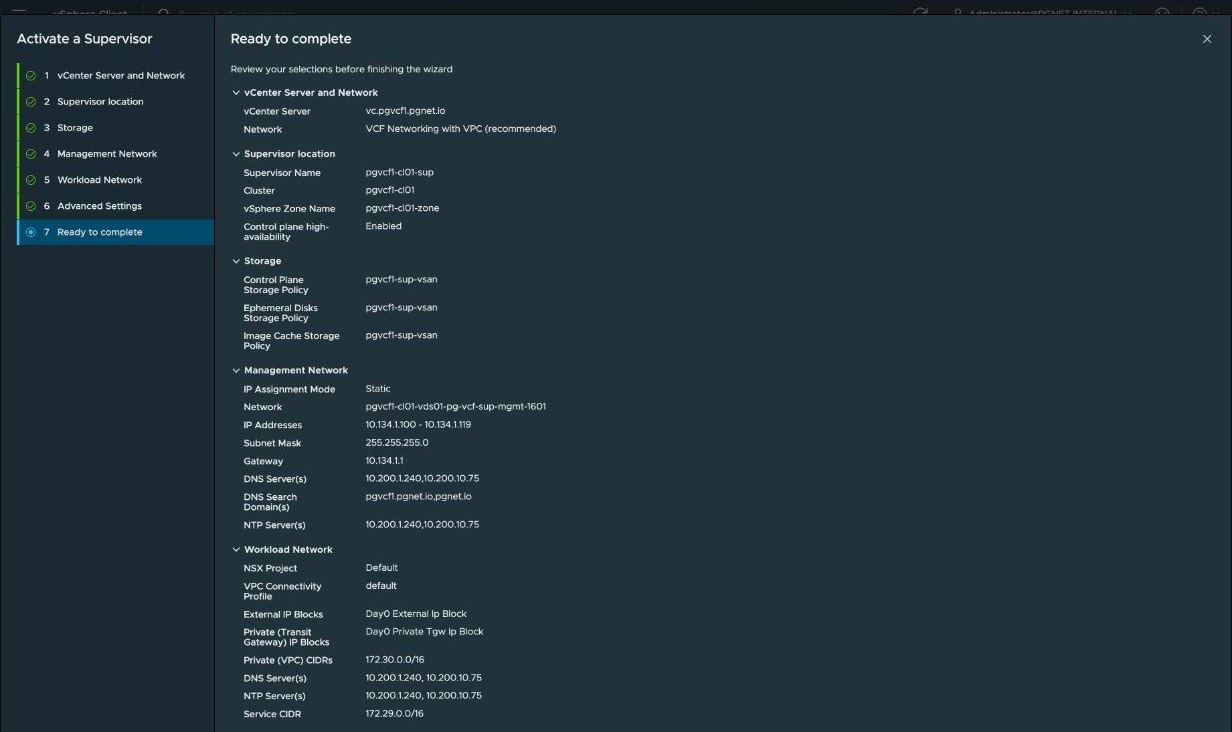
Step 7 — Ready to complete
Every value on one page. Read it before Finish.
3. What happens next
Measured on the second Supervisor, with Finish at 13:11.
| After Finish | What you see |
|---|---|
| Under a minute | Three SupervisorControlPlaneVM created |
| 6 min | All three powered on |
| 7 min | The Kubernetes API answers on the floating management address, port 6443 — 401 without credentials |
| 10–12 min | NSX has two new VPCs, kube-system_… and vmware-system-supervisor-services-vpc_…, each with a SNAT address from the external block |
| 14 min | Four virtual services on the Avi controller, their VIPs allocated by NSX |
| 16 min | vCenter reports the API endpoint as the VIP rather than the management address |
| 21 min | Kubernetes status Ready |
| 25 min | Running / Ready |
The first Supervisor also waits for Avi to create its first two Service Engines. The controller clones them from the library image, and until they boot the VIP exists but does not answer, so vCenter can say Running / Ready a few minutes before the API is reachable on its name. A powered-off vcf_Avi-se-… VM with disconnected NICs is an import in progress. The second Supervisor’s services are placed on the same two Service Engines, which is why it is quicker.
To watch an activation from the inside rather than from vCenter’s status field, log in to the new API as soon as it answers:
vcf context create sup-debug --endpoint https://10.134.1.100 --type k8s --auth-type basic \
    --username administrator@<sso-domain> --insecure-skip-tls-verify
kubectl get svc -A | grep LoadBalancer           # the four services and their external addresses
kubectl -n vmware-system-ako get pods            # the Avi operator: 3/3 Running
An NSX object named clusterip-<id>-dlb appears during activation. Its size is DLB: the distributed load balancer NSX uses for in-cluster ClusterIP traffic, and its virtual servers carry Service-CIDR addresses. North-south is Avi — use_avi_lb = true in the Supervisor’s nsx-ncp-config.
4. Name the API
When the kube-apiserver-lb-svc service has its external address, create the A and PTR records for the API name.
The name was entered in the wizard, so it is already in the certificate served on port 443 — issued by the vCenter CA, with the DNS name and the VIP as subject alternative names. Port 6443 keeps the cluster’s internal certificate. Trust the vCenter CA root and a login by name is clean.
5. Activate the second Supervisor from a file
The wizard imports a configuration file, from Supervisors › Import config or Get started with config. It saves retyping six screens and makes the differences explicit.
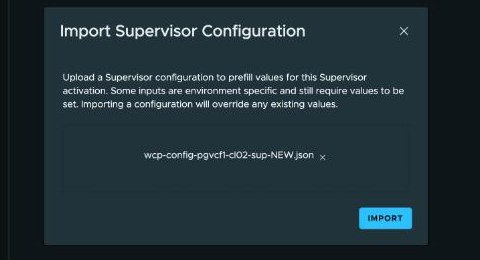
The file is the first Supervisor’s configuration with seven values changed: name, cluster, port group, address block, storage policy, Service CIDR and API name.
Two things are not in the file and are set by hand on step 2: cluster deployment with the cluster, and the zone name. Every other step arrives filled in. Check each against the values table, and the summary page against all of it.
6. Keep the NFS-backed control plane apart
The documentation gives a DRS VM-VM anti-affinity rule for the three control plane VMs as a best practice on VMFS or NFS datastores, and says it is not required for vSAN-backed deployments. DRS spreads them at activation, but nothing holds them there, and the VMs have to exist first.
uv run --group vsphere scripts/supervisor_prep.py anti-affinity            # reports
uv run --group vsphere scripts/supervisor_prep.py anti-affinity --apply    # pgvcf1-cl02-sup-control-plane-anti-affinity
Result
Measured 2026-09-20.
pgvcf1-cl01-sup | pgvcf1-cl02-sup | |
|---|---|---|
| State | Running / Ready | Running / Ready, 25 minutes after Finish |
| Kubernetes | v1.34.9 | — |
| API | https://sup-cl01.pgvcf1.pgnet.io → 10.150.0.8 | https://sup-cl02.pgvcf1.pgnet.io → 10.150.0.12 |
| Other VIPs | DNS .6 · image proxy .7 · registry .9 | image proxy .13 · DNS .14 · registry .15 |
| SNAT, one per system VPC | 10.150.0.4 · .5 | 10.150.0.10 · .11 |
| Control plane | Floating 10.134.1.100; VMs .101, .102, .103 on pgesxa1, 3, 2; .104 held spare | Floating 10.134.1.120; VMs .121, .122, .123 on pgesxi2, 3, 1; .124 held spare, with the anti-affinity rule in place |
| Service addresses | From 172.29.0.0/16 | From 172.27.0.0/16 |
| Load balancer | Four Avi virtual services, up | Four more, on the same two Service Engines |
Nobody chose any of the 10.150.0.x addresses. NSX allocated all twelve from the external IP block in sequence, and the wizard’s workload network step shows its live free list before and after. Both API names resolve forward and reverse, and both endpoints answer from outside the VPCs — through the distributed VLAN connection, an Avi Service Engine, and into a private VPC subnet.
Fixed once activated
| Setting | What the documentation says |
|---|---|
| Control plane and floating addresses | ”Changing the IPs of control plane VMs and floating IPs is not supported.” |
| Control plane size | ”You can only scale up” |
| Zone name | ”A vSphere Zone name is generated for a Single Management Zone Model if not configured and cannot be changed” |
| Load balancer | Chosen by NSX at activation; one per Supervisor |
| Storage class names | The Kubernetes-compliant name of a storage policy cannot be changed |
Lab-only conditions
| What | Note |
|---|---|
| One Avi controller behind both Supervisors | Avi |
| Consumer hardware, vSAN encryption off | The hardware |
References
📖 Reference — VMware Cloud Foundation 9.1 documentation, vSphere Supervisor Platform. Deploy a Supervisor with VPC Networking, pp. 6861–6864: the wizard, the control plane sizes, the API DNS name, configuration export and import, and “Changing the IPs of control plane VMs and floating IPs is not supported” (p. 6862) and “Once you select a control plane size, you can only scale up” (p. 6864). Workflow to Activate Supervisor with VCF Networking with VPC, pp. 6853–6860: a unique Kubernetes services CIDR for each Supervisor (p. 6857) and lower-case host names (p. 6854). Supervisor Architecture with VCF Networking with VPC, pp. 6850–6852: “Distributed connections supporting a Supervisor require a Virtual Network Appliance (VNA) cluster.”
Storage: Create Storage Policies for Supervisor, pp. 6845–6848 — policy names become StorageClass names and must follow RFC 1123 (p. 6847), the Kubernetes-compliant name “cannot be changed later” (p. 6846), policies for a one-zone Supervisor need not be topology aware (p. 6845), and the anti-affinity best practice for control plane VMs on VMFS or NFS (p. 6848).
Design:
VCF-SUP-AMZ-REQD-CFG-003,-004and-006(Table 57, p. 814),VCF-SUP-SMZ-REQD-CFG-001(Table 58, p. 815) — a zone is dedicated to one Supervisor and cannot be reused — andVCF-SUP-CP-REQD-CFG-001(Table 61, p. 816), the five consecutive management addresses. The zone-name sentence quoted above is the implication of-003, p. 814. The VNA requirements for a Supervisor:VCF-WLDCON-DTGWVLAN-REQD-CFG-013and-014, Table 575, p. 1844. Avi before activation:VCF-AVI-LB-REQD-CFG-04, Table 598, p. 1919.
About the references
Page numbers are from the September 2026 build of the VMware Cloud Foundation 9.1 PDF. Broadcom rebuilds the PDF from time to time and the page numbers move, so each reference also gives the section name.